[0:00]I wanted to make a video about the Swismiss 2025 update. Great! Time to boot up the game and get some footage. Cool, cool, cool, cool, cool. Wait a second. Did you catch that?
[0:17]Oh, no. That's not supposed to happen.
[0:26]No matter what I tried, I wasn't able to get the ball to stop going invisible whenever you shot it. So, I went searching to see if anyone else had run into this issue, and I promptly found this GitHub report. This bug report was full of details relating to the bug and even included a console command that claims to fix the problem. I booted up TF2, plopped the command straight into my console, and lo and behold, it works. Very nice. I recorded my footage and then promptly forgot about it as I went on to do other things for the video. Fast forward a little while, and now I'm in the active process of editing the part of the video that would include the footage of the Swissmas ball. It's at this point that I thought to myself, "Man, this fix sure was easy." I'm sure it'd be interesting if I added a small part of the video explaining how to fix this bug for yourself. What could go wrong?
[1:18]My end goal was simple: find out what causes the bug and find out what fixes the bug. That's it. I already sort of knew what fixed the ball, the console command. So, I started by looking into what the command does, and apparently, cl_jiggle_bone_framerate_cutoff is basically a fail safe that disables jiggle bones if your frame rate dips below a certain number. By default, if you drop below 20 FPS, the game stops the jiggle bones from moving to save on processing power. Furthermore, setting the value to zero turns them off regardless of how low your FPS gets. When I first found out about this, I was slightly confused because I didn't even know that the ball had jiggle bones. Looking at the wiki, there's no mention of the ball having jiggle bones anywhere, so I figured that might be related to the bug. It's at this point that I decided to start looking inside the code of the ball. Don't worry, we're not going to get very technical here. Think of it like ordering a pizza. Just like making a real pizza, you need to list every single detail, like what toppings you want, how you want your cheese, if you want thin crust or stuffed crust, etcetera, etcetera. However, you have to be extra careful when you arrange your instructions, because if you mess up even just a little, the compiler refuses to make your model. Because of that, I decided to make my plan very simple: take the ball's existing and working QC file, and then modify its values very, very slightly, and then recompile it over and over again until I find a set of values that make the ball visible. Unfortunately, no matter what numbers I modified, the ball never stopped going invisible. I kept trying and trying until it finally hit me: what if I just deleted the jiggle bones?
[2:59]Oh.
[3:04]Finding out that fixing the ball was as simple as deleting a couple of lines of useless code felt incredibly obvious. Now that I knew what caused the bug, I posted my discovery online and finally got back to work on my video. A couple of hours later, I checked my pings and noticed someone claiming that I didn't actually fix anything and even removed the jiggle effect. Wait, what? At first, I was confused and was about to type a long reply about how they're wrong and stupid, but then I decided that if I wanted to make a claim that someone was mistaken, I should at least double check everything, just to make sure I don't look like an idiot. The claim was that the ball no longer had its jiggle effect, but I thought that the ball was never supposed to have jiggle bones in the first place, and that was the cause of the bug. While it was confusing, there was one way to truly know for sure, and that's to start looking for footage of the beach ball from before the bug started happening. It was hard finding footage because literally no one cares about the beach ball, but after searching for a bit, I found what is probably the clearest example I could get. This is a video from August 2010 on the release of birthday mode for TF2, and that is what the ball is supposed to do. That's what the jiggle bone is for. I was wrong. It was all a sham, my whole world view was shattered. I didn't fix the bug, all I did was replace one problem for a different problem. And you want to know what the worst part is? Not only do I not have a fix for the ball anymore, but this also means that I don't know what fixes the bug either, which means I'm back at square one.
[4:40]Look, at this point, I was in too deep. I had to figure this out, if only for my own sanity. But I knew that if I was going to fix this ball, I had to be careful. I can't afford to be wrong again. Despite not having any leads, I can still move forward by process of elimination. I may not know what causes the bug, but I definitely know what doesn't cause the bug. Sounds confusing? Good. Let's focus on what we do know. Disabling the jiggle bones stops the ball from going invisible, and removing the jiggle bones from the QC file also stops the ball from going invisible. So, we can at least assume that whatever is causing this bug has to be related to the jiggle bones, and not something related to physics or anything. Now, like I said earlier, trying to change all the values in the QC file didn't do anything, but there was one thing I didn't try changing, the jiggle bone property. You see, jiggle bones come in four different flavors depending on what the developer wants the model to do: Is rigid, is flexible, has base spring, and is boing. I didn't try changing them because, frankly, I was worried that I wouldn't be able to compile the model if I started messing with them, but I figured it might be worth a shot now. That last one is what the ball uses, by the way. I decided to change the property group to is rigid with random values and then recompile the ball. Now, the ball looks like this.
[6:00]Yeah, it looks a little funky, but this is actually a pretty big breakthrough. We now have a ball that has jiggle bones but doesn't go invisible when you shoot it. I tried out the other properties and it was the same deal. None of the other properties went invisible when you shot the ball, so whatever the issue is, it has to be related to is boing. I was obviously on the right path, so I decided to read the Valve developer wiki page about jiggle bones to look for something that was uniquely different about is boing. And that's when I noticed it. Every property here affects bones by moving them or rotating them except for is boing. Is boing is the only property that can modify a model's scale. When I discovered this, a switch immediately flipped in my brain and I knew exactly what the problem was. In 3D environments, if a model isn't the correct size, you can use scale controls to have it grow larger or smaller, depending on what you need the model size to be. Because is boing is the only property that can affect a model's scale, I figured that something in the code is causing the ball's volume to be set to a really small number when you shoot it. Now, I didn't know if this was related specifically to the code or if it was related to the fact that the ball is also a physics prop or any other thing that I'm not currently thinking of, but all this did confirm one thing. Whatever the problem was, the only way to move forward is to investigate and modify the actual source code of the game. Now, let me be very clear: I am not a programmer. The only reason I got this far tracking down the bug is purely due to the fact that I have experience dealing with QC files and 3D environments, which I learned from making items for the TF2 workshop. I know absolutely nothing about coding, C++, or the TF2 SDK. So, I decided to do something very stupid. I went ahead and decided to vibe code my way through it. Yeah, yeah, I know, I know. If it makes you feel any better, it was an absolutely miserable experience. Trying to do anything with an LLM feels like you're talking to a genius with dementia. Sure, it can get you pretty good results in a vacuum, but if you start asking for anything even remotely complex, it'll start making things up and misremembering things. To avoid these hallucinations, most of my time was spent asking it to break down parts of the code and then cross reference it with Google searches to make sure the information it gave me was accurate. Because I have no experience in debugging, I essentially brute forced my way through it, making patch after patch after patch. I would ask it to explain to me what each function does, and when I found something that could possibly cause the ball to go invisible, I would add a guard rail. Then, I'd compile the game and check if the bug was still present. I did that for 15 hours straight, but finally, on Christmas morning at 4:00 AM, this happened.
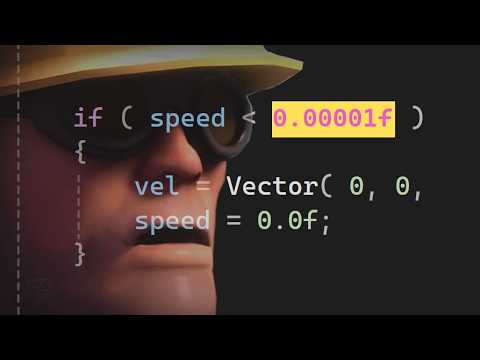
[9:02]I finally had a fix, I was ecstatic. However, it didn't last for very long, and reality quickly set in. Despite having fixed the bug, it's still very clear to me that all that the code is is essentially just patches and fail safes and other miscellaneous things Frankenstein on top of each other. While I had fixed the bug, it wasn't clear to me what actually fixed the bug. Was it one value change? Was it a line of code? Was it a small thing? Was it a combination of multiple things? At this point, I didn't care very much, especially considering the circumstances. So, I enlisted the help of my good buddy Rune to find out what actually fixed the issue. I sent the DM and then promptly went back to bed and had the greatest sleep of my life. When I woke up, I found that Rune left me a very nice message explaining that whatever fixed the ball had to be these two lines of code. Yeah, that's right, the whole bug was apparently just a two line fix. To be extra safe, I double checked by deleting all other changes and ran the code with just a two line fix, and it was spot on. However, I knew that this wasn't the true fix. All this does is reset vectors if the math is messed up, but the real question should be why does the math come out messed up? But then I remembered, I'm not a programmer. I had already spent three days of my life finding a fix for a bug in a field that I am not familiar with. This was good enough for me. But I couldn't just keep this information to myself. This bug has been reported for three and a half years, and while I don't know how old this bug is, footage of this bug has been around since at least 2018. That's like eight years ago now, who knows how old this bug actually is. So, while I don't fully know what causes the bug, I figured the wisest thing I could do is post it on GitHub and let everybody know about my discovery. And wouldn't you know it, only a couple of hours later, the LeBron James of TF2 patches, Ficoool2, came along, saw my post, and found the root problem. Which means I can finally answer the question you've all been waiting for. Why does the ball go invisible when you shoot it? But first, a word from our sponsor, liquid.tf. I'm very happy to have them sponsor this video because I've actually used their services before, so I know they're legit. liquid.tf is the first peer to peer TF2 marketplace, which allows you to sell items for real life cash money. That's right, your TF2 items for real life money. You can keep your items until the very moment it sells, and on top of that, it's cheaper than the Steam community market. So, go check them out. Once again, thank you liquid.tf for sponsoring this video. So, why does the ball go invisible when you shoot it? I'm going to try and answer this as thoroughly as I can, so apologies if I repeat myself a little bit. When creating the beach ball, Valve wanted to make it more interactive with the environment so the ball wouldn't feel like a static concrete sphere rolling around. So, they added jiggle bones to the model. More specifically, they added the is boing property because that property was made with bouncy props in mind. However, is boing is a bugged property. On line 591 of Jigglebones.cpp, which is where the code relating to is boing is located, the code starts doing math to find out exactly how the ball should jiggle based on its velocity. Now, this velocity value isn't exactly what you're probably thinking about. You're probably thinking about the number that indicates your current running speed, like when you use the command cl_showpos 1, but in the code, it's a little different. Velocity is a vector that indicates how fast and in which direction something is moving in 3D space. If we go back to line 591, the code here is basically turning the velocity vector into one number by performing a function called normalize in place. Then, it checks to see if the new number, speed, is smaller than 0.00001. If it is, it transforms the speed to a flat zero and sets the vector to 0, 0, and 1. After that, it sends those numbers down the line for more calculations. If it isn't smaller than 0.00001, then it continues as normal. Now, here's where the jenk starts happening. When performing normalize in place, the code does two things. The first thing it does is transform the velocity vector from these three numbers to one number. To do that, it performs the Euclidean norm formula, where it takes the square root of the sum of the squares of the numbers from the vector. Look, you don't need to understand it, you just need to know that it's one of the things that it does. The second thing normalize in place does is transform the original vector into something called a unit vector. The process is pretty straightforward, just take your vector and divide it by the end result of the Euclidean formula. This is basically to make sure that no matter how big or small the vector's values are, the ratios remain the same, and they can all go through the same code without affecting the end result. It's kind of like how these two fractions hold different values, but ultimately hold the same ratio. This works pretty well for all types of possible numbers, but let's see what happens when the velocity is set to zero. So first, the vector goes through normalize in place, like I mentioned earlier, so 0 squared + 0 squared + 0 squared equals 0, and then the square root of 0 is just 0. Nothing crazy so far. Now, onto the second part, where we get the unit vector. So now, we need to divide the original vector by the result of the Euclidean norm and, uh, I think I see the problem now. If it's not clear to you, well, computers don't like dividing by zero. That's a big no-no. In most other cases, this would result in an N value, short for not a number. This would typically lead to a crash or something catastrophic happening in game. However, in this specific scenario, TF2 prevents an nan by adding an epsilon. In floating point math, numbers aren't exactly tracked and noted precisely within your computer's memory. So, when you do a simple operation like 0.1 plus 0.2, you don't get 0.3. You get 0.30000000000000004. The four at the end represents our epsilon. Now, let's go back to the chalkboard. Remember when we were doing 0 divided by 0? Well, because these are coordinates in 3D space, it's more like 0.000000001 divided by 0.00000001, which is an actual real possible number. This is why this line of code exists. Valve wrote it to catch the epsilon and then turn it into a real hard coded zero, but this right here is where the bug is happening. Apparently, this number here is not big enough and epsilons are just going through it as if they were regular numbers. Why? Oh. I guess that's just floating point math for you. Now, how did I go about fixing this? Well, I wasn't clever or anything, I just prevented the vectors directly responsible for the shape and size of the ball from being zero. It's like trying to fix a leaky pipe that keeps breaking with duct tape. At that point, why not just fix the actual pipe? And you know what, that's exactly what Ficoool did. His code entirely avoids dividing by zero and now keeps the vectors in check by using more reliable methods, and just like that, the bug is fixed. So, uh, now what? I mean, the code is out there on GitHub, it's been there since December 2025. Valve can add this to base TF2 any day now, that'd be pretty cool. Oh, also, I don't know where to put this, but I found out that despite this fix only being made with the ball in mind, this code also prevents hats that use the is boing property from turning partially invisible. So, I guess that's an extra reason for this to get added to TF2. Bye bye.