[0:00]Today I want to take a look at this AI voice recorder by Mugugu. And before we get too much further, it is important to note that it was provided for demonstration purposes. Now this has over 73-hour run-time and has 64 gigabytes of memory, so you're going to be able to store a lot of notes with this. So the first thing you'll notice is it's powered by Chat GPT. That's what they're going to use under the hood in order to understand the voice recording, organize the notes, and get those results for you, which I'll do a demo of the app here briefly. Once we open it, it comes with everything you need to get started. The recorder itself is very small and sleek, so you can see that that's going to work out and be easy to take around with you. And then it comes with your standard things like a MagSafe ring, if you want to add it to your case, a USBC charger. So this here has two different modes that it goes by. One is just the kind of the note-taking mode, that's going to be your general recording, and the second is call recording mode, where it's going to help you record and summarize calls. Now, for that, if you are part of the iPhone ecosystem with a MagSafe case, you can simply put this on the back of your phone, and it's going to help record the call and take all the notes that you need. You can see how slim that is and it's just amazing, right? Like, this is super easy, convenient, and out of the way, um, in order to allow you to achieve the results you're looking for, monitoring the call and being able to summarize the notes at the end. To switch between call and note mode, all you have to do is double-click, and you can see that it says call, double-click, and then you can see it went back to note-taking mode there. We take a closer look, you can see the microphone holes, your USBC charger, and then this is really your main control panel here. So to in order to turn it on, you're just going to push the button, and you can see that right now it is in note mode. If I wanted this to record, all I'm going to do is turn this on. It gave me a quick vibration. You can see that the red is here, and we can see that it's recording. So why don't we do a quick little demo and I'm going to talk about this for you and let you know what I plan on doing in this video. That was kind of confusing, but we're going to see how it handles it. And then the next action items that I want to see from this confusing conversation is to say, one, let's go to the park and hang out. Two, I need to plan more vacations and three, I need to publish this video. Now that I'm done with this, I'll go ahead and turn it off. And my recording is complete, and you can see that it is saved now. So, once you're ready to start looking at your notes, you're going to open up the Dawei app. And then what you're going to see is I've got one recording that I've already downloaded while I was testing it, and then I have one that says not synced. So I'm going to go ahead and click on the not synced one, and then we're going to start getting this information. Now that I'm here at the recording, you can see that I can play it, and I can jump around. And then what we can also do is you can click this transcription button. Now this is a little bit confusing, the bottom isn't what I said, that is just a an idea of what the transcript could be like. So what you're able to do is hit the transcript button, and then transcript, and then I can give it a little bit of summary template that I would like. Was this a call? Was it meeting minutes? Do I want it to try to label the speakers and which AI model I'd like to use in order to get the summary. So you can see right now it's Chat GPT40, you could do 4.1, 03, whatever is up to you. Now, I'm going to click meeting minutes just to give it a challenge, see what it happens, and then the it's in English and it wasn't a two-way conversation, so I'm not going to select that. So I'll go ahead and click generate now, and we can see that it's going to first upload so it can get the transcription and then it will end up giving us the summary. So we'll go ahead and wait for that. So now you can see that we've got the summary of everything I was talked about. It was breaking it up into 30-second segments, and it's just a really great way for us to be able to see what's going on. Now, there is an ask AI button here, and I could just say, what were the action items. And it's going to go ahead and pull those up on my phone, so you can see that here are the action items that you had: go to the park, plan more vacations and publish the video. That's really awesome for recalling information, especially when you are on a very long call, a very long meeting, and you're trying to recall something specific. And then, the next thing you do is you could see that if we go over to the summary page, you can it's got the summary right here. It also has those action items identified, tells us the time, we could update the location, you can edit all of this information here. And you can see that it's like, uh, really showing that, hey, there was a recording confirmation, we did this for demo purposes, here are the action items I gave. And wow, this was confusing, so overall really, really cool. And then finally, you can see here that we've got a mind map. I'm not very good at these, but it's kind of cool to think how they're trying to group things together. I suppose on a really long call or really long meeting, that would be really helpful. So you can see here that there are different tiers of subscriptions for free, you get 600 minutes per month, which for most might be plenty. And then after that, you can go to the different tiers, which will allow you to support more languages, more processing time, and kind of everything in between. So definitely able to look at that on your profile page. Overall, if this is something you're looking for, I'm super happy with it, and it's worked flawless in my initial testing phases. If you're interested in buying this, there's an affiliate link in the description down below, no cost to you. If you end up buying something, I'll get a little kickback, it'll help to support the channel. If you found this video helpful, go ahead and like it. Comment down below if you have any questions. Do my best to get those answered for you. Most importantly, have a great day.
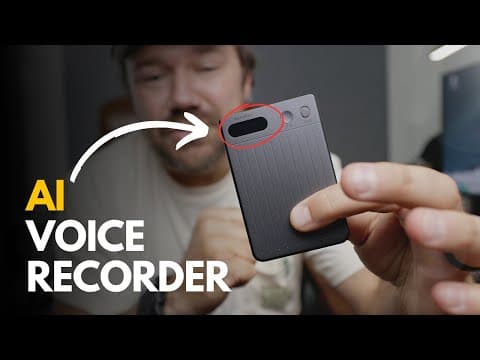
Mugukue NanoRec Note Demo: AI Transcription & Summary Test!
Dan Reviews Stuff
5m 37s1,248 words~7 min read
YouTube auto captions
Transcript source
YouTube auto captions
This transcript was extracted from YouTube's auto-generated caption track. The transcript below is server-rendered so it can be read, searched, cited, and shared without opening the original YouTube player.
Pull quotes
[0:00]And before we get too much further, it is important to note that it was provided for demonstration purposes.
[0:00]Now this has over 73-hour run-time and has 64 gigabytes of memory, so you're going to be able to store a lot of notes with this.
[0:00]That's what they're going to use under the hood in order to understand the voice recording, organize the notes, and get those results for you, which I'll do a demo of the app here briefly.
[0:00]The recorder itself is very small and sleek, so you can see that that's going to work out and be easy to take around with you.
Use this transcript
Related transcript hubs
Watch on YouTube
Share
MORE TRANSCRIPTS


