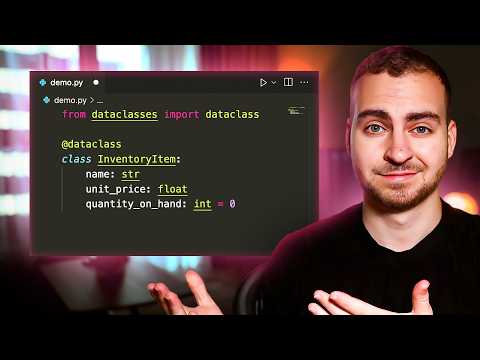
[0:00]Chances are that you've seen a class that looks something like this. Something pretty straightforward where you're just storing a few different values and maybe you have something like an equal method and a repre method. In this case, we have a two-dimensional point, and we're just storing two values, X and Y. Now, what if I told you there was a way that we could eliminate writing all of these different methods and write this class in only four lines of code? Well, if that sounds interesting to you, then stick around, and I'm going to share something that's really cool in Python, which is data classes. So, let's dive into data classes. But first, let's just run this code so we can get a look at what the output is, and then compare it to when we use a Python data class. So, all we do here is implement a two-dimensional point. We store the value X and Y. In our representation method, we print out what the point looks like, so we have the X attribute and the Y attribute. And then we have a way to compare these two points where we just check if the X value is the same and the Y value is the same. We just have a little bit of output down here after we create two different points. And you'll see that when I run the code here, we get our first point, our second point, and then the fact that these points are not equivalent because their X and Y values are different. So now, I'm going to write this class using a data class, you'll get a sense of how that works, and you'll see the difference. So there we are. We now have the exact same program. It does the same thing you saw before, and this class has the exact same functionality. So let's run the code just to make sure this is indeed working, and you can see we get the exact same output we got before. But this time, we didn't need to write any of that boiler plate code like defining the initialization, the wrapper method, and the equal method. This is the Python data class decorator, and what it does for us is actually fill in a bunch of methods that we typically have to write on our own. It's super interesting and I'm going to share with you more about how it works in this video. So let's begin by talking about what a data class is and what actually happened when we wrote these lines of code. Well, this first line of code simply imports the data class decorator from the data classes module. Now, this was something that was added in Python version 3.7. It's somewhat new, but the point is, you don't need to install this. It's something that's built into Python. Now, what this is called is a decorator. A decorator is something that will modify what's defined below it. So in this case, we're modifying a class. However, we could be modifying a function or a method, and there's all kinds of other decorators in Python. For example, you may have seen the static method decorator before, or the class method decorator before, and there's all kinds of other ones that you can import from built-in Python modules. Now, in this case, what the data class decorator will do is it will read the contents of our class and specifically, it will focus on the different fields that we've defined. Now, what we've done here is defined a field X and a field Y, and we've given the type annotation that it's going to be of type int, or the type hint in Python. Now, these are known as fields. And what the data class decorator does is read these and populate three common methods that typically we'd have to write on our own. So in this case, what it's going to populate is the init, repre, and equal methods. Now, these are thunder methods, otherwise known as double underscore methods or magic methods, which allow us to provide some special functionality to our Python classes. Now, starting with the init method, this is something that's called when we create a new instance of our class. So when we do something like P equals point, we're going to call the init method. And then we need to provide any arguments or any parameters that are specified in init. Now, what data class will do is it will read the different fields that we've defined and automatically specify those as mandatory parameters that we need to provide to the initialization. So in this case, I need to provide an X and a Y in that order because that's the order in which I defined these different fields. So I need to pass something like one and two. Now, it also implements a repre method. Now, the repre method is something that will be called when we try to print out or view the contents of the object, specifically in something like our terminal. So if I go print P, what will happen implicitly is we're actually going to call the repre method, and then whatever that returns is what will output. Now, as we saw before, the way that wrapper will be implemented is it will simply return a string that contains the name of the class. So in this case, it's point, a set of parentheses, and then inside the parentheses, it will specify all of the field names as well as their corresponding value. So we'll get something like point X1, and then Y equals two. That's just the default implementation for wrapper, and that's how it will be implemented when we use the data class decorator. Lastly, it will implement the equal thunder method. The equal thunder method is something we can use when we compare two instances of the same object. So if I do something like P equals point, and then P2 equals point, the way that equal will be written is it will simply compare all of the different attributes for their direct quality. So we'll see if the X's are the same and if the Y's are the same, and if they are, then it will go ahead and say these objects are equal. So if I go P is equal to P2 like that, and we run our code, you'll see that we get the value true. I apologize for the messy terminal. So just a quick pause here for any of you that are seriously becoming software developers. If you want to be like Max, who landed a 70k per year job in just four months of work, consider checking out my program with course careers. Now, this teaches you the fundamentals of programming, but also lets you pick a specialization taught by an industry expert in front end, back end, or DevOps. Beyond that, we even help you prepare your resume, we give you tips to optimize your LinkedIn profile, how to prepare for interviews. We really only succeed if our students actually get jobs. That's the entire goal of the program. So if that's at all of interest to you, we do have a free introduction course that has a ton of value, no obligation, no strings attached, you can check it out for free from the link in the description. So that's the absolute basics of the Python data class, but there's a ton of other things that we can do. So I'm going to show you a few examples now and go through some more advanced behavior. So the example you see now is directly from the Python documentation, and it shows you a slightly more complex class. In this case, we've actually implemented our own method, which is totally fine. We can write as many methods as we'd like, and you'll notice that we have some type hints here. So if you're unfamiliar with this syntax, all we're doing is just adding some type pins, which allow us to have some better autocomplete and understand what different methods and functions should be accepting or returning. They're not actually enforced in Python, which means you could return something other than a float, but in this case, we're just writing them out to kind of document how the code should look. Now, what data class will do here is it will add those three methods we described, so init, wrapper, and then the equal method. Now, if you're curious what the init method would look like, it would look exactly like this. So let me zoom out a little bit so that we can read it. This is what would be generated by data class. Again, this is right from the Python documentation. It's going to take all of the different fields that we've written out here, so name, unit price, quantity on hand. It's going to add the type hints for all of them. And in this case, you see that we have a default value, so it's default equal to zero, which means if I don't pass something for quantity on hand, it's just going to be assigned the value zero. Now, it's worth noting here that data class has a ton of additional arguments that you can pass to it to modify how it works. For example, you can pass if we should generate the initialization, if we should generate the wrapper, the equal, we have one for order, we have a bunch of other arguments here, and I'll leave a link to this documentation in case you want to check it out from below. Now, one notable one you may be considering using is called order. Now, what order will do is implement the LT, LE, GT, and GE methods, which allow you to use the common arithmetic operators like the less than sign, less than or equal to, greater than, et cetera. Now, the way this works is it will actually compare the different objects using a tuple of all of their field values. We don't need to get into that in this video, but in case you're curious, I'll link this in the description. Now, jumping back into the code here, I want to show you an example that you're bound to run into if you use this frequently. Now, that's having a mutable default parameter for one of your different field values. Now, just to illustrate why this is an issue, let's have a look at a common example here in Python. So you can see that what I have here is a simple function. What we do is we have a list as the default value for the LST parameter. Now, this is mutable, meaning it can be modified, and we'll really be storing a reference to this list as opposed to a new instance of this list for every single call of the function. Now, what that means is that when we print this out, you're actually going to see that the list will be modified between function calls. So when I run the code, you can see that we get one and then we get one one. Now, this is obviously an issue, and this is a bad practice in Python that you need to avoid. But how do we fix that when we're using the data class? What if I want to do something like the different sizes that we have, and I want this to be a list where we store maybe some strings? Well, I can't simply assign this to a list because if I do that, I'm going to get that same issue that we're seeing right here. So how do I fix that? Well, the way we fix that is by using a function that's provided from the data classes module. Now, that function is called field, and we can import it like this. Now, it has a bunch of different parameters that we can pass to it. But what we're going to focus on here is the default and the default factory. So what I can actually do here is rather than specifying this as a normal list, is I can write this as a field. Now, within the field, what I can do is I can pass to this something known as the default underscore factory, and I can give this a function that should be called anytime we initialize a new instance of this class. So this is now going to completely solve our problem, and anytime we initialize a new instance of this class, this default factory function will be called, and whatever it returns is what we'll use as the default value. So we'll get a new list every single time, not a reference to an existing list. Now, if you do want to use this field, and you don't want to have default factory, instead, maybe you want to have a literal value that is immutable, you can actually just specify a default. And if you specify a default, you can pass a value, say like this. Now, in this instance, we'll get the same issue as before because this is a mutable default value. However, this is another parameter that you can pass to field. Now, with field, there's a few other things that we can specify here as well. For example, we can indicate whether or not we want it to be included in the initialization, in the representation, in our compare methods, so things like equals, less than, greater than, et cetera. And those are the main ones to take note of. So for example, maybe we don't want this to be included in the initialization, then we would say a nit equals false, and now it's not going to be something that we need to pass when we have that init method. Now, just as a quick side note here, if you're curious what the code generated by this decorator will look like, you can use the help function and pass the name of your class. So I can say help inventory item, and now when I run my code, if I look at my terminal, I can actually see all of the different definitions of my methods. So for example, I have my constructor here. It's specifying all of the different things. Then I have my methods like equal, init, repre, et cetera. Just something interesting in case you wanted to see that. So now we're going to move on and discuss something you've probably had a question about, and that is how do I define a class variable when I use the data class decorator? Well, to do that, we can simply import the class var type from the typing module. We can then come here and define something like class variable. We'll give the type hint as the class var. And then inside of here, we'll specify what we actually want the type of the variable to be. This could be something like an int, and we can make this equal to 100. Now, when we do that, data class will actually recognize that this is a class variable because it will read the fact that this is a class var. And it will not include it in any of the methods that it generates. So it won't put it in the init, the wrapper, or any other one that it's making. It's simply going to ignore it because it's a class variable. So now we're moving on and we're talking about inheritance. Now, in this example, we have a data class that is inheriting from a non-data class. Now, when that's the case, the initialization that's written by default from the data class decorator is not going to call the initialization of the base class. So this is something that we need to do manually, and we can implement that by writing the post init thunder method. So when I write the post init thunder method, what will happen here is data class will do the exact same thing it did before. Implement the init, the wrapper, and the equal method, and then it will call this post init. Now, by default, it's going to call it without any parameters, and then we have the ability to call the base class thunder method, or the base class initialization, which is what we're doing. Now, at this point, we know that any of our fields will have already been defined, so it's fine to actually use them here when we call for example, the rectangle base class. Now, this is an example that's provided directly from the Python documentation, but it gives you a good kind of sense of how this works. So we do need to manually call this when we're inheriting from a non-data class, base class. So here's another example where we inherit from another data class. Now, when we do that, things change slightly, and what ends up happening is we'll actually write an initialization for this child class right here, which contains the attributes which we inherited from the base class. In this case, we've inherited the width and the length, and then we have color. Now, what that means is that in our constructor, we're going to actually take the width, the length, and then the color. And the reason that's the case is because we actually look up all of these different fields using something known as reverse method resolution order. Now, I don't want to get into that too much in this video, but pretty much what it means is we start at the very, very base class, so whatever the top of the chain is. So if something was uh being inherited from this one, we'd start at that, but in this case, we start at rectangle and then we go to the child class colored rectangle, which means we have the width, the length, and the color. And you can see that this is the correct initialization. Now, the same thing is going to happen for our other methods, so for equal, wrapper, et cetera. We're going to use the attributes or the fields in that order, again, starting with the base class and then going into the child class. Now, in this case, there's no need to write that post init. The reason we don't need to write the post init is because the init is automatically going to have these attributes or fields already because of how it's inherited. So now we move on to the last example, which is the most advanced, and this is where we need an initialization variable. So let's say that we're actually writing a class, and there's a value we need to accept during initialization, but it's not a field that we want to be included in the class or something that's going to be used beyond just the initialization. Now, this is a good example where what we actually need to do is accept a database during initialization, and then we look something up in that database, but we don't need to store that afterwards, or we don't care about the value after, right? We don't want this to be included in say the wrapper or in the equal method, or anything else that's going to be generated by the data class other than the initialization. Now, there's other ways to do this, but what we can do is we can specify this as an init var, which is what we've imported here from data class. And now what it means is that it will be included in the constructor, but it won't be included in those other methods. It also means that it's going to be passed automatically as a parameter to our post init method, so we can use it for doing any custom logic or lookup that we need. So in this case, you see the post init will accept this. The reason it accepts it is because it's defined as an initialization variable, which tells data class to automatically pass it when it calls the post init method. Then in here, what we can do is we can make sure that J is none, and database is not none, and if that's the case, we can then assign self.j, which is a field that we want to store persistently on this class, with the database.lookup of J, which in this case would give us value, or whatever the lookup function would do. This is just kind of a mock example right here. Anyways, that is something I wanted to show you because it can get kind of advanced, and just the point is that pretty much any scenario you've thought of has actually been handled by Python. There is a ton of documentation that you can read. I will link this page in the description. So with that said, guys, that's going to wrap up this video. That has covered all of the important parts of this documentation. If you found this helpful, go ahead and leave a like, subscribe to the channel, and I will see you in another one.
Python Data Classes Are AMAZING! Here's Why
Tech With Tim
16m 12s3,557 words~18 min read
YouTube auto captions
Transcript source
YouTube auto captions
This transcript was extracted from YouTube's auto-generated caption track. The transcript below is server-rendered so it can be read, searched, cited, and shared without opening the original YouTube player.
Pull quotes
[0:00]Something pretty straightforward where you're just storing a few different values and maybe you have something like an equal method and a repre method.
[0:00]In this case, we have a two-dimensional point, and we're just storing two values, X and Y.
[0:00]Now, what if I told you there was a way that we could eliminate writing all of these different methods and write this class in only four lines of code?
[0:00]Well, if that sounds interesting to you, then stick around, and I'm going to share something that's really cool in Python, which is data classes.
Use this transcript
Related transcript hubs
Watch on YouTube
Share
MORE TRANSCRIPTS


