[0:00]Drop shipping, drop shipping, drop shipping. Ye hai humara Indian drop shipping product aur isse humne Facebook Ads run karke 1 Crore ki sales ki hai. Par fir bhi hume Roposo platform fees, chargebacks, RTOs, inflated product prices, ads cost aur taxes mila ke loss hi hua hai. Are ye nahi batana tha. Toh ab ek kaam kiya jae. Ek course launch kiya jae aur is loss ko recover kiya jae. Not all creators, par jo bhi aap drop shipping gurus YouTube pe dekhte ho, un sab ki same story hai. To aap logo ko sab kuch ek mature aur grounded tarike se dikhane ke liye aur actually sikhane ke liye maine bhi pichle paanch dino ke liye drop shipping try ki. Aur wo bhi Indian market mein, kyuki main generally US market target karta hu. Toh humne research kiya ek product, build kiya ek store, setup ki tracking, run kiye ads, and finally dekha ki humara kitna paisa bana Indian market mein. Full transparency, no red-green spreadsheets ke itne product deliver ho jaayenge, jo ki hote nahi hai. Ready for this? Let's do it.
[1:00]Toh sabse pehle hume ek product find karna tha aur product find karne ke kayi tareeke hai. Aap chahe to ek naya Instagram account bana ke sirf ads aur product based reels ke sath engage kar sakte hain aur fir Instagram aapka feed products hi products se bhar dega. Ya aap YouTube pe jaake US ke creators ki videos dekh sakte ho to find something interesting. Jaise ki aap search kar sakte ho best dropshipping products to sell right now. Ya phir aap Roposo, Zendrop aur AutoDS pe account banake unka marketplace check kar sakte ho. By the way, Roposo sirf research ke liye hai. Maine is challenge ke andar Roposo use nahi kiya. Mai aage aapko video mein bataunga kyu. Toh maine is particular challenge ke liye Instagram wala method use kiya. Main hamesha try karta hu ki koi problem solving product choose karu, kyuki problem solving products lagbhag winner bante hain. So after four-five hours of research, maine ek aisa product choose kiya jo US mein bhi kaafi sell ho raha tha, Nasal strips. Maine is product ko pehle bhi multiple times dekha tha Instagram pe and I thought it would be a great problem solver. Why? Kyuki mujhe khud bhi sinus ka issue hai, so I related it well. Ab product toh humne choose kar liya tha, but hume ye bhi verify karna tha ki whether or not hume ye product test karna chahiye. Aur uske liye hume teen cheeze check karni thi: pehli product cost aur suppliers, dusri advertising feasibility aur teesri competitors. Toh jaisa most Indian dropshippers karte hain, main pehle Roposo pe gaya and nasal strips search kiya. Look at the price, guys. It's ₹448 to ₹508 per product. How am I supposed to make money with this product agar mujhe product hi ₹448 se ₹508 ka mil raha hai in the first place? To give you guys some perspective, main IndiaMart pe aata hu aur dekhta hu nasal strips ki kya price hai. As you can see, it's ₹115 per piece. Ab compare karo ₹448 Roposo and ₹115 IndiaMart, absolutely bonkers, right? Now maine IndiaMart pe sellers ko contact kiya ki kya wo mere liye per order ship kar sakte hain. And as expected, unka answer tha no. Phir maine unko convince kiya ki main din ke 20-30 orders la dunga. After long conversations, the supplier finally said, okay. So now even with shipping and logistics, humari overall cost thi ₹210. Way better than Roposo, isn't it? I know aage jaake jab orders bahut jyada aa jae toh thoda messy ho sakta hai, but then I would prefer buying inventory upfront. Also, Roposo jaise platforms ka aap ek aur issue dekhoge aur wo hai fake RTOs. Aap jaake reviews dekho Trustpilot pe, Reddit pe, YouTube pe, aap dekhoge ki dropshippers ko fake RTOs show hote hain, even though the products get delivered. Toh always make sure ki aap ground work karo aur IndiaMart jaise sites pe ya locally suppliers find karo. I know thodi si mehnat lagegi, par India mein aapko dropshipping karne ke liye one click done for you setup nahi milega. That's just the brutal reality aur ye aap faaltu dropshipping courses ke chakkar mein bhi padna band karo. Moving forward, humara cost aur supplier wala part toh sort out ho gaya tha. Next hume check karni thi advertising feasibility. Ab Facebook Ads, Facebook Ads log karte toh rehte hain, but the hard reality is ki beginners ke liye Facebook Ads setup karna and optimize karna kaafi difficult hai. Toh is challenge ke liye humne Google Ads pick kiya jo ki beginners ke liye kaafi easy and practical hai. Obvious reason, well Facebook Ads interruption marketing ke andar aata hai, which means aap logo ke paas apna product leke jaate ho. On the other hand, Google pe log khud product search kar rahe hote hain. Simple as that. So now we needed to check ki kya hum nasal strips wale product se profitability validate kar sakte hain? Aur uske liye I used a tool called SEMrush ya fir Semrush. Ab SEMrush ek search engine optimization ya fir search engine marketing tool hai, jis par aap ye pata laga sakte hain ki advertisers ek click ke kitne paise de rahe hain ek particular keyword pe. Toh SEMrush mein we typed in keywords like nasal strips, nose strips, nose strips for snoring, etc. And as you can see, SEMrush hume dikha raha tha ₹2 to ₹3 CPC. Ab ye 100% accurate nahi hota. I generally take double the CPC that SEMrush shows. Toh after checking the CPC, I did a rough math. Ki agar hume 1,000 clicks aate hain, toh our ad spend would be ₹4,000 to ₹5,000. Agar hum apne product ko ₹999 pe bechte hain, expecting a 2% conversion rate, that's roughly ₹20,000 in gross sales. Toh mere hisab se advertising feasibility wala checkbox bhi tick ho chuka tha. And now the third step, I had to check competition. Aur competition check karte hi mera confidence thoda up, thoda down, dono hua. Up isliye hua kyuki mujhe validation mila ki koi aur bhi ye product bech ke paise kama raha hai. Aur down isliye hua kyuki wo product mujhse kaafi saste mein bech raha tha. About ₹749 instead of ₹999. So to keep things competitive, mujhe bhi apna product price ₹729 karna pada. Mera margin kaafi compromise ho raha tha. But according to the math I did, I would still be profitable at a 2% conversion rate. Chalo toh pehle din ka summary. Product research ya choose karna, done, supplier ko convince karna, done, advertising feasibility check karna, done, and finally competition check karna also done.
[5:48]Ab research aur groundwork kyuki ho chuka tha, dusre din mujhe brand name sochna tha, domain availability check karni thi, domain buy karna tha, website design karni thi aur payment gateway bhi setup karna tha. Again so much work to be done. Toh brand name and domain name finalize karne ke liye maine GPT ki help li. In about 20 to 30 minutes, mujhe ek achha sa brand name mil gaya jiska domain bhi available tha. And we decided ke hum apne brand ko name karenge as BREATHEWELL. Hume breathewell.in karke domain bhi mil gaya tha, which was great. Maine domain GoDaddy se buy kiya aur fir Shopify ki three month wali trial li to set up our store. Sabse pehle humne apne domain ko map kiya domains wale section mein aake. Simple sa process aapko bas Shopify aur GoDaddy ko link karna hai. Now next humne sabse pehle toh basic sa ek product setup kiya aur simple si website design ki, bilkul simple. Why? Kyuki hume payment gateway ke liye bhi toh apply karna tha. Generally ye process do se teen din le leta hai so make sure you start it early on. Kayi areas mein GST bhi chahiye hota hai, toh wo bhi aapko figure out karna padega. Anyways, maine PhonePe PG as apna payment gateway select kiya, kaafi trustworthy hai and the support is also top-notch. Baaki Razorpay and Cashfree is also okay, but kaafi clunky hai and support is also very bad. Thodi bahut problems mujhe bhi aayi payment gateway setup karne mein, but I took help of my cousin to get it all sorted out. Once maine apni taraf se payment gateway wala sara kaam kar diya tha, jaise ki privacy policy setup karna, contact info, refunds and returns, etc. ab mujhe ek killer store design karna tha. Aur mujhe pata tha it's going to be very boring and hard, but jo bhi ho I had to do it. Toh maine GemPages karke ek app aata hai Shopify mein wo install kiya and got started working on the product page. Ye particular app hume kaafi product page templates de deta hai to make the process easier. Logos and product image designs maine ChatGPT se banwa liye the, kyuki main kaafi D2C brands ke sath kaam karta hu, toh I know what kind of images work best. Other than that, maine kaafi GIFs dhunde, unko thoda sa tweak kiya, thode reviews dekhe and wrote a few reviews, checkout flow optimize kiya, etc. Aur ye sab karne mein mujhe 8 se 10 ghante ka time laga, almost non-stop. So this is how the site turned out on desktop. As you can see, not bad at all. Although mera primary focus mobile tha. And this is how the site looked on mobile. Let me swipe and scroll a little bit. As you can see, very sleek, kaafi trustworthy and the checkout flow is also very very smooth. Humne ek alternative number leke WhatsApp support ka button bhi yaha pe laga diya taaki customers questions puch sake. So by the end of Day 2, we were ready with the website par hum abhi bhi payment gateway ki API key ka wait kar rahe the.
[8:21]Great news, by Day 3's morning, humare paas API key bhi aa chuka tha. In other words, humara payment gateway bhi setup ho chuka tha. Ab bas Ads ka setup bacha hua tha. Well, as you remember, humne Google Ads pick kiya tha as our marketing option, toh hume Google Merchant Center bhi setup karna tha. Jin logo ko nahi pata Google Merchant Center kya hai, Google Merchant Center ek platform hai jahan par aap apne products ka data upload kar sakte ho, jaise ki images, price, availability, etc. taaki Google ko ye pata lage ki aap bech kya rahe ho. Fir wahi data use hoke Google Shopping Ads, product listing aur search results mein dikhaya jata hai. Short mein ye aapke online store aur Google ke beech ka bridge hai jo ensure karta hai ki aapke product sahi tarike se ads mein appear ho rahe. Thoda better example agar aapko du, toh jab bhi aap koi product search karte ho Google pe, jaise ki beard trimmer.
[9:09]Toh ye jo saari listings aati hai Google Shopping Ads ki, ye pehle aapko Merchant Center mein setup karni padti hai. Jyada complicated kuch nahi hai, bas aapko Shopify mein aake ek app install karni hai jiska naam hai Google and YouTube. Phir aapko ek simple sa process follow karke apne Merchant Center ko Shopify se link karna hota hai. Bina code ka process hota hai, so don't worry aapko YouTube pe bhi second tutorials mil jaayenge. So ye wala setup karne ke baad, mujhe Google ki taraf se apne product ke approval ka wait karna tha, jo ki 2-3 ghante mein ho gaya tha. Sometimes aapko 24 ghante bhi wait karna pad sakta hai, which is totally fine. Once everything was all set, maine apne Google Merchant Center ko apne Google Ads account se link kiya. Aapko Merchant Center ke dashboard mein hi ye wala option mil jaata hai. And one last thing, hume Google Ads ka conversion tag bhi setup karna tha taaki purchases track ho sake. Iska bhi kaafi simple sa process hai, you have to come to Shopify, go to Google and YouTube App and then manage settings. Aap chahe to iske bhi YouTube pe tutorials dekh sakte hain. Anyways, once we were all set, hume bas apne ad campaign setup karke unko publish karna tha. But before I go ahead, I want to tell you ki maine apne store pe COD rakha hi nahi tha. Yep, no cash on deliveries. Jaan boojh ke maine COD nahi rakha tha, because I didn't want to deal with returns and stuff, halaki RTO kaise manage karna hai, ye bhi main aapko aage video mein bataunga. So by Day 3, end of day, things were starting to look good. Toh moving forward humne ek Google shopping ad campaign create kiya aur apna budget ₹1,000 per day set kar diya. In a matter of hours, humara campaign live ho chuka tha and we started getting clicks already. Toh by the end of day 3. Hume Google Ads mein aaye 3.55k impressions and 77 clicks. Humara average CPC tha ₹7.89, which is normal to be high jab hum campaign launch karte hain and the total cost was ₹607. Jab hum Shopify pe aaye toh hume dikha raha tha 141 sessions. Ab itne saare sessions isliye kyuki main, mera cousin, I was showing the store to my friends and family, plus the PhonePe team, sab site ko baar baar khol ke dekh rahe the. Coming to orders, hume do orders aaye the third day ko, with gross revenue of ₹2,187. Ek customer ne do products order kiye the aur ek ne sirf ek hi product. Ye raha orders wala section aur ye rahi customer journey to verify that. Main aapko Google ke bhi tracked conversions ka proof dikhaunga aage to be transparent.
[11:22]Well, Day 4 ki shaam ko jab maine Google Ads check kiya. Toh hume dikh rahe the 4.33k impressions, 103 clicks, humara average CPC tha ₹7.80, still pretty high but better than yesterday, and the total cost was ₹803. Coming to Shopify, Day 4 ko hume aaye 117 sessions, three freaking orders and again ₹2,187 in gross revenue. Toh Day 4 ko bhi hume same revenue hua par ad cost thoda jyada tha. Again, pretty normal thing to happen, you don't wanna panic with Google Ads. Well the good news was we were still maintaining a steady conversion rate of over 2%. Ab paise jyada spend hue the par sales fir bhi kam aayi thi. Toh hume hath pe hath dhare toh baithna nahi tha and hope for things to get better. Toh main Google Ads mein aaya aur pehle toh jo bhi useless keywords the campaign mein jin pe paise waste ho rahe the, un sab ko maine as negative keywords add kar diya. When I did a little bit of math, collectively hume ₹100 ka extra ad spend hua tha in sab keywords pe. Now ₹100 itself is not a big number, but ye humare overall ad spend ka 10% ke aaspaas tha. Now think about 10% of ₹1 lakh, ₹10 lakh or even ₹1 crore. Ab kyuki hume kuch sales already aa gayi thi, toh mujhe customers ki location mein bhi ek pattern dikha. Toh maine jin bhi states se clicks aa rahe the, but sales nahi aa rahi thi un sab ko exclude kar diya. Toh basically maine saari second tier aur third tier states exclude kar diye. Now with that being said, we were all set for Day 5 aur budget bhi humne double karke ₹2,000 per day kar diya tha.
[12:51]Well Day 5 ki shaam ko jab maine Google Ads ka dashboard check kiya, toh hume 994 impressions aaye the, only 35 clicks and an overall ad spend of ₹284. Jo ki dekhne mein kaafi unusual tha, but looking closely humne notice kiya hai ki midday ke aaspaas humare ads deliver hona band ho gaye the. Maine Google pe apna product search bhi kiya tha kayi baar, it was not showing jabki pehle ho raha tha. Anyways, pehle maine Shopify khola and as you can see, we had 49 sessions that day. Four freaking orders and ₹2,916 in gross revenue. Amazing numbers, par humare ads kyu stop ho gaye the? Was quite concerning. Maine sab kuch check kiya campaign mein, everything was looking good, even the optimization score was over 97%. Merchant Center bhi maine check kiya, waha bhi koi issue show nahi ho raha tha. Mere sath pehle bhi ye kayi baar issue hua hai, so I just waited. Lekin agle din bhi same story. Toh maine Google Ads support ko contact kiya ye janne ke liye ki kya issue chal raha hai aur 6-7 ghante ke baad unhone ek vague sa email response diya.
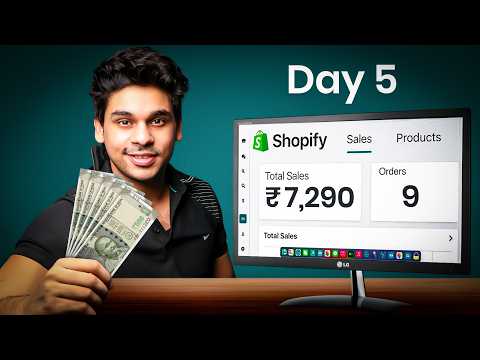
[13:55]Sorry, how long is it gonna take? Seven business days. Alright. That's a long time. Seven freaking days. Chalo no worries, ek baar hum abhi tak ka profit loss check kar lete hain. So humne campaign run kiya teen din, technically less than three days. Toh Google Ads mein hume 8.98k total impressions aaye, 215 clicks, our average CPC was ₹7.88 and total cost was ₹1,690. Actually, ₹1,694.09 to be exact. Shopify ka data dekhe toh hume aaye 343 total sessions and nine total purchases worth ₹7,290. Our average conversion rate was 2.62%, which was excellent and the average order value was ₹810. Google mein humari sirf paanch conversions ya purchases track hui, which is normal. Aap YouTube ya Reddit pe bhi jaake dekhoge toh advertisers kayi baar is baare mein baat karte hain. And now to show you the proof ki saare ke saare orders prepaid the. Main PhonePe PG mein aata hu, apna date range select kar leta hu and as you can see, total number of sales and orders are identical. Main ek baar fir se refresh maar deta hu page ko aur settlement mein aake proof bhi dikha deta hu that we were paid. Aur final P&L ki baat kare toh hume total gross revenue hua of ₹7,290. Ad cost humara tha ₹1,694.09. Products plus shipping cost would be ₹210 into nine, which is ₹1,890. So ₹7,290 in gross sales minus ₹1,694.09 in ad cost minus ₹1,890 in products plus shipping is equals to ₹3,705.91. If we do a little bit of math, that comes out to 50.836% net profit. Now this is huge. Agar round up kare toh it's about 51% net profit. That's the power of problem solving product plus amazing store plus great marketing efforts. Aur agar COD hota toh I am pretty sure orders 14 se 15 bhi ho sakte the. Par COD aap tabhi karo jab aap khud inventory buy karo. And jinko bhi ye business India mein karna hai, main toh yahi recommend karunga ki aap inventory khud kharido taaki aap packaging bhi khud control kar paoge aur COD bhi confidently handle kar paoge. Basically ek full fledged e-commerce business ki tarah. Well ab COD manage kaise karna hai? Simple sa tarika hai. Aapko jo order aane ke aur customer ko delivery hone ke beech ka jo time frame hai, uske andar customer ko baar baar remind karna hai ki aapka product aa raha hai. Not as a marketer, lekin aapko product ke reviews, benefits ya phir case studies customers ko regularly bhej ne hai, ya toh email ke through ya phir WhatsApp ke through, taaki customer excited rahe aapke product ko leke ki mera product aa raha hai. Generally hota kya hai, customers order karte hain products aur ya toh phir wo bhul jaate hain ya fir they lose interest. So it's your job to keep them engaged. And that's the key to reducing RTO. So this was the challenge guys. Agar aapko pata hai ki aap kya kar rahe hain, you can be very profitable with drop shipping even in India. Ab Google Ads ke through aap apne store ko scale nahi kar sakte, kyuki kitne log search kar rahe hain uska control aapke hath mein nahi hai. But think about five stores, guys, and each doing ₹1 lakh in revenue. Hai na life changing? That's the way you'll have to look at it. Ab mera ye goal tha ki main aapko kam se kam ₹40,000 to ₹50,000 ki sales dikhau, but ye issue aa gaya. Koi baat nahi, we'll do an even better part two in upcoming months. Well, I hope aapko kaafi cheeze samajh mein aa gayi hongi. Maine poora process bhi dikha diya aur challenge ke sath prove karke bhi dikha diya that my process works. Aur please courses ke chakkar mein padna band karo, aapko last mein ek spreadsheet dikha denge aur phir bewakoof bana denge aur aap ban bhi jaate ho. So please don't follow for it. Other than that, start learning, start testing, start earning and I'll see you at the top.


