[0:00]With a fun new way to get started with robots and coding, the new Sphero Mini Soccer and Sphero Mini Activity Kit are a great way to get a grasp on coding fundamentals. The Mini Soccer kit adds a new shell and some cones, while the Mini Activity kit includes barriers, arches, cones, and pins with 15 activity sheets to get you up and running. With intuitive apps to let you drive the ball around or dive deep into coding with JavaScript, there's a lot you can do with the Sphero Mini. Let's check them out. Thanks for watching 9to5Toys. Be sure to like, subscribe, and enable notifications with the bell icon so you don't miss any upcoming videos. This is Jordan with 9to5Toys. The Sphero Mini has been out for a few years, but these new kits add some fun new ways to play and learn. We have both the Mini Soccer and the Mini Activity kit to take a look at, so let's check out the Sphero Mini Soccer first. Coming in at the same $50 price point as the regular Sphero Mini, the Mini Soccer comes with a different shell and eight cones to play with. Getting the Mini Soccer set up was very easy. When opening the box, you're greeted with the three-step process, which is just removing the soccer ball shell, which just pulls apart. Charging the Sphero Mini and downloading one of the apps. The easiest way to get started with the Mini is the Sphero Play app. Be sure to charge the Mini before opening up the app though. Once the app is open, just hold the Mini near your phone and it will automatically connect. From here, there are a few different ways to control the Sphero. The default is a joystick where you just drag a circle around to move in a certain direction. There's also slingshot, tilt and many other types of control. With the blocks control, this is the first way to get started with making your own commands for the Sphero. Here you can add your own commands like what direction to move and different colors to light up. And if you want to take programming to the next level, download and open up the Sphero EDU app. Within the Sphero EDU app, this is where you can really make the Sphero Mini your own. You can make programs with blocks by just dragging them on and changing the parameters. Explore tutorials on how to use the app and even read and write some of your own JavaScript code. There is a ton to do in here and really opens up a world of possibilities for your Sphero Mini. From starting with the Sphero Play app and moving on to the Sphero EDU app, it's easy to see how versatile and educational the Sphero Mini can be. And then, if the Mini Soccer kit doesn't have enough in it, the Mini Activity kit adds a lot more pieces and suggested activities for just $80. In addition to the three cones, the activity kit comes with six pins and a 28-piece construction kit. This way, when used with the activity cards or just in your own imagination, you can build different courses for the Sphero Mini to run. The activity kit comes with a great selection of ideas for getting to know the Sphero and its capabilities. The first activities teach you how to control the Sphero Mini and then gets into some more intense courses to practice your skills and your control of the Sphero Mini. Each card has a quick demonstration on front and some more detailed instructions on back to make sure you know what you're doing. Overall, the Sphero Mini is a great way to get started in coding while having a lot of fun. These kits are a nice place to start as you get to know the Sphero Mini more, and I'm sure you'll come up with plenty of more ideas on how to use it. So, what do you think of the Sphero Mini and the available kits? Let us know in the comments below. Thanks for watching. If you enjoyed this video, please give it a thumbs up and consider subscribing. This is Jordan with 9to5Toys.
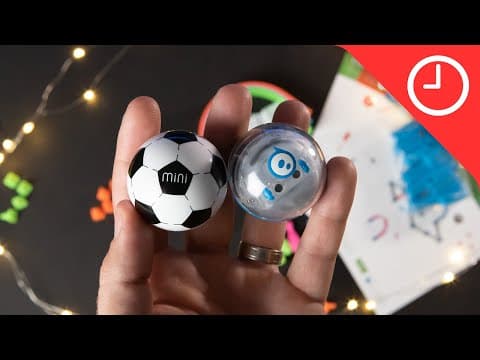
Sphero Mini Soccer and Activity Kit Review: Fun and easy way to start coding
9to5Toys
3m 20s715 words~4 min read
Auto-Generated
Watch on YouTube
Share
MORE TRANSCRIPTS


![Thumbnail for ✅ Best Smart Door Lock 2026 [Find Which Smart Lock is Right for YOU?] by Foremost Picks](/_next/image?url=https%3A%2F%2Fimg.youtube.com%2Fvi%2FoRozIS6IsnY%2Fhqdefault.jpg&w=3840&q=75)