[0:02]Hello, and welcome. My name is Donald Byler. Today, I'm going to walk you through a simple threat-hunting exercise within Symantec EDR. We'll kick things off with a PowerShell event review. We'll hide some event types initially, which we'll come back to, but to start with, I want to make sure we are working directly with the recorded PowerShell events without the rest of the Symantec technologies yelling at us that that something is wrong. We'll explore event fields, toggling some of these into view to quickly help our understanding of the event chain. We'll use Event Actor PID and Process PID to manually build out a process lineage. We'll also take a look at the hidden event type 4100 from our first query to more quickly identify process lineage. We'll also submit a file to sandbox and review those results. We'll request some process dumps for review and perform an endpoint search. With that, let's go ahead and jump over to the EDR console. This is the logon page for the Symantec EDR console. As we get logged in, it brings us to the Event Activity dashboard. I'm going to go ahead and skip right over to the search page. And when we get to the search page, you'll notice a couple of things. One, we're in the database search tab currently. This shows us all of the events that are being recorded and streamed up to the EDR platform and then stored in the local database. It also shows us the timeline with the event counts throughout the day for when these these activities occurred. There is also an endpoint tab. This allows us to perform queries directly against our endpoints. This is also where the status for those searches would be found, as well as the status for any recording requests such as the process dump or the full dump recordings. Going back to the database search. Let's go ahead and look at some PowerShell activity. As you are working within your environment and you're finding queries that are valuable and repeatable for you, make sure you're saving them so that you can come in here and very quickly perform one of those queries. You'll notice my PowerShell query that I performed, I had saved as raw PowerShell events. This is showing me the event activity uh throughout the day for PowerShell. I have a minus type ID 4100 here that I am hiding from view for now. We will come back to these 4100 events. After the query was run, certainly, this shows us the PowerShell activity that we're looking for. This also shows us it changes the timeline and shows us the event count for when the PowerShell activity occurred. If I click on that, it narrows the scope of that timeframe down to to this window of of time where these activities occurred. As I begin to work with these events, I'm going to toggle the time column. I would like to see these events from the oldest first and work my way down. We'll notice the command has launched PowerShell, the PowerShell made a network connection, it then created a file called Microsoft KB some numbers.exe in my Windows temp directory. It then launched that file and then PowerShell's job was done and PowerShell terminates. I'd be curious to understand a little bit more about what's going on here. I'm not for certain yet that I don't like this activity, I just don't know yet. So, what I want to do is find out what is PowerShell being asked to actually do. And if we expand these events, we can look at the different event fields. Depending on what you're looking for, certainly some of these fields will have no value and then some of them may be very valuable, it just depends again on what you're looking for. In this case, we're looking for details related to PowerShell. There are other fields in here, things like enriched data string info. This has a decoded command field that allows us to look at if had the command sent to PowerShell been encoded, we would have been able to decode those and then make them human readable and we would display that information here. This is a very simple example, no encoding occurred. So you'll notice the command line here, event act or command line, as well as a process command line that we're going to toggle into view. Now, I'm going to collapse this event and now we're looking at the same event chain, but we have more context around what what PowerShell was actually being asked to do. You will see that it's being asked to download a file from this domain and file name of sample.exe and is writing this to the Windows temp directory under uh new file name of Microsoft KB some numbers.exe.
[5:08]It then executes or launches the Microsoft KB number.exe. Well, we saw that occur in the activity, we saw it make the network connection, we saw it create that file on the window uh the Windows temp directory, and then we saw it launch that file. But now with the additional context, we see that it's pulling a file of some name we're not familiar with, changing that file name to masquerade as something related to Microsoft, and then launching it. Now, I start to not like what I'm seeing here. So, let's put more of the the picture together. What launched command line? It didn't just appear out of nowhere. So, if we expand on this event one more time, we can find the event actor process ID uh of the process that would have have launched command. And somewhere in here, where is that? Event actor PID. So, that process ID is 1092. We can come back up here, collapse that event, and I'm going to add that into the current query and we're going to build on that lineage and and find out what launched command. So, I am going to say process.pid 1092. We'll run that query and now we see Microsoft Word is launching command. So I don't like what PowerShell is being asked to do and I definitely don't like that Microsoft Word is asking PowerShell to do that. That's generally not something I would expect at least in my environment. Now, if we take a close look, we can get a hint of what actually launched Microsoft Word. You'll look at the command line and you see uh the document was being launched from Inet cash content.outlook under a temporary folder there and then a DLL VBA shample docum. So you have the document name but more interestingly, it comes out of a temporary folder under Outlook, which means this probably came through an email as an attachment and the end user launched it directly from from Outlook. We can confirm that by continuing to build on the process lineage. We can find the event actor PID uh that launched Microsoft Word. I happen to um have already saved that query. So we'll build that out here. The PID was 4188 and you'll notice sure enough, Outlook launches Microsoft Word. Word launches command, which launches PowerShell and results in this file being executed in my environment on this endpoint.
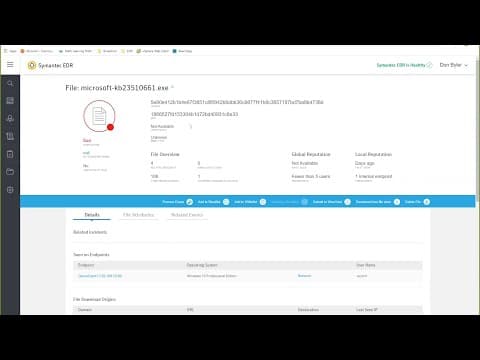
[7:47]Now from here, decisions need to be made, right? If if the trust level of this endpoint is such that it's just time to reimage that box, then maybe that's what we do. For purposes of using this solution, we're going to go ahead and continue our investigation and I think my next stop is the actual executable file that was downloaded and launched. So, I have that, you know, the link to the Microsoft KB number executable here and when I click on that, I get some interesting information about this file. It's going to tell me uh current file name, though there may be multiple file names involved if we have seen records or we have records of the files with different fingerprints. Uh I'm sorry, with the same fingerprints, but just different file names. And as we scroll down, we're going to see different details. Uh, do we see this file related to any incidents? And there are some incidents within EDR. We'll look at those in a different conversation. Um what other endpoints in my environment have we seen this file on? Right now, just the one endpoint that that we have noticed uh in our previous queries. We can also see file downloads came from certain domains and the different file instances uh on the endpoint. Now, I might be interested to see the related events, the complete picture of the events related to this file. We've seen the PowerShell events, right? We've seen what launched PowerShell. If I click on the related events tab and we scroll down here, I'm going to go ahead and toggle the time column again, bring the oldest event up first and we see some similar things. PowerShell creates this file, PowerShell launches this file. Now, all of a sudden, I see a lot of technology, Symantec technologies that don't like this file for a lot of different reasons.
[10:04]And it builds that lineage for us pretty immediately. If you recall, we built out Microsoft Outlook, launching Word, launching Command, launching PowerShell, downloading a file and and launching that file. Well, you look at um, for example, this 4100 here, email client launched PowerShell, which attempted to launch a suspicious process. If we expand this event, you'll see the lineage was already built out. Outlook launches Word, launches Command, launches PowerShell. This is the same thing we built out manually just a little bit ago.
[10:41]So, recall through some of your queries, remember, as you're going through your queries, uh, don't ignore what the Symantec technologies are also telling you about as as they as they come up with their their verdicts. Now, if we hid those again from this view, most all of these events are Symantec technologies that didn't like what happened. But I still don't have an actual picture of, well, well, what happened when this file was launched? It was launched, and then it terminates. What else is going on? There are a couple of things I might want to do to to determine that. One, let's submit this file to a sandbox. We're going to pull it from this endpoint. We're going to go ahead and submit that. Uh click okay. That should pull the file from the endpoint and send that up to the sandbox for review. I would also like to look at the process dump. So, what's the recording stored at the endpoint for what this file actually did? If you'll recall, the events being recorded and streamed to the platform are the important things that tell us, hey, you know, give us an indication that bad things are happening, but it may not be absolutely everything related to those those events. So, if I pull the process recording, again, from this endpoint, we'll go ahead and uh get that information so that we can review that. Now, the the sandbox is simply a detonation of the file in Symantecs in uh sandbox environment. We're going to record what the file does in our environment. We'll give you back a copy of the recording and then we'll give you a verdict on whether or not uh it is good or bad based on the behaviors monitored within the sandbox.
[12:44]Now, if we start, let's go look at the logging. We're going to look at the actions, and this should tell us how we're doing from the sandbox submission. Looks like it is still started. So, let's take a look at the status of our process dump and see what we get. We may end up simply uh pausing this recording until the the results come in, but I expected them back fairly quickly. If we go to that search page and we go to the endpoint tab, we're going to see the process launch and the records returned. So, we're still waiting for these to come back. And we might be able to view some of these related to that file. Oh, not not quite yet. I was hoping we would.
[13:35]Right. As soon as I paused the recording, I went back to the sandbox uh results. I went to logging here and we had sandbox results back. So, we have not yet seen the results from the process recording from the actual endpoint, but we did get back that uh file is malware. Our our submission to sandbox was complete and that the sandbox did not like that. If we go back to the file details now, we'll be able to learn a little bit more. Now, you'll notice here, I have Cynic modifications previously. The Cynic modifications were zero. We had Cynic is the the name for the sandbox technology. Uh the file had not been submitted to sandbox, and now that it has been, I can quickly move to the the Cynic actions or activities that that were recorded. Now, by default, we're just going to list what was malicious and suspicious. Uh but we can drill down into the full recording. We see it changing the host file. We see it um what copying itself to a new file, uh to the local temp directory as a system.exe. We will also see, let's see, some process started. A lot of registry activity. At some point in all of these events, you will see a file a a registry creation for some persistence. So, we should see some of that as well, but this is what was recorded in the sandbox and this is what came back from from that recording.
[15:23]Now, this alone, having knowing that the file actually executed in our environment, we didn't see anything actually prevent it. It's safe to say, we really don't trust this endpoint. It's probably time to reimage or otherwise clean up or remediate what that file might have done.
[15:44]Now, we can, and again, we know that it was executed and ran on an endpoint. If we go to, let's head over to the endpoint results, still don't have anything returned, which. Okay. Now, for the fun of it, let's look at and compare what we found in the recording to what was actually recorded at the endpoint. So, if we head back to the search page and go to the endpoint tab, we should now have results and we do. The process dump results are going to show us everything that that file would have done when it was executed at the endpoint. And as we scroll down here, I am going to toggle the time again and put the oldest at the top, and we see this executable file, it creates a shample.dat, which I believe we saw in the recording from the sandbox. It loads a handful of different DLLs. It creates that system.exe file for in the local temp directory. Um so, we we are seeing it match up to doing some of the things that that we saw in within the sandbox recording.
[17:18]It definitely did what it was expecting to do or what it wanted to do on our endpoints. Now, I think the last piece of the puzzle here, certainly there are different options we have. We can uh work with the endpoint itself and start remediating. We can uh isolate the endpoint. We can remove the delete the files.
[17:41]Um we have some options for just remediating these. Uh we also have the option of, hey, we no longer trust this endpoint, let's go ahead and and reimage. The last thing we want to look at is what about uh the word document that started this whole thing? And we see here there is a DL VBA shample.docm. I'm going to copy this and I'd like to understand, is it still on the endpoint or not? And if we search our endpoints and we'll perform a quick shample.doc on a specific endpoint. I can pick a group of endpoints, but in this case, I happen to know which endpoint it is.
[18:30]And we're going to look for a file path will work. And we will to a star. Right. And we will go ahead and perform that search. Now, this search is reaching out directly to that endpoint.
[19:13]And we are searching this machine for that file name. The search results come back. Uh the speed, I'm sorry, at which the search results come back is entirely dependent on how you perform the search. If we had a more accurate path for this file, it would have been very targeted and the endpoint would have looked only in that location and then come back with the results. Since we said search everywhere for this file name, it's going to take a moment for that for those details to come back. We'll go ahead, we'll pause the recording here and we'll come back as soon as we have results. All right, it looks like we have completed the search. And you'll see here, we get completed search and completed recorder search. So, if we open this up, we're going to see some different things. First of all, when you search an endpoint, we're actually searching two locations. We have a recording overview, which is searching the recorded data store at the endpoint. And then we have an evidence of compromise overview, which is searching what's on disk and what's in the registry. Both of those completed with data. The endpoint activity recorder shows us some interesting things. Remember, early on in the conversation, I spoke about the fact that this file came out of an Outlook temporary directory. Depending on what happens throughout the day, these files are created and then they're removed. So, it's entirely possible in this temporary directory that this file would have been deleted before we could have um gained access to it. And you'll notice Outlook's creating this file. uh Outlook creates the file in the temp directory, modifies the file. And then at the very last, it does remove that file. So, it's no longer available in that temporary directory where we originally saw it performing its its work from. However, if we go to the evidence of compromise and look at what's on disk, you'll notice that the user has uh appears to have saved this file on their desktop. I can now go to click on this, this file. And if I want access to it, I can go ahead and say, you know what, copy this to file store. Now, this is not an executable file, so it should, oh no, there we go.
[22:04]Now, because I've located this file somewhere on disk on that that endpoint, we can go ahead, go to the file details here and we can copy to file store.
[22:18]This will reach out to the endpoint. It will pull the file up to the EDR platform so that I could pull it down.
[22:28]In review, we manually built out a process lineage using the Event Actor PID and Process PID fields. We discovered that Outlook launched Word, launched Command, launched PowerShell, which created and executed a Microsoft KB executable file. We took a look at the event type 4100 for a quicker view of a process lineage and to understand a little bit more about what Symantec's behavior technologies may tell us inside of EDR. We then explored the Microsoft KB number executable via a sandbox submission as well as a process recording from the endpoint. We saw that it did create another executable file in the local temp directory on that endpoint. We also performed an endpoint search for the word document that started this whole process. We did find that it had been created in a temporary Outlook folder. It was also deleted, cleaned up by Outlook, probably when Outlook closed or the email or the word document had been closed. But that endpoint search also showed us that what appeared to be the end user having saved that file on their desktop. This allows us to use EDR to go pull that file and put our hands directly on that file. Thank you very very much for watching. I look forward to our next EDR conversation.


