[0:00]Let's go over how to draw blood off a pick or central line. Before you ask, yes, labs can be drawn off a pick or central line as long as the provider has okayed it and put in a written order for this. First, you need to identify the correct port. Blood can be drawn from a double lumen or a triple lumen central line, but never use the lumen that has been used for TPN if the patient is receiving supplemented nutrition. First, you wanna go in with a vacutainer, your blood tubes, and three 10 ml saline flushes. And depending on your facility, you'll uncap the green or orange cap, which is embedded with antimicrobial. This is a single use and can be thrown away after. Be sure to scrub the hub for 30 seconds. It's always 30 seconds for a pick or central line, and then you're going to unclamp your line. Then you'll flush with 10 millilites. It's important that you don't ever flush with less, you'll always need at least a 10 milliliter syringe. Then you'll detach your first flush and flush again. I'm using two flushes for this, but you always want to flush per your facilities protocol. Then, leaving it attached, you'll withdraw or pull back until you get blood in the 10 milliliter syringe. Then immediately discard the waste in a biohazard bin. Keeping the tip of the lurelock sterile, attach the vacutainer and insert the tubes you're using. After you've taken them from the port, attach another 10 milliliter flush and flush slowly. Then clamp the line and apply a new sterile cap to the lumen port. Make sure you document where you drew the blood from in your patient's chart, which line and which lumen. And prep and then send to the lab. That's all for drawing blood off a pick or a central line. Happy studying, future nurses!
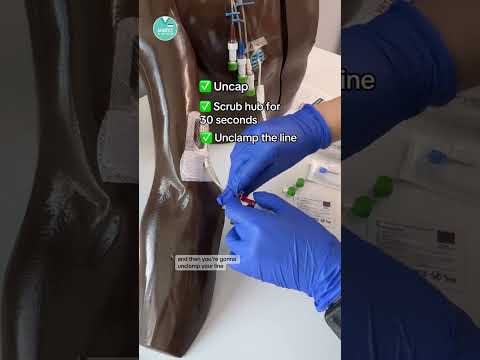
🩸How to draw labs from a PICC or CVC #RN #BSN #futurenurse
NurseInTheMaking
1m 53s319 words~2 min read
YouTube auto captions
Transcript source
YouTube auto captions
This transcript was extracted from YouTube's auto-generated caption track. The transcript below is server-rendered so it can be read, searched, cited, and shared without opening the original YouTube player.
Pull quotes
[0:00]Before you ask, yes, labs can be drawn off a pick or central line as long as the provider has okayed it and put in a written order for this.
[0:00]Blood can be drawn from a double lumen or a triple lumen central line, but never use the lumen that has been used for TPN if the patient is receiving supplemented nutrition.
[0:00]First, you wanna go in with a vacutainer, your blood tubes, and three 10 ml saline flushes.
[0:00]And depending on your facility, you'll uncap the green or orange cap, which is embedded with antimicrobial.
Use this transcript
Related transcript hubs
Watch on YouTube
Share
MORE TRANSCRIPTS


