[0:00]When you got started programming in Java, I bet somebody just told you that you had to have this public static void main string args and in there is where you write your code. Then I bet you probably thought, wait, what does that mean?Wait, wait, wait, what's what's public static void main string?What does all that mean? And they probably told you, shut up, nope, don't ask.Nope, shut up, stop.No, just program it.Just do it, right it.Put that in there. That's what you got to do.And you probably went, whoa, okay, all right, I'll do it. But that question is probably still going on your head.What does all of that actually mean? So I promise that in just a few minutes, you're going to know what each individual piece of that means, what it does and what it's used for. So let's get to it.So I think the best way to think about what is happening here is that the JRE, the Java runtime environment on your computer has to call your program's main method to trigger the program to run. So, for example, I have a class here called main method explanation that has a main method. And what the JRE is actually going to do is call this main method.Uh, something like this.So, with the main method explanation.main, and it's going to pass in arguments. And all the pieces of this public static void main string args, uh, method signature are designed to make that call work. So, first things first, public, why is it public?Well, it's public because this method has to be callable by something outside of this class. If this method was something else like private or protected, the JRE wouldn't have the access to call it, so the method has to be public. If this was private instead, only this class would be able to call it. And so, it's, it's kind of like saying, hey, I'm a great program and the JRE goes, great.How can I run you?It's like, yeah, you can't, you can't.Only I can run me. And that's a pretty useless program.So next, why static?So a static method is a method that can be called on a class without needing an instance of that class to run it against. And that's how the JRE is actually going to call your program.It's not going to create an object of main method explanation and then run a main method on it. It's just going to run the main method directly on the class, exactly as I have it written here.So here's what it's not going to do. Uh, create a new variable of type main method explanation called explanation equals new main method explanation and then take explanation.main. It's not going to do that.It's designed to make the call directly on your class like this.So that's why it has to be static. It's not going to be called on an instance of your class.It's going to be called on your class.So your main method has to be static. Now, next is this void.Now, void is actually the return type of your main method. Just like you have methods that return an int or a long or a string or whatever, your main method just returns nothing.It's void.It has no need to actually return anything. So, when your program gets called, it gets run, and it finishes.Doesn't have to return anything.When this main method is done, your program just ends. Now, next, why is it called main? It just is.It's just called main.You can't call it anything else.The the JRE is going to call your class.main. And so your main method better be called main or it won't work. So I know at the beginning I told you, yes, people told you, and it's just the way it is, in this case, that's just the way it is.That's what the JVM is going to call.That's what you better name your method. Now the last part of this is probably the most interesting, this string array called args. And what this actually is, is an array of strings that are arguments that can be passed to your program. And if you've never used it, it can actually be pretty cool.Now, a lot of programs that you write, you just don't care what is passed in in this, uh, array of strings arguments. You don't need to do anything.Your program's going to do what it's going to do.You don't need to give it any other argument at the beginning.You might take input later or something like that, but you don't need to when you kick off the program, give it input.You're get input from the user later or something, but you can do it. So I'm going to show you a quick example of how you can actually take in an argument and use it in your program. So let's say you just wanted to print a message from whoever's starting up your program and they can insert that's messages as the argument.You just want to print it out.So you can do system.out.println args zero. So that's just getting the zeroth, the first element on this array, and it's going to print it out. So how do you pass in that argument?Now, I'm going to show you a couple ways.First is in the IDE I'm using.I'm using Eclipse right here. So, if you're programming in Eclipse, for example, if you want to change these arguments, you can right click anywhere on the class and go to run as and then click run configurations and then you'll see this arguments tab. And that's where you can put in your arguments.So, for example, we can put in um, chimichanga. And then apply, and then we can hit run.And what that's going to do is pass in as an array, one element array, um, with the string chimichanga. As you can see, it prints out chimichanga. So, you can imagine what kind of things you can do with this.You could, let's say you want to print out something like X number of times.You can give it that number in the input arguments. There's all kinds of fancy stuff you could do with that. But also if you're not running in an IDE and you're just using a text editor or something, you can still do this.Um, so here's my uh, folder with main method explanation dot Java in it and I can open uh, PowerShell window here or you can use command window or whatever you've got.This is just basically a command window. And so, I can compile my program with Java C.What's the name of it?Java C main method explanation dot Java.So, it's compiled.You can see my class file here. And now I can run that command with Java space um main method explanation.And then I can just put my arguments right after that.So I can also put chimichanga's. And I can see it printed out chimichangas.But something to note, if you are actually using these arguments in your program, uh, you have to pass them in. So, for example, here if you don't pass it in, you're going to have problems.So we could run that last command again just without that uh, parameter. And you can see, oh no, I got an array index out of bounds exception.Uh, it was looking for something in an array that wasn't there and blew up. So you can run into problems if you don't use that right but uh, in the right hands, it can offer some pretty cool functionality. So I hope you learned something today.Hope I demystified a little bit of the Java world here today for you.And if I did, give me a thumbs up.It's super appreciated. If you'd like to see more videos like this in the future, hit that subscription button.Thanks so much, everybody.See you next time.
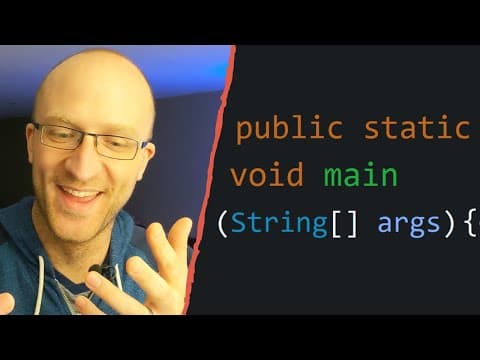
Java Main Method Explained - What Does All That Stuff Mean?
Coding with John
7m 12s1,313 words~7 min read
YouTube auto captions
Transcript source
YouTube auto captions
This transcript was extracted from YouTube's auto-generated caption track. The transcript below is server-rendered so it can be read, searched, cited, and shared without opening the original YouTube player.
Pull quotes
[0:00]When you got started programming in Java, I bet somebody just told you that you had to have this public static void main string args and in there is where you write your code.
[0:00]Then I bet you probably thought, wait, what does that mean?Wait, wait, wait, what's what's public static void main string?What does all that mean?
[0:00]And they probably told you, shut up, nope, don't ask.Nope, shut up, stop.No, just program it.Just do it, right it.Put that in there.
[0:00]That's what you got to do.And you probably went, whoa, okay, all right, I'll do it.
Use this transcript
Related transcript hubs
Watch on YouTube
Share
MORE TRANSCRIPTS


