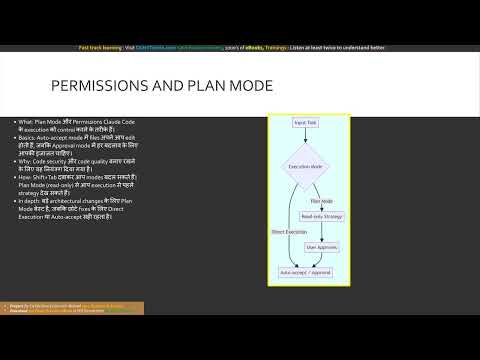
[0:00]Hello doston, main hoon aapki AI trainer aur aaj ke is training session mein hum decode karenge Claude code ki foundational concepts ko. Chaliye shuru karte hain. Hey guys, aaj hum Claude code ko bilkul basic se samjhenge. Imagine kijiye aap chatbot se code likhvate hain aur phir copy-paste karte hain. Kitna boring hai na? Yahin entry hoti hai Claude code ki. Ye ek terminal-based AI agent hai. Iska matlab hai ki ye seedhe aapke codebase ke andar baithta hai. Ye sirf text generate nahin karta, balki aapki files ko read aur write kar sakta hai. Agar koi bug aata hai to ye khud commands run karke use test bhi kar sakta hai. Ise hum autonomous system kehte hain. Is diagram mein hum standard chat aur Claude code ka antar dekh sakte hain. Chat sirf text deta hai, lekin Claude code seedhe files padhta hai, likhta hai aur commands run karta hai. Ab baat karte hain iske dimagh ki, jise hum Agentic Loop kehte hain. Jab aap koi prompt dete hain, to Claude code seedhe andhadhundh code nahin likhta. Woh pehle aapki files se context jama karta hai. Phir zaroori action leta hai, aur sabse khaas baat, wo apne kaam ko verify karta hai. Agar koi test fail ho jaye to wo loop mein wapas jaakar apni galti sudharta hai. Ye loop tab tak chalta hai jab tak stop reason 'end_turn' nahin aa jata. Yahi wajah hai ki ye complex bugs bhi khud fix kar leta hai. Yahan Agentic Loop ka flowchart hai. Prompt milne ke baad, ye context jama karta hai, action leta hai, aur result verify karta hai. Agar error hai, to loop wapas chala jata hai. Aage badhte hain context management ki taraf. Har AI ki ek working memory hoti hai jise context window kehte hain. Jab aap bahut saare tools run karte hain ya files read karvate hain to ye memory full hone lagti hai. Aise mein performance kam ho sakti hai. Ise manage karne ke liye hamare paas behtareen commands hain. Slash compact command aapki purani baaton ko summarize kar deta hai aur space bachata hai. Aur agar aap kisi naye feature par kaam shuru kar rahe hain to slash clear karke purani bias ko hatakar ek fresh start kar sakte hain. Ab dekhte hain ki hum Claude Code ko control kaise karte hain. Ismein aapko auto-accept aur approval modes milte hain. Agar aap chahte hain ki har change se pehle aapse poocha jaye, to approval mode best hai. Ek bahut hi shandar feature hai plan mode. Ise aap shift+tab dabakar chalu kar sakte hain. Plan mode mein Claude koi file change nahin karta, wo sirf codebase read karta hai aur aapko ek foolproof strategy banakar deta hai. Bade architectural changes ke liye hamesha pehle plan mode ka istemal karna chahiye. Yahan execution mode ka structure hai. Aap seedha kaam karva sakte hain ya plan mode mein pehle strategy banakar use approve karne ke baad execute kar sakte hain. Doston, kisi bhi project mein consistency bahut zaroori hai. Iske liye hum claude.md file ka use karte hain. Ye ek markdown file hai jo Claude ko aapke project ke rules, commands aur coding style ke baare mein batati hai. Ye teen levels par kaam karti hai. User level par aap apni personal settings rakh sakte hain, project level file ko aap Git par commit kar sakte hain taaki poori team same standard follow kare, aur directory level par aap kisi khaas folder ke liye rules set kar sakte hain. Isse aapko baar-baar prompt mein rules nahin batane padte. Is diagram mein configuration layers hain. User level par personal choice, project level par team rules aur directory level par specific files ke rules set kiye jaate hain. Ab baat karte hain Claude code ko aur zyada powerful banane ki, jo hum skills aur custom commands ke zariye karte hain. Custom commands chhote shortcuts hote hain, lekin skills bahut hi advance hain. Aap skill.md file banakar kisi bhi repetitive task jaise PR review ko automate kar sakte hain. Claude aapki request ko skill description se match karta hai aur use apne aap activate kar deta hai. Aap ismein allowed tools set karke restriction bhi laga sakte hain taaki security bani rahe. Yahan skills ke kaam karne ka tarika dikhaya gaya hai. Aapki request skill description se match hoti hai aur phir tool restriction ke saath ek naya isolated context shuru hota hai. Last but not the least, MCP aur subagents. MCP ka matlab hai Model Context Protocol. Ye Claude ko bahari duniya jaise GitHub, Jira ya aapke database se jodta hai. Aapko bas ek MCP server configure karna hai aur Claude khud-b-khud wo tools istemal karne lagega. Iske saath hi, aap bhaari task ko sub-agents ko delegate kar sakte hain. Subagents background mein apna alag kaam karte hain aur sirf summary wapas laate hain jisse aapki main memory khali rehti hai. Toh dosto, like subscribe karein aur Quicktechi.com visit karein premium certification prep ke liye, jismein shamil hain Q&A banks, full ebooks, audiobooks, full length training aur interview guides. Is final diagram mein MCP servers aur subagents ka network hai. Claude code bahari data ke liye MCP ka use karta hai aur bhaari task ko subagents ko saunp deta hai. Welcome to quicktechie.com. So just type in quicktechie.com here. Then you can go through the material which is provided by Quicktechie. We have first of all video courses which you can go here and you can find the various video courses across the technologies as well as finance domain. If you see in Microsoft we have eight programs currently running. Next you can go through the ebooks available. So all the ebooks which are in PDF format today and you can download this. So let me go through Microsoft certification ebooks. You can click on any of this and you can see this is the PDF available for you to download. These are the premium ebook, mostly available on quicktechie.com platform only. Now the second part is exam simulator. As we primarily focus on the all technology companies and finance domain, certification preparation material, so this is a company wide listed here and you can go through this. So let me go through the Microsoft one again. You can see this is all Microsoft related certification. AB 730 exam, if you open it, so you can see here this and all the practice papers are available here. Today we have a five practice paper. So click on the first practice paper, it would load the questions. You can answer this question. This is where you can answer it and you can move to the next question. Now third material we wanted to highlight is an audio book. We started recently with the audio books as well, which you can listen on the go and various technology wise ebooks are available. And at the last, this is our alumni, these people who are subscribing to our courses and this uh platform, they are all uh listed here. And at the end, I wanted to tell you, if you find any course or training or certification preparation material which you want to get us prepared for yourself. Please put on the comment section if you are watching on YouTube on Udemy or uh on this platform itself, quicktechie.com. Then please put the comment or you can even send an email to uh using this contact us options here. You can directly do the WhatsApp message. You can call us on this numbers as well.
Module-2 Foundational Knowledge Across Claude | Claude Certified Architect (CCA-F) | Hindi
QuickTechie Official
6m 41s1,254 words~7 min read
Auto-Generated
Watch on YouTube
Share
MORE TRANSCRIPTS