[0:00]Hey, what's going on, everybody? It's Caleb and welcome to your video on API concepts, design and architecture. I'm really excited for this because this is a start of a series of videos on application development, back-end development, API development.
[0:13]We're going to talk about a lot of concepts, but we're also going to follow up with hands-on exercises and building out applications. So, first thing I wanted to mention is you'll want to check for the playlist link so you can watch through all of these videos.
[0:24]Now, this is a pretty long one, it's going to set the foundation, so there's a couple of things I want to get out of the way at the beginning. So, I already mentioned the playlist, but I also want to mention the notes.
[0:33]I have extensive notes for this lesson and some of the upcoming lessons as well, so you will want to check that out, I'll have a link down below.
[0:39]So, those notes act as a companion for these lessons, it'll have everything we're talking about, different code examples, references, and additional information that'll go along really well with these lessons.
[0:50]The other major thing is that some of these lessons will be concepts, some of them will be hands-on, you definitely want to follow up the concepts with hands-on material so you can solidify what we're talking about here.
[1:00]It's very critical that you follow along and actually build APIs so you know how to take what we're talking about here and apply it to the real world.
[1:06]And then the last thing, this isn't really an advanced series, but we're not going to start from the absolute beginning. So, I'll introduce APIs without much prior knowledge, but if you need additional computer science principles, I have a fundamentals course which I'll have a link down to below.
[1:22]This is not mandatory, but if you find that the material here is going a bit fast, I'd recommend you go through that first.
[1:27]Oh, and one last thing, timestamps. We're going to cover a lot of information, so you want to use the timestamps available on the timeline or in the description to jump to whatever section you need, this will be handy if you want to reference certain sections later.
[1:47]Or if you don't get through the full lesson in one go, you can jump back to where you left off. So, a while ago here on YouTube, I did a Rest APIs and one hour video, and I think this is a pretty good introduction.
[1:55]But this video's focus is going to be a bit different. First, we're going to go in more depth, we'll cover the same material with a lot of additional information and cover more material in this lesson because this is going to be dedicated to just all of the API concepts you need to know to be a software engineer.
[2:08]We'll talk about the different types of APIs, you might be coming here looking for Rest API information, which is the majority of what we're going to talk about, but there are other API types as well.
[2:17]So, we'll talk about how Rest APIs are different than these other types. Additionally, we're going to bring in more system design concepts.
[2:27]So, this gets into a little bit more of dealing with different servers and how to architect your API in a way that it can be scalable. So, we want to build scalable systems that can support many, many users.
[2:44]So, if you're just getting started, some of these things you might not worry about because you're just trying to build your first API.
[2:50]We're going to do that, but then we're going to go deeper and talk about more stuff you should know.
[2:54]We'll also talk about pagination, authentication, versioning, and various other intermediate and advanced topics when it comes to building out applications.
[3:03]So, I'm very excited for this video, consider this to be the foundation that you're going to build the rest of your knowledge on when it comes to application development and APIs.
[3:16]So, I want to introduce you to everything you need to be successful, so we're going to cover a lot of different things in this lesson. By the end of this video, you're not going to be an expert on everything, but you'll have a much better idea of everything you should know and we'll continue to discuss all of those different topics in future lessons.
[3:30]So, let's first start talking about what an API is, what it stands for.
[3:38]So, this stands for application programming interface.
[3:46]And this allows us to build applications that talk to each other. So, when you hear the term interface, you should think of the surface area of potential interactions for an app.
[3:59]So, let's say we build this app here, this app might work with a database and do all these complex things, but we don't just give everybody access to the database.
[4:10]We give specific things that the user can do, for example, we could get some data or we could delete some data.
[4:16]And these different things we can do, that concept is called an interface, and it allows us to interface with other applications.
[4:24]So, we might have a different app over here and we can interact with app one from app two because app one has an API.
[4:35]So, these two apps could be two completely different apps, for example, I might be building some calendar app and I'm using Google Maps API basically asking, "Hey, how long would it take to get to my appointment?"
[4:52]And the API gives me back a response, so basically, I just enhanced the functionality of my app by using some other app's API.
[5:04]This is a very common structure. Another very common structure is instead of using a completely separate API, I might actually split my app out into back-end, front-end.
[5:17]So, logically the same product or same purpose, but two separate code bases. And this front-end will just make API requests to my back-end, this back-end can then grab data from the database or make sure that whoever's asking for this information is authorized to ask for that information.
[5:32]So, we're not just giving data out to anybody. And then once the back-end does all the processing and whatnot, it sends the data back to the front-end, the front-end can then just display it all pretty and cute on a web page.
[5:47]So, this is the other major structure that you will see APIs for. In this situation, you can still think of these as two apps, we have a front-end app and a back-end app.
[5:54]They're just working together to provide a single product. So, this is different than if I use some third-party API to enhance my app's capabilities.
[6:03]But both of these are possible, doesn't really matter, the whole idea with an application programming interface, is you can do whatever you want.
[6:09]Basically, we create an app and we expose different capabilities to the outside world to interact with our app. So, that is the general idea around APIs.
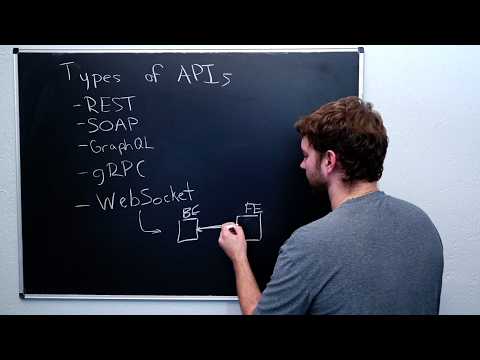
[6:18]So, this is what we're building, right, but there are actually different types. So, these types of APIs, that's what I want to talk about now.
[6:49]I'm going to talk about some of the most common ones, but there are other ones, I'm sure. So, the first one we just mentioned would be a Rest API.
[7:00]Rest stands for representational state transfer, so it's some way to transfer state between apps. Rest will use HTTP, so we'll be able to do this inside of a browser, and it works with JSON.
[7:12]JSON is an object notation, so this describes how we structure the data that we send over the line.
[7:17]Now, another one you might hear is SOAP. Now, I never use SOAP.
[7:23]My temptation to make some stupid joke about real-world soap is unbearable. This is an alternative to Rest.
[7:35]This was used a lot more in earlier applications, so you might see this for legacy systems or enterprise systems.
[7:47]A big difference with these SOAP APIs is that they use XML, which is, you can imagine JSON, but ten times more annoying and difficult to work with, then you have XML.
[7:58]So, if you're building a new system, I wouldn't use SOAP, but you should definitely be familiar with it, at least an idea.
[8:05]So, if you do come across a SOAP API, you're not like, "Oh, what's this?" That'll be important if you're building a new system that integrates with an old system.
[8:13]That old system might not have a Rest API and you might need to use SOAP, even though you're building a new system, the interaction with the old system, you need to adhere to the API of the old system.
[8:49]Next up, we have GraphQL. Now, if you're familiar with databases, you might be familiar with SQL, and this is structured query language.
[8:58]GraphQL works in a very similar way, but it's not to interact with a database directly, rather, it's to interact with a back-end.
[9:08]So, in this situation, instead of exposing multiple endpoints, this would be the traditional Rest approach.
[9:28]What we'll do instead is we'll just create a back-end that has one GraphQL endpoint that the front-end can connect to or the other app can connect to.
[9:41]And then the front-end here does the decisions on what it wants, so you can think of it as the front-end providing a query to the back-end and then the back-end provides the appropriate response.
[9:56]So, this is a really common thing, usually I would recommend people learn this. So, if you are already familiar with Rest, you should probably get some experience with GraphQL.
[10:04]However, if you're brand new, I would recommend first learning Rest. Next up, we have gRPC.
[10:10]Now, you may have heard of RPC before, which is remote procedure call. You can think of this as a way to execute things on the back-end.
[10:23]But when we prefix it with G, this is a specific protocol, the Google RPC protocol. And many people are going to say that this G stands for Google.
[10:35]However, I think officially this stands for gRPC remote procedure call, so it's just a recursive acronym.
[10:48]You'll see this quite commonly in different technologies, but ultimately, when you see gRPC, you can think Google remote procedure call, and this is a specific type of API that uses something called protocol buffers, or Protobufs.
[11:02]So, instead of XML or JSON, we'll have protocol buffers, so this is an approach to serializing data that's very effective.
[11:12]It reduces the size of the data as much as possible, allowing for very fast transfers between apps.
[11:20]This is really common for microservice architectures, so let's say, instead of just having a front-end and a back-end, you might have all these different components that interact with each other.
[11:30]And all of these work together to provide the architecture for some app. This generally is called a microservice architecture, and using Protobufs is pretty common for this for that cross-app communication.
[11:47]Although not required, you could just use a Rest API. So, with this, you will have files that are of the .proto type, not prototype, proto type.
[12:00]And these define a structure for the types. So, every single app can use these Protobuf files to establish the structure of the data in their individual apps, whatever language that might be.
[12:18]So, this is really great working across multiple different languages, we can define all of the types with these .proto files and there's ways to transfer from a .proto file into a certain type for whatever language you're working in.
[12:30]Now, I would say those are the main four you should be familiar with. You can also use things like WebSockets to interact between apps, so you can build a WebSocket API.
[12:45]And a WebSocket is a bidirectional channel to communicate. So, if we have a back-end and a front-end or two apps, they don't have to be back-end, front-end, we typically with a Rest API, we'll make a request to the back-end and then the back-end gives a response.
[13:02]But with WebSockets, the back-end can also send data directly to the front-end without a request.
[13:10]Basically, the way this works is the front-end opens a connection and then that connection is maintained and the communication can then happen from either direction as long as that connection is maintained.
[13:28]This is really common for real-time applications. So, if something happens on the back-end and we need to immediately tell the front-end, then you could say this is a real-time app.
[13:40]For example, a communications app, such as chat or notifications, and so forth.
[13:51]Anything where the communication is initialized from the back-end, but do keep in mind that the front-end can also send data to the back-end as well.
[13:58]So, here are some of the other types of APIs, you can look up others if you want to know more information. These are some of the things I'm hoping to cover here in this playlist or on YouTube.
[14:11]So, if you're interested in building some of these things, you'll definitely want to hit that subscribe button, follow along for the journey. And what I want to do for the rest of this video is zoom in on this one here, Rest APIs, or as I mentioned, you might see restful APIs.
[14:30]Once you have this down, you should be pretty competent in cross-app communication and then picking up these others is going to be a whole lot easier because you understand the principles.
[14:40]Now, the actual way you do it's going to be different. So, there's some stuff we're going to talk about that's specific to Restful APIs.
[14:45]So, specifically, we're going to have different methods we're going to talk about, we're going to have a variety of endpoints, we're going to have status codes, response codes, and we're going to be working with JSON data.
[15:07]So, if you're not familiar with JSON, it's really, really simple, I'll show you a very basic example right here, right now. Right at this moment.
[15:15]Not going to delay, just going to show it to you, okay? It's going to be right here. So, JSON stands for JavaScript Object Notation.
[15:24]And it looks very similar to an object in JavaScript.
[15:27]If you haven't used JavaScript though, it's no big deal. Basically, you're going to open the object with a curly brace, then you're going to have a series of attributes, these will be quoted, such as name, and then a colon, and then the value, such as Caleb.
[15:43]And a comma, and then another attribute, quoted, such as age, and then a value, such as 30, in this case, it's not quoted.
[15:54]It supports different types here, so we can use a string, which we showed with Caleb, we could use a number, we can use a Boolean, true or false, we can have nested objects.
[16:06]That's an important thing here, we can structure objects inside of other objects, and we can have arrays. I think we can also have null as well, which you can count if you want.
[16:18]So, if you have an attribute and you specifically want to say there's no value for that attribute, you can use null. Notice that there's no quotes here, that would be a string containing null, it's just null the keyword.
[16:32]Now, if you're coming from JavaScript, you might notice some similarities, but within JavaScript code, you don't have to quote the attributes, and you can also use different types inside of an object within JavaScript.
[16:47]So, for example, you could use a date or a function or undefined, these things are not supported in JSON, so it's not a one-to-one to JavaScript objects.
[17:02]So, I wouldn't even really strongly associate this with JavaScript, I would just think of it as JSON with key-value pairs surrounded by curly braces.
[17:11]Okay, so we have a pretty decent understanding of the structure of our data, how do we use this structure to build an API?
[17:18]What does a Rest API look like? Well, some of the things we just mentioned, we'll have a method, for example, in these are written in all caps, get.
[17:29]This is an HTTP method, so Rest API is built on top of the HTTP protocol.
[17:34]So, with that, you'll have an HTTP method. Get is a very common one, this is used to retrieve data from a server, and when you go and visit a web page, you're actually making a Get request, even if you're not working with APIs directly.
[17:46]And then you'll typically have some resource. So, resource, you can think of this as here, let me give you a bunch of other abstract names, entity, an item, or some database record.
[18:04]This is basically the thing that we are wanting to interact with. So, an example of this would be users, and that would be something that might give us back that same JSON structure we saw earlier, where we have the person's name and their age.
[18:19]I'm going to go through the example of comments posted on a website.
[18:23]So, this could be a social media, it could be whatever you want, anywhere that you can post a comment.
[18:27]So, let's say you have a video and people can post comments below, etc.
[18:38]We need a way to be able to retrieve this information from the back-end and we don't have direct access to the database.
[18:43]So, it's going to look like this. We have the back-end, the back-end stores that data in a database, we make a request for comments.
[18:57]And then that back-end formats the data as we need and gives it to us in JSON. Once we have this JSON data, we can work with it on the front-end to format it and make it look nice to the user, which is how we end up with a web page with the posts and then the comments below it.
[19:22]So, that's the general workflow. Then when a user goes in here and maybe posts a new comment, this is going to follow that same pattern, but now it's going to make a request to the back-end with a different method.
[19:35]So, instead of a Get request, we're going to do a Post request.


