[0:01]Hi and welcome to the new video on industrial instrumentation and automation. In this video I'll be discussing about PLC programming basics, okay? So at present industrial in the industrial automation sector, there are several leading PLC manufacturers that develop typical PLCs ranging from small to high-end PLCs. Okay? And each and every PLC manufacturer has its own dedicated software to program and configure the PLC hardware. Okay? So, manufacturers PLCs software program. But the PLC programming language is varied depending on the manufacturers in most cases, it can be varied. But some manufacturers have common programming languages and some others have dissimilar. manufacturers common programs different. Textual language and graphical language, textual language. Textual instructions list IL programming structured text ST. Graphical, ladder diagrams, function block diagram, sequential function chart. classifications.
[1:26]common use ladder diagram ladder diagrams commonly used graphical.
[1:38]programming instructions graphical components and ladder diagrams most common. focus ladder diagrams just textual language basic ID instructions list programming basic. Okay. So, four in top left, ladder diagram. Ladder diagram program. diagram ladder two sides vertical fix horizontal ladder. Next, instruction list program. Normally instructions instructions based. LD and AND and OR instructions instructions. These two cases just. Discussing. Structured text. Sequential function chart. just. Okay. So, moving on, PLCs are intended to be used by engineers without any great knowledge of programming. And ladder programming, LAD, was developed as a means of writing programs that can then be converted into machine code by software for use with the PLC microprocessor. So, programming concept, main programming ladder programming. It can be simply, we can simply write the programming or the code in ladder, ladder programming and it can be simply converted into machine code. And PLCs can receive input signals and send output signals. We already know input signals from switches and contacts of an industrial system, indicating some condition have changed - push buttons, start or stop switches, limit switches, selector switches or contact of relays. Okay. So, input scan stage, outputs are sent out to the real world causing some conditions to change indication lamps, motors and relays. input is used for a control action, such as closing the contacts of a switch. The term output is used for a device connected to the output of a PLC, such as a motor. PLCs switches push press off lambda motor on output actions. PLC must have a program in its memory which is executed when it receives an input signal and, on the basis of the program executed, sends out an output signal to the system.
[4:44]We already know operations cycle. self check three input scan, logic scan, output scan. Inputs logic run program logic ladder program graphical program. Commonly ladder programming. So, PLC programming relays. Relays are the most popular components of the PLC hardware. PLC hardware part output relays. Relays open close normally open normally close type relays. Relays are used as outputs in the ladder diagram. Ladder diagram final output relays. They can be used to control ON/OFF actuation of powered device.
[5:37]Device connect on off control normally open normally close. normally open input condition meet logic program run on. Reverse case. A relay can be latching or non latching. That's what we're going to check.
[5:56]A latching relay needs an electrical impulse to close the power circuit. Another impulse is needed to release the latch. Latching door latching. one close on latch. Then open again one impulse. push only on. That is latching type relay. non latching relay. holds only while the switching relay is energized and require continuous electrical signal. non latching. automatic push. continuous electrical signal only. latch non latching relay. latching relay. basic relays difference.
[6:52]So, main graphical ladder diagram. ladder programming. So, very commonly used method of programming PLCs is based on the use of ladder diagrams. Ladder diagram. So, here you can see, left and right two rails. On top of the rail, rungs. A ladder.
[7:16]So, that's why it is called a ladder diagram or ladder programming. Here, there are different elements and things according to our sequence, logical sequence, we will connect and do things. So, we can see what are its components, what are its rules. Okay. This is the same example we discussed earlier. The three cycles. input scan, logic scan, output scan. This shows what happens. This is a simple ladder logic. If a positive transition comes, it connects to the input. Then the output connects accordingly. If push button is pressed, the lamp turns on. I showed this earlier. Okay. So, the ladder diagram is a graphical way of representing logical flow and control.
[8:05]It is used as a graphical computer language for simulating and testing control programs for programmable logic controllers, PLCs. Used as the symbolic programming language used in industry to communicate with programmable logic controllers PLCs. Called as ladder diagrams. They look like a ladder with horizontal and vertical rails. With such a diagram, the power supply for the circuits is always shown as two vertical lines, with the rest of the circuit as horizontal lines. Earlier diagram shows two vertical lines are power supply. The rest are horizontal. They are called rungs. The power lines, or rails, as they are often called, are like the vertical sides of a ladder, with the horizontal circuit lines similar to the rungs of the ladder. The horizontal rungs show only the control portion of the circuit.
[9:08]The left vertical leg represents power supply and right vertical leg represents the ground state. Left is phase and right is neutral, positive and negative meaning. Okay. So, these are the main symbols used in the ladder diagram. So, electrical devices are shown in their normal condition. This is a normally open contact. Nothing in between. This shows normally closed contact. Normally open condition. normally close condition. Positive transition, negative transition. P means we have seen an example earlier. Positive transition sensing contact. From zero to one, it changes, then it closes.
[9:54]That's what happens here. If input is one, then it closes, meaning normally open. If it is normally closed, then if input is one, it opens. If it is N, then it is a negative transition sensing contact. If there is a change from one to zero, it closes. That's the point. This is a coil representation. Final relay coil is shown here. It can have positive transition sensing coil, zero to one close, negative transition sensing. set latch coil, negated coil. These are many. We will not use all of them in detail. We will discuss simple examples. Thus a switch that is normally open until some object closes it is shown as open on the ladder diagram. And a switch that is normally closed is shown closed. Okay. And the main elements. In a ladder diagram, there are two rails which are drawn as vertical lines going down the foremost ends. These are vertical lines and provide the sources of energy to relays and logic system.
[11:05]Then we have the rungs. The rungs are drawn horizontally and link the rails to the statements of logic. Contains the branches, inputs and outputs.
[11:25]Branch means a point branches. We know this. If another comes below a rung, it is called a branch. Then inputs. The inputs are actual control acts such as pushing a push-button or activating a cap switch. Then outputs. Outputs are electronic machines which are turned on and off like an electric motor or a solenoid lever. Timers. Timers will be required for some things. Counters will come.
[12:06]We will discuss the examples of timers, counters and latching in another video. Only basic things will be discussed here. Okay. Then, the most important thing is a logic expression. Logic expressions are used to formulate the desired control operations in combination with the inputs and outputs. The logic operation is according to the rung and branch. If we need timing, we use a timer. If we need counting, we use a counter. Okay. This is a basic element. Rails, rungs, branches, inputs, outputs, timers, counters, then logical expression. Okay. Then there are some rules to be followed while forming a ladder diagram or while reading a ladder diagram. Okay. The first one being, the vertical lines of the diagram represent the power rails between which circuits are connected. The power flow is taken to be from the left-hand vertical across a rung. Vertical line power supply. Reading should be from left to right. And each rung on the ladder defines one operation in the control process. One rung, one control operation. Then output cannot be connected to the left bus rail and the input cannot be connected to the right bus rail. Output left bus rail input right bus rail. It's a condition. Then only one output may be placed on each rung. Each rung, only one output. Then each output can be used only once in a program while the input can be used many time. Inputs can be used many times in different combinations. Output can be used only once. The inputs and outputs are all identified by their addresses. All of them will have their own addresses. So, we will identify them using the address. The notation used depends on the PLC manufacturer. Each PLC manufacturer has different types of addresses. Addresses are important. We identify each input and output based on that. That's the main common rules. Now, this is the flow. Ladder diagram flow. I just showed it. This is our left power rail and this is right power rail. This is rung 1, rung 2, rung 3, rung 4, then end rung. So, power flow should be from left to right. Left to right. This way it should go. From top to bottom. So, a ladder diagram is read from left to right and from top to bottom. The top rung is read from left to right. Then the second rung down is read from left to right and so on. And when the PLC is in its run mode, it goes through the entire ladder program to the end. The end rung of the program being clearly denoted, and then promptly resumes at the start. This procedure of going through all the rungs of the program is termed a cycle. So, it's called a cycle. And the end rung might be indicated by a block with the word END or RET, for return. Since the program promptly returns to its beginning. So, END means finish. RET means return. So, it returns to the beginning. That's its flow in the ladder diagram. Okay. Let's look at this. This is a simple example. Here, a switch. Here, a contact. Normally open and normally closed. So, here, when input comes, this is what is shown as happening. The flow is seen. First, the top one is read, then it's checked. Then the bottom one is read. Then the third one is read. So, we can see what is connected here. It's a relay coil. Then a lamp. Red lamp and then a green lamp. So, when it comes here, this is normally open. Nothing has been done. So, it means nothing special will come.
[16:25]So, this light will remain off. Okay. If it's this one, it's normally closed. So, it will remain in the normally closed condition. So, this light will blink. Okay. So, this is what happens here. Now, if we look at another example, similar things happen. But here, the switch is closed. So, CR1 is energized. CR1 is energized. Here, this and here. Here, nothing passes through. Okay. So, I just gave an example. Similarly, we discussed the basic things of the ladder. I said there are list codes. So, let's just introduce its basic instruction set. Then it will be easier to discuss both of them together. So, I'm just telling this first.
[17:08]So, here, in the other elements, similarly, here are individual instructions. First, the load instructions are given here. It has four types. LD, LDN, LDR, LDF. So, what it is, its symbol is also shown here, we can understand. This is normally open. This is normally closed. This responds according to the positive edge. This responds according to the negative edge. That is, it's called a rising edge for positive. That's LDR. This is called a falling edge. That's why LDF. So, if it's just LD, what does it mean? Open contact. Contact is active while the control bit is one. So, if one comes, it activates. If it's LDN, what does it mean? Closed contact. Contact is active while the control bit is zero. If one comes, it opens. Otherwise, it remains on. For normally open contact, LD is given. For normally closed contact, LDN is given. Similarly, for positive working, LDR is given. For negative triggering, LDF is given. R means rising edge and F means falling edge. Then there are store instructions. We will not use this much here for now. Okay. ST means the result of the logic function activates the coil. So, it activates the coil. If it's STN, what is it? Inverse result of the logic function. So, it's negated. It's negative. It activates when the opposite comes. If it's S, what is it? The result of the logic function energizes the relay or sets the latch. R means the result of the logic function de-energizes the relay, resets the latch. S means set, R means reset. That's the meaning.
[18:46]That's for store. Then for AND operation, it is also similar to what we discussed earlier. If it's just AND, it means normally open. ANDN means open and closed. ANDR means one for rising. ANDF means one for falling. So, AND means connect in series. That's the meaning. Okay. It's written here. I don't need to read it in detail. Then ORs are also similar. Simple normally open OR will come. If ORN is given, one is normally closed. ORR means one for rising, ORF means one for falling. Okay. These are the things that come. So, for now, we will be discussing programs using only these few things. LD means start a rung with an open contact. LDI also exists. Start a rung with a closed contact. AND means a series element with an open contact. ANI means a series element with a closed contact. ANB means to branch. OR instruction. ORI. A parallel element with a closed contact. I means with closed. Just LD means open, meaning normally open. ORB means to branch OR. OUT means output. So, for now, we will be using this set of instructions. Each manufacturer has different types. So, for now, we will be doing this set of instructions list codes. Okay. Let's take an example. So, first, it's AND. Here, it's done for the case of normally open. So, we need an output X. Two inputs, A and B. So, A dot B, which is AND, we know that if both A and B are one, then the output will be one, or it will be on. We know that if it's one one, then it's one. That's AND. So, if we represent that, two normally open contacts are connected in series, then it's AND. So, here, we can do it using the instruction code we discussed earlier. When it's normally open, just LD is enough. We don't need LDI. So, here, what should we do first? First, we need to draw this. So, think of it as drawing first. First, draw A. So, LDEA. Now, after that, the next one is not a load. It's connected in series with it. So, it should be AND. So, ANDB. It's normally open, so it's just ANDB. If it was normally closed, what would it be? ANIB. Okay, that's all. Then, next is the OR gate. For the OR gate, we know that if any one of them is high, then the output will be high. So, we know it's A + B. It's a representation of A OR B. So, it should be connected in parallel. A and B are connected in parallel, normally open. So, what should we do here? First, load A. Now, it's coming in parallel. So, OR. ORB. It's open, so OR. Otherwise, we would have to give ORI. Okay, that's all. Then, OUT. The OUT X that I mentioned earlier, you just need to mention that. Okay. This is NAND gate and NOR gate. So, we know NAND means A dot B whole bar. A dot B whole bar means we know it's A bar plus B bar. So, A bar means normally closed. B bar means normally closed. They just need to be ORed. So, if we look here, we can understand. A bar and B bar. So, what is the difference from the previous one? It's the OR of these. But here, LDI should be given. Similarly, ORII should be given for B.
[22:07]If we look at the instruction, we can understand. Both are normally closed. So, LDI A and ORII B. Okay. That's all. Then, here, A plus B whole bar is the NOR gate. That is, A bar dot B bar. Right? Normally closed and normally closed. So, this is for the other AND. It just needs to be done with I. That's all. Give LDI A, give ANI B, give OUT X. That's all. I haven't written it here. You can check it. Similarly, XOR and NOT gates. Not is simple. A bar. That is LDI A. That's all. Out X. It's simple to get. This is XOR gate. We know XOR gate is exclusive OR. Only if one person is one, the output is one. If both are one, it's zero. If both are zero, it's zero. We know that. This is that case. So, its equation is this. A dot B bar plus A bar dot B. That's what it is. So, normally open, normally closed. Normally closed, normally open. The AND combination of both should come in OR. Right? So, if we say that, first, we have to create this. Then, we have to add one branch to it. That's how we have to do it. So, when this comes, how will it come? First, LDI A. Right? Because it's NC. Then, what? ANIB. So, the next thing is done. Okay, ANIB. Now, what should be done there? Branch instruction should come. So, branch instruction we discussed. What? AND or OR. ORB exists to make two parallel. Okay. So, at the end, we can do it. So, after loading it, we have to make it parallel. So, when loading, what will come? LDI A. Because it's NC.
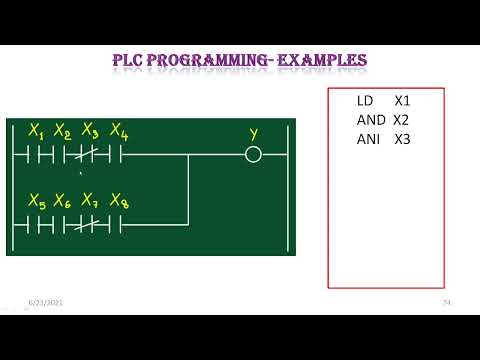
[24:00]Then, what? And B. Now, branch. We discussed this earlier. This is ladder diagrams. From this, we can just look at how to create a logical expression. That's all. Simple thing. When we take the first one, X1 and X2 are parallel. So, X1 or X2. Then it's ANDed with X3. So, Y = X1 + X2, which is X1 + X2. So, X1 + X2 into X3. Next, when it comes, X1 or X2 and X3 or X4 are multiplied. And next, when it comes, X1 dot X2 plus X3 is Y. Right? Okay. Now, we have discussed all of them together. This is a diagram. I just showed how to write its list program. So, first, what should we do? First, we have to create this branch. Create the parallel one. Similarly, create this branch. Then, just AND both of them. It's enough to use ANB. Okay. So, first, we need to load X1. X1 is what opens this rung. So, LDX1. LDI will not come. Because it's normally open, LD is enough. Next, what should be done? It should be ANDed. So, ANIX2. Sorry, it should be ORed. ORI X2. Now, ORI X3. Next, ORI is not needed. Just OR is enough. Because X4 is normally open. So, OR X4. So, that's done there. Now, similarly, we load the next one. LDI X5. We have to give LDI X5. Because it's normally closed. Then, OR X6. OR X7. So, those two branches are loaded there. Now, what should be done with them? They should be ANDed. So, ANB. And branches. So, the branches are ANDed. Now, specify the output. OUTY. That's all for its list programming. Similarly, in this case, we can say, first, these are full ANDs. These are full ANDs. So, after these two come, finally, what should be done? Just OR it. So, what will come here? LDX1. AN X2. AN X3. AN X4. So, that's done. Next, it should be loaded. So, LDX5. And X6. ANIX7. And X8 will come. Finally, these two branches, I mean, what should be done with them? They should be ORed. So, it's a branch. ORB. OUT. That's all that comes in its case. Okay. Okay. Now, let's look at a very simple example of how to write a program for this. A PLC mixer process control program. So, its diagram is shown here. In the diagram, we can see it's a mixer. So, whatever liquid is there, it comes here through a pipe. Here, there's a pressure sensor switch, sorry. There's a pressure sensor switch, a temperature sensor switch, and a manual push button for starting. This is our process vat. This is its motor. This is the motor for stirring. So, the mixer motor to automatically stir the liquid in the vat when the temperature and pressure reach preset values. So, when both the temperature and pressure reach preset values, the motor should turn on and stir. So, we need to understand a few things from here. It has two inputs: pressure sensor and temperature sensor. The output is the motor. So, if both meet, then AND should be active. Then another thing. Alternate manual push button control of the motor to be provided. It means even if these conditions are not satisfied, we can bypass it and press the push button directly, then it should turn on. That condition should also be there. So, there's a pressure sensor switch, a temperature sensor switch, and a push button as input. The motor is the output. So, normally, if both of them meet, then after AND becomes active, it can come. Or else, the push button. So, to AND these two, it should be parallel. Right? One of these conditions should be met, or the push button condition. That's what it means. The temperature and pressure sensor switches close their respective contacts when conditions reach their preset value. So, we know that. So, these are the things that come. So, we understood from this that there are three inputs: pressure sensor switch, temperature sensor switch, push button. There is only one output: motor. Okay. So, based on that, its simple representation came. Okay.
[29:25]So, before that, we are showing the connections of the PLC here. The same input field devices are used. So, this is our input. These are connected to one, two, three. Pressure is connected to one, temperature to two, and manual push button to three. These devices are wired to the input module according to the manufacturer's labeling scheme. So, this labeling will not be the same for all manufacturers. It will be different for each. So, it is given there. This L1 means line, L2 means neutral return, as we know from the previous diagram. Similarly, output is wired here. So, output means only motor comes here. So, motor is connected to L1. Okay.
[30:22]Then for its control, a triac is used here. It is shown that triac switches motor ON and OFF in accordance with the control signal from the processor. So, the control signal comes from here to its gate. So, according to that, the triac turns on and the motor works. That's what it means. So, normally, it remains open. So, after it's energized, it goes to L2 and the motor works. That's what happens there. Okay. Now, its simple representation came. Okay. So, all of them are replaced with switches. This is a normally open switch, normally open switch, normally open switch. All are represented as normally open contacts.
[31:02]Pressure switch, temperature switch, manual push button. So, it shows the addresses here. I bar 1, I bar 2, I bar 3. Because we connected to input one, input two, and input three. This is output one. Only our motor starter coil is shown here. Overload relay is not necessary to show. So, the format used is similar to that of the hard-wired relay circuit. So, the hard-wired relay circuit we showed earlier, it is similar to that. Similarly, here, we have drawn the ladder diagram. Okay. Okay. Then the symbols represents the instructions. So, these are instructions, right? The numbers represent addresses.
[31:47]I bar 1, I bar 2. For each manufacturer, it will be different, as we already discussed. Okay. The I/O address format will differ, depending on the PLC manufacturer. You give each input and output device an address. This lets the PLC know where they are physically connected. So, for the PLC to know where it is connected, we have to give the correct address. So, address is a very important thing that comes in it. Okay. So, that's all that comes. So, I just gave a simple example. We don't have much to say about its working. Then, how to enter the program? So, entering and running the PLC program. To enter the program into the PLC, place the processor in the PROGRAM mode and enter the instructions one-by-one using the programming device. So, we properly program it using that. To operate the program, the controller is placed in the RUN mode, or operating cycle. So, the other one is programming mode, this is run mode. That's all there is. Okay. So, that's all.


