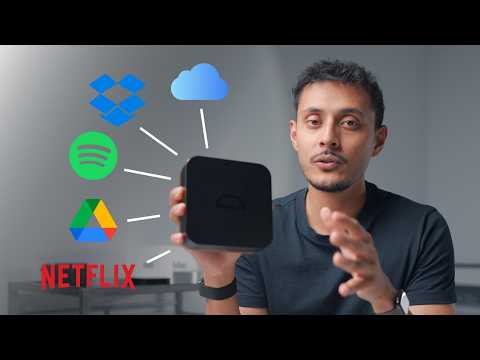
[0:00]So this is all you need to replace iCloud, Dropbox, Google Drive, Netflix, Spotify and many other services. The problem, most people are sick of paying for subscriptions and they also want more control over their data.
[0:12]The solution, building your own cloud. It seems quite technical, but it's easier than ever to self-host and build your own cloud and it only takes an hour or so.
[0:21]For me, I actually don't mind paying for subscriptions as long as they're actually worth it.
[0:26]I just want more power, more control over my own data. Building your own cloud used to be quite a technical challenge, even for someone like me who I like to consider myself quite technical.
[0:36]But now, I feel like it's actually become easier than ever to build your own cloud and the normal average person can do it as well.
[0:41]First is deciding which device to go for. I have the Umbro Pro here.
[0:45]It's not sponsored or anything, I just found that this ticks all of the boxes for me.
[0:50]The unboxing experience for this thing is great. It actually feels like an Apple product.
[0:54]And what drew me to this device were actually a few different things.
[0:57]Number one, the build quality is fantastic. It's premium and it feels solid.
[1:02]Number two, it of course looks amazing as well. The black aluminum finish and the walnut accent just looks very classy.
[1:08]Number three, it's tiny. It's actually a similar size to a Mac Mini, and I also have an Apple TV here for comparison.
[1:16]Number four, it's quiet because internally it only supports NVMe SSDs.
[1:21]Number five, it has a ton of connectivity including two USB-C ports, a HDMI port, and a 2.5 gigabit Ethernet port.
[1:29]And number six, is the software. It's running Umbrel OS, which is a lot nicer to use and look at compared to most other NAS software, which can be quite intimidating.
[1:39]Now, am I saying you should go out and buy this specific one that I have here?
[1:42]No. There are some alternatives out there from companies like UGREEN.
[1:46]They have some cheaper options, but they're not as fast or as quiet or as compact as this device.
[1:51]I wanted something that specifically does not look like a NAS, and I can tuck it away somewhere like under my TV, or put it somewhere that won't take up too much room.
[2:00]It has four NVMe slots on the bottom that are completely toolless, making it easy to install and get going.
[2:07]I'm actually only putting two in here for now, but they're both four terabytes.
[2:11]But if you did want to connect an external hard drive that has spinning hard drives in it, you can actually connect it via USB-C here and expand the storage, which can obviously be much cheaper than having to get four high storage SSDs.
[2:23]Once it's all set up, all you have to do is connect it via Ethernet to your router, but I have Ethernet wired through my house, so I was just able to plug it into the wall.
[2:31]When you connect it to your network, all you need to do is go to umbrel.local and you can start going through the setup process, which is, honestly, for me, even I was impressed at how simple and easy it was.
[2:41]Umbrel also offers the option of having a fail-safe setup, which is basically like having a RAID 1 setup.
[2:47]And what I like about this is that it's actually very clear what it does and how much usable storage you'll have.
[2:52]And the idea is that if one of the drives in your device were to fail, you have another drive that actually has all of your data as well.
[2:58]The Umbrel OS itself is also beautiful. It looks and feels very polished and it's just user-friendly, which I think is important because it makes it a lot easier for regular people to understand how to use it.
[3:10]They also have an App Store just like you do on your iPhone. You can find apps here to do nearly anything and everything.
[3:18]And this is what makes this machine so powerful. It doesn't just have to be a place to back up your photos and videos. It can be used as a place to host your movies, files and even run home automation software, which is exactly what I'm going to be using it for.
[3:29]I do want to highlight some apps that actually replace very common services that most people will know.
[3:35]So, Immich is basically a photo and video backup like iCloud.
[3:39]So the idea is that you can either back up your whole library on your iPhone or just select albums to your Umbrel device, all wirelessly all over the network.
[3:48]Now, I'd actually still recommend something like iCloud if you can, because I still use iCloud even though I have devices like this, mainly because I like the security of knowing that all of my photos and videos are still somewhere in the cloud and I can access them from anywhere.
[4:00]There's also the 3-2-1 backup rule, which generally means that you should have three different copies of your data on two different devices, and one of them should be in another location.
[4:12]So I do think using something like this and also using iCloud with it is actually the best way to have all of your photos and videos, because obviously if you have photos and videos of family or friends, of holidays and things like that, those are invaluable.
[4:25]Once they're gone, they're gone. And I really do think it's important to back those up in any way you possibly can.
[4:29]I will also be running Home Assistant on this thing, which is basically home automation software.
[4:36]And the idea is that you can connect a bunch of different devices that don't necessarily talk to each other into one device and they can interact with each other.
[4:42]So for example, I have smart Philips Hue light bulbs, but I also have Govee smart light bulbs.
[4:50]And obviously those two don't really talk to each other in their own apps.
[4:54]However, I can connect them up into here and have them all automate. So for example, if I were to switch on my Govee light, it will automatically switch on my Philips Hue lights, or I can do it the other way around.
[5:04]And of course, I can set up automations, so if I want lights to come on at a specific time of the day, if I want them to turn off, if I want them to change brightness automatically, change color temperature automatically, I can have it do all of this.
[5:13]And of course, you can connect it to anything that basically has any sort of smart capability.
[5:18]Home Assistant is incredibly powerful. There's also Nextcloud, which is basically a Google Drive or Dropbox alternative.
[5:24]I personally won't be using that, but it's really nice to have.
[5:28]If you're someone who's sick of paying for Dropbox or Google Drive and you just want all of your files, you want to be able to access them all and have them on your own sort of network, on your own hard drive, you can do that.
[5:37]And of course, there's apps like Plex and Jellyfin, which you can use to manage movies and TV shows that you have, of course, legally obtained.
[5:43]Tailscale is also an app that I would recommend if you're looking to access your Umbrel Pro outside of your home network.
[5:50]So maybe you're in another country, or you're just away from home, and you want to be able to access it safely, you can use something like Tailscale to access it safely and securely because of course, you don't want it to be sort of just open on the internet so that anyone can access.
[6:02]When it comes to noise and heat of this thing, it doesn't get hot.
[6:05]It gets warm, but it definitely does not get hot.
[6:08]There is a fan in it, which is audible. It is not silent. However, the fan is so, so quiet and I found that it actually switches off when there isn't really much going on.
[6:18]If you have it next to your access point, or you have it under your TV or something, you are not going to hear it, it's going to be very quiet.
[6:23]The only time I could hear it is when I had it on a desk like this, and I have it a couple feet away.
[6:27]That's the only time I can really hear it. It is a very silent device. And it's as simple as that. I now have my own cloud that I can access from anywhere.
[6:35]I can add any apps that I like, customize it, and add more storage very easily.
[6:39]Out of all of the solutions that I've come across, I feel like this is actually one of the quickest and easiest to get going with.
[6:45]However, there is one issue with it, and that is the NVMe drives.
[6:50]NVMe drives right now are just ridiculously expensive.
[6:53]It's why I haven't actually filled it up with four drives.
[6:56]I only have two drives in here. The two drives I have are ones that I've just sort of had laying around because I don't want to spend 3 or 400 bucks on a four terabyte SSD.
[7:09]Of course, I could spend less and get a one terabyte, two terabyte, but I just think to myself, okay, I'm fine with eight terabytes for now. I'm using one of them as a fail-safe, so I have four terabytes total.
[7:14]But right now, man, NVMe are expensive and I'm hoping at some point they come down in price, because then it makes a device like this even more attractive.
[7:22]But like I said, you could just put one SSD in here, maybe a one terabyte or a two terabyte, and then you can connect up an external hard drive, a spinning drive through the USB-C port and you have a ton of storage that way.
[7:35]Because actually I think having a spinning hard drive for things like movies and photos and stuff is probably makes more sense because you don't need that fast access for storage.
[7:43]These are pretty overkill for just accessing movies and photos and things like that.
[7:46]Oh, and by the way, for anyone interested, I also have the UGREEN DXP480T Plus, which is another NVMe NAS.
[7:53]I use this at my desk setup specifically as a backup for YouTube videos and to share content with my team across the world.
[7:59]The reason I use it over something like the Umbrel Pro is because that device has two Thunderbolt ports and a 10 gigabit Ethernet port.
[8:07]It's actually very similar to the Umbrel Pro in a lot of ways, but it is more of a sort of pro-consumer, business-orientated product, especially because it's nearly double the price of the Umbrel Pro.
[8:15]I've stuffed it with 16 terabytes of NVMe storage, and then the plan is to get another larger NAS somewhere in my home and use that to sort of back up that drive.
[8:27]So I'm going to have like three NAS in my homes all backing each other up.
[8:30]But that's what you've got to do. To have different backups, to have different copies of your data, you do have to have different devices.
[8:35]Make sure to check out one of my other videos. I did a video recently on tech that I think is worth buying, tech that lasts, and also check out my favorite products of 2025.
[8:44]Hopefully you guys enjoyed it. Follow me on Instagram and Twitter, and subscribe for more.


