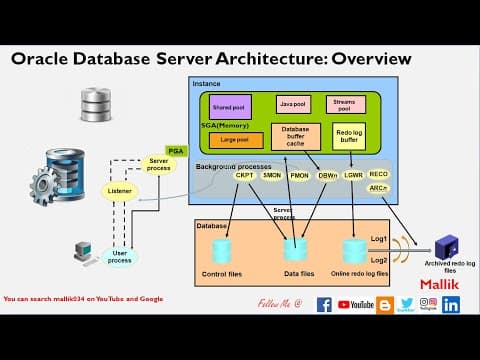
[0:00]Hello everyone, welcome to Malik 034 channel. This is Mallikarjun, chapter six on Oracle database server architecture overview in my database administration course. Uh if you see this single slide, in this single slide I'm trying to explain entire my database architecture. And first of all like any new incoming connection, and that connection will be handled by listener. So this this incoming connection, this client will pass all username, all the TNS details, all the service name, port name, host name, everything I'm going to pass it here, and then this listener will take all those details. And then whenever there's a new incoming connection, there's a one shared server process will be started for that connection. And then this listener will talk to server process and then it will it will it will it will confirms whether this user is authorized or not. And then if if this user is authorized, and this listener will come back and talk to this user, say that you are authorized and you can directly talk to the server process. And first the question is, how this listener knows which database to connect? For that, there's a back Pmon background process. Pmon background process will register my database services with this listener. So that, you know, whatever this user trying to connect, whichever database this user trying to connect, this listener is smart enough to identify that database details. So, once this listener connects this this confirms this user is authorized and this listener will go out of the picture and this no more comes into any picture, and this user directly talk to my server process. And then I said like, one user connects, there's a one server process started, like 10 user connects, there will be 10 server process started based upon our connection mode, whether it's a dedicated server connection or shared server connection.
[1:59]If it's a dedicated server connection, then client connection, 10 server process will be started. And then if it is shared server connection, one shared server connection can talk to, can can handle 10 incoming connection based upon our our definition. If I define my one share server connection can handle 10 connection, that single shared server connection can handle 10 connection, based upon our our definition, whatever we define during the database build, whether it's a shared or dedicated, that will be defined during the installation. Okay, then this shared server process will will be handled by my uh the PGA, the program global area. If 10 connection, there will be 10 PGA memory will be assigned. And then this PGA memory is not shareable across all these 10 connections. This PGA is, uh, you know, not shareable. It is dedicated to that particular user connections. And then whereas SGA is a shareable memory, where all this 10 incoming connections can share my SGA. And then PGA is not shareable. There is a separate PGA for all these 10 incoming connections, right? So, and then if you talk about database core component, memory, background process and data files. Memory is like, the what I said, like PGA and SGA, all both are my memory component in my database. And then, as I said, PGA is non-shareable, and each particular user session has its own PGA. And then SGA can be shared across all the user connections. All 10 users can access my PGA. And then inside PGA, I have some sub components called like shared pool, large pool, Java pool, streams pool, Liby buffer cache and Redo log. This shared pool has two components, one is library cache and data dictionary cache. Library cache is nothing but, you know, my past representation of all the SQL will be stored under my shared pool. And data dictionary cache And data dictionary cache will be actually holds my all the database object information, like views, tables, and, you know, all the database object will be held under my data dictionary cache. And large pool, large the large pool, like whenever there's a IO process, and whenever there's a backup and recovery, and this disk IO happens, uh, that time, you know, the memory from the large pool will be assigned. And coming to this Java pool and stream pool, Java pool, like whenever you install JVM, Java virtual machine, uh, Java VM and Java VM is one of the database component. Whenever there's a Java call or Java JSP compiler, uh, the memory for those calls or those activities, uh, the memory will be taken from the Java pool. The stream pool is, uh, whenever there's a Oracle stream process needs, whenever there's a Oracle replication, stream replication, uh, process runs, so the memory for those stream processes will be assigned using the stream pool. And, uh, database buffer cache and redo logs. Uh, this database buffer cache holds actually, uh, the red or written data, like whenever new data is written to my database, any insert statement, those new blocks, or new data will be written to my database buffer cache. Or whenever this client requests the data from the database, that reading of the data, so that data will be again written back to buffer cache. So this is actually holds any transactions, any read transaction or write transaction, all the actual data will be written to my buffer cache. And then for the all those transactions, whatever happens in in this buffer cache, all for those all transactions, there will be a redo log and there is a change vector is recorded here. Whenever there's a insert statement, or whenever there's a delete statement, or whenever the select statement, uh, all those, uh, records will be formed here in the redo log changes. So it holds the transaction changes, transaction logs. Uh these will be useful in case of instance recovery, uh, in case of instance or database crash. So that is about buffer cache. So, this is my SGA component, and coming to background, I have number of background processes, like checkpoint, smon, pmon, dbwn, LGWR, recoverer, and archiver. What these all background process does, uh, first, uh, I'll start with the DB writer. DB writer is the one which is going to write a modified data, any new changed data, modified data, dirty buffer, we can call it, dirty buffer, uh, from this buffer cache to my data file. And then coming to the logger, whenever there's a redo log has written to my, uh, uh, whenever there's a, uh, redo changed vector written to my buffer cache, those, uh, data from this buffer cache, log writer is going to write it to my redo log files. And then, there are some certain conditions when this DB writer will write to data file, and when this log writer will write to data files. This DB writer will write to data file when there is a checkpoint happens, or when there is a redo this DB buffer is almost like 1/3 full or, you know, there are some certain conditions. Based upon certain scenarios, this DB writer will write all this buffer cache to my data files. Similarly, log writer will write all this redo log to my online redo log files. On these certain conditions, like 1/3 full or every three second, or whenever a checkpoint happens, or whenever, uh, before this DB writer writes, this log writer will write to my redo logs. There are some certain condition, three, four condition, this log writer will write to, uh, log files. And coming to this Smon and Pmon, like Pmon, I already told, like Pmon is responsible for registering my database service with the listener. And also Pmon will, uh, you know, cleans up any, uh, whenever there's a idle session timeout, or user sessions, you know, it is going to clean up all those, uh, you know, idle sessions and all. Uh and then coming to Smon, Smon is the one which is the responsible for instance recovery in case of my database crash. If support database crashes and database goes down, and then when next time you start your database, Smon will come into picture, and then that will do my instance recovery. And then, uh, it will frequently cleans up my temporary table space, and then, you know, it release the space, other process also it will do. And then coming to the checkpoint, checkpoint is a process where, uh, you know, it is going to update, uh, it is going to update, uh, control file and data file header with the SCN. SCN is the system chain number. There will lot of SCN numbers will be keep generating in your database and those those SCN number will be keep updating into my control file and data file headers.
[9:14]And which process will do this checkpoint? Checkpoint process is the one, it will pick up that SCN number and then those SCN number will be, uh, you know, written to, uh, this database headers.
[10:11]And then in order to keep all these data files and control files in sync. And then coming to recoverer, recoverer is the one, like whenever you are using a distributed transactions, like, you know, remote database, you know, whenever you you you do any, any transactions over the remote database. Like database A and database B and database C, you know, involves all three database for a single transactions. And then, you know, you connected to database A and then you are waiting for other response from the database B and C, uh, and then but you never get any response from those remote database, you know, those transactions will be in doubt. And then those all indoor transactions will be cleared by, uh, the recover process. And coming to this archiver process, archiver process is nothing but, uh, whenever this log writer writes to redo log, like I have, I'll be having multiple redo logs, like log one and log two, and then it will be keep writing it to log two. And then once this log two is full and then, you know, this log writer start writing into log one. And then again this log two also fulls, again my log writer will start writing into log one.
[11:28]When log, log one is full, it try to log, it try to write into log two. And then before it erase and try to start writing into log two, again archiver process will take a backup of whatever content inside the log one, and it will keep inside my archive, archive log. And then these archiver logs will be useful in case of, uh, whenever database failovers or instance crash, you know, we can restore using these archiver logs. And and then we already talk about this, uh, log writer, DB writer, and archiver, and, you know, Pmon, Smon and checkpoint. And there's a one more like server process I told, and there's a reverse, reverse, you know, scenario will happened. The DB writer will write buffer cache to the data file, but whereas server process will writes data from data files to the buffer cache, and then from the buffer cache, it will represents to the any requestors or any requesting clients. Uh think this is one of the, uh, you know, very, very important, uh, process, this server process. In most of the interview, they will ask, which process will write data from data files to the buffer cache? That is your server process. And coming to the actual database, you know, I will be having a, you know, lot of data files. For example, I mentioned here three control files, data files, you know, online redo log files, and I'll be having a password file, and I'll be having a archive files, and then also I'll be having my backup files. And I'll be having alert files, trace files and init files, there are so many files inside your database. And then coming to control file, control file is the, uh, you know, core files which has your database creation information and it will be having your, uh, database SCN number, and it will be having your, uh, data file location and redo log file location, everything will be stored in your control file. It is a core file and without this control file, you cannot start your database, okay? And then coming to this data files, data files are the one which actually holds your, uh, end user data. Which actually holds your business data. This is actually main main files which actually holds your data of your organization. Uh, these are the main files. If you lose this data files, you will be like losing your organization data. This is actually holds your actual transaction data. And then coming to redo log, redo log again, as I said, it is a whatever the transactions user does, those transaction information will be formed in your redo buffer in the in the form of redo vectors, and then those transaction details will be logged into your redo log files. Redo log files is nothing but it's a transactions logs will be written into my redo logs. And coming to password files, as I said, other other files are like password file, password file is nothing but it holds my database CIS or CIS, you know, CIS user passwords. Those password file will be used to connect my connect to my database remotely, uh, for remotely by CIS user to do some administration tasks. It basically password file having my database password details. And then coming to parameter file, parameter file is the key pair value where you will be defining your database parameters. And then whenever you do start up and shutdown, whenever you do start up, that parameter file will be read and then, you know, it will be assigned all those SGA and all those database parameters. So that parameter will be helpful for your database startup without that parameter file, you cannot start your instance, right? During the instance start up that parameter file will be read, and coming to alert and trace file, alert file is nothing but it will be alert file for your database which keep recording your database health. And whenever there's a errors or warnings and errors or warnings or fails, everything will be noted in your alert log. So, you will be keep monitoring the your alert log and then based upon the error message or warning message, we will it will help for troubleshooting my database. You know, we can, we can, we will get to know what is happening at my database side by looking at those alert logs. And trace files are nothing but the more detailed information about those particular errors or warnings, whatever it is happening at my alert log. It will be, it will be, uh, more information will be captured in those trace files. You will be keep reading those trace files whenever you are, you know, working on when you are trying to fix those particular alerts or wears or warnings. Those are trace files are nothing but it is again human readable file, which will be which will be having more data than your alert log, uh to troubleshoot any particular error messages. And coming to the backup set, backup set are nothing but, you know, you have to take your data files periodically. You know, you have to backup your database periodically like backing up your data files or backing up your control files or backing up your, you know, online redo log files, you know, all and also you can backup your archive logs. So everything will be backed up and, you know, those are called backup pieces. So, you can have your, you can have backup pieces using Arman utility or using hot backup or any kind of CP. You can do, uh, take a backup of those, those are called backup pieces. Those all are like, uh, I can say, uh, my database files. So, this entire process, whatever I explained so far, you know, that is, that is all forms my database server architecture. Thank you, guys. So, if you like my video, please, uh, share, like and comment.


