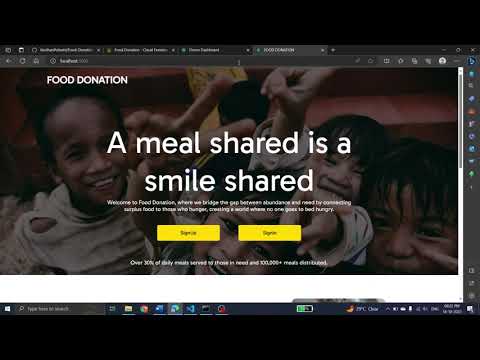
[0:01]Okay, let's start. We are building a full stack web application on Node.js. Okay, let's see first of all the result. I'm run the server. and let's see the output. It's runs on port 3000. Here the website of intro page, first home page. Here click on sign up, or we can register from here. Here we can register a donor or an organization. If you have an account, then directly go to login page. Here this page has a donor login. Okay, I am giving an existing donor with email and password authentication. I am giving email and password. These data is stored in Firebase database. Okay, this is the home page of donor. And let's see the organization home page.
[1:27]Here similarly, organization have to register from here, or donor from here. If you have account from organization, directly go to login. Here asking your organization ID. Every organization have a unique ID, I am giving an ID and email and password. Here the home page of organization. Here you can see the all donor requests shown here, displayed in the bottom of the page. Here you can donor page. Here donor can donate food and grocery. If you want to donate food, then click on Donate. Here opens a form, that form contains item names and quantity. And select the organization. These organizations are previously inserted in the database. So, which organization is stored or registered into our website, only those organizations is displayed here.
[2:59]I am selecting this organization and I am clicking any rice or item and giving a quantity 20 kgs. And click on, if you want to click another add another item, click on Add Item. Here adds an item. If you want to remove, you need click on into mark. Then click on Donate. Then successfully donated and click on donate done. It redirected to history page. This is the donor history page. Here we can see all the previous requests from the donor donations.
[3:45]Here see donated to which organization and what can you donate food or grocery. Here you also see the status of the donation. If the organization accepts your donation, then here updated with an accepted status. And here organization history, in organization history, there is a button collected. That button used for after collecting the item from the donor, click on the Collect button, then its status goes to the donated, donated successfully, status is got when that button is clicked by the organization. Okay, now let's see the donor homepage. Let's donor want to donate a grocery, then click on Donate Grocery. Here similarly, same as food donation. Adding items and quantity and click on Donate. Organization can see at home page all these requests. Okay, let's see the code. Okay, first of all, initialize the database, which is Firebase database. And next, import all necessary packages. I used body parser, password hash, unique ID, Express Session and Express. And set up this Express and body parser with these app dot use and app dot set. And next, routes. These are the routes for handling the request and responses from the client side. I used app dot get and app dot post functions for handling the routes. Okay, first of all, rendering the intro page by app dot get or root route, then it renders the intro page. And next from intro page to render sign up page and login page. Here we can login and register routes. Here there are routes for organization and donor registrations and login with the data validation and password hashing. Password hashing can protect the passwords of individual registration owners. Okay, next, next route is login submit and login registration.
[6:53]Organization registration submit means all the data which is given in the form registration form, all this data is stored in the database. And next then render to the next login page and similar to the donor registration submit. And next, organization want to login, this route is called, this route is used by the post function. I used post method for calling this route. I am taking an email and password, organization ID. In the login route, then verify these email and password and organization ID in the database. If the all the data is matched perfectly, then render the organization home page. This is the organization home page with a donation history. That is, if the another donor is donated to this registration organization, then displays the donations history in the home page. Then similar to the donor login submit. Here also checks the email ID and password. And if the email ID password is matches with a database, then redirected to login donor home page. In donor homepage, we are giving a donor name displayed in the topmost right corner. And next, in the donor page, there is a two options. One is for donating food and another is for Donate Grocery. In Donate Food, click on Donate Food, there is open a form with a form data. Form data means organization IDs and user data that means address and phone number. After entering all fill the form, then click on submit. This route is called app dot post Donate Food Submit. This route is called whenever all the data is stored in organization database and similar to the donor database. This database is stored in a donation history collection, with this collection is a sub collection of organizations and donors. All these data is stored into a database like status, donor name, phone number, email, password and address and other items and quantities. Okay, next similar to the grocery donation. Whenever donor click on grocery, then renders the grocery form, donation form. In that form renders the organization data and donor data. And similarly, after click on submit, it's here a post method calling donate grocery submit. Here also stores all the data in the database, which is organization database and donor database. And stores in a donation history sub collection. Okay, next after click on submit, then donor redirector to donor history page. This route handles the history page. After click on donation in the donor form. Here this route is called. Don history handles the all the previous donations made by the donor.
[11:06]Displayed here and also displays the status in this route. Here render the donor history page with a donor history data. This data is handled in the front end EJS file. And next, donor history is completed. And then donor profile. In this profile shows the donor details and number of donations made by the donor. These details is shown in the donor profile and next organization profile. Similar to the donor profile. Here also number of donations got by donors is displayed in the organization profile and also organization details are displayed in the organization profile.
[12:30]Here you can see there is a navigation between home and profile and also history for this route handle the navigation. Home to history and history to profile like that and next organization home. This is also used for navigation purpose. And next donation accept. This route is used for accepting the donation. In the organization login, whenever a donor is donated a food or grocery to the organization, organization need to be accept those requests in the organization home page. In this organization home page, accept the donations. Whenever click on accept button, here clicking the session organization session email and donor email and order ID. I am using unique ID for creating a unique ID for each order. This unique ID represent a unique donations. Here updating the status in this route. After click on submit, accept, then status need to be updated with accepted. Then also shows the, in the shows, in donor home page, there is a history and in history, it shows a time. It shows time whenever reach to the donor. Let's see here select the time like 2 hours to select the items from the donor and click on accept. Then it shows in a donor website, donor page. Here you can see I can refresh the page, then here the status is updated with accepted. And organization will reach out to you in 2 hours. This is the message is displayed. So used the time for this. And next also in organization collection also status is updated with accepted message. And next route is handled for organization history. This is for also navigation route. Whenever click on history in the navigation bar, then go to calls this route. And next donation collection. This route is called in donation organization history. Organization history, there is a button collect. This button used for after successful collecting from the items from donor, then click on this button. Then it's updated to collected. Then it's successfully donated. See, successfully donated. And also in donor page, it was updated with a donated successfully. Okay, next one is this route is handled the status of collected or donation successful. And last route is logout. This route is logout from the current session. Here request dot session is destroy the current session and renders to the home page. And this is server is listening on 3000 port. Here the intro page. I used EJS for creating a front end. Some CSS and HTML file for creating a UI. Then here the organization history page. Here render the EJS with a for loop and iterate the documents and prints the each document in a div. And next, similar here donor history. Similar to the organization history, iterate the documents and print the each documents in each div. And next donor login also displays a error message, if the user already exists or checks the user password is correct or not. And next here donation food donation form. I used some JavaScript for this. Adding dynamic input tags and click on submit button. And similar to the grocery donate form. And last one is organization home page and organization history. All these data is iterated with a for loop and iterate each document and print each document in each div. Okay, let's see the database, how it stores in a Firestore database. Here, see there are two collections, donors and organizations. Organizations collection, there is all the organization details. In each document has the each organization, in each organization, have city name, email, password, organization ID, PIN code, street, like that. And here, we can see donation history. This is the sub collection of organization. Here we can see donation history. There is a donations made by the donor. It got it here an array with an items of names and items quantity names. Each quantity and each item is same index. And here, you can see order ID. It is the unique ID represented by the unique donation. Okay, this this is the structure of the database.
[20:25]And navigate from the logout page to here, logout. Then click on logout. Here, redirector to home page. Similar to the organization logout. Then click on the home page. Here after click on logout, destroy the session from the front end. So, this is the full stack web application we are developed. Thank you.


