[0:02]Hi, so we'll start with protocol number two of our Repeat Explorer workshop. This protocol is focused on comparative repeat analysis in three species.
[0:15]In our case, we will analyze three different species. I hope you have successfully completed protocol number one, so you are familiar with most of the options we will use here.
[0:27]But there are also some different settings we need to cover. So first, we will review some of the principles of comparative analysis, and then we will start practical training by preparing the reads for this task.
[0:41]And then we will set up Repeat Explorer Run, again, highlighting options that are specific for comparative analysis.
[0:50]After its completion, we will explore the results in the Galaxy platform and then we will download resulting files to our local computer.
[1:01]Then the utilization of the Repeat Explorer output files for comparative analysis will be covered in a separate tutorial.
[1:10]Again, I would like to remind you that you can find a detailed description of this protocol in this paper, which you can download from the link which is listed here.
[1:23]Just a quick information about the data we will use in this tutorial. So, it will again be a plant genomic data from three species.
[1:35]We have used in our protocol number one. So, here we will use three different species that differ in their genome size. They also differ in the proportion of repetitive DNA.
[1:48]And you can see here on this phylogenetic tree that two of them are closely related, while the the third species is more distant to those two.
[2:02]If you would be interested in more information about this study, you can have a look at this publication.
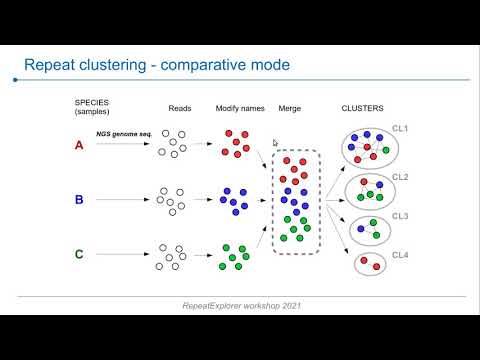
[2:13]We are going to run Repeat Explorer in comparative mode, which is schematically depicted here, the process of preparing the reads and how the analysis then works.
[2:28]So, we have reads from three different species that we will first need to process. So we will modify the read names, the read IDs to include species specific texts there that are later on in the during the analysis used to identify the origin of the reads.
[2:49]We will do it separately for reads from these three species, then we will merge all reads into one data set and this will be subjected to the repeat clustering. So we will submit it into the pipeline.
[3:05]Using a species specific text in the read names, the pipeline can then determine the proportion of reads in each cluster that come from different species. And this is very useful and important information because you know that the reads are sorted into clusters based on their similarities.
[3:26]So, individual clusters here represent the same type or the same family of repeat with their representatives from different species, which is very useful information. So, you can see that you can have clusters with reads from all three analyzed species, but also clusters where there are only two species represented, and also species specific clusters.
[3:55]A very important consideration when you are setting up this analysis is how many reads from individual species actually should be put together and analyzed.
[4:08]So there are two options, you can either use equal number of reads from all species, so this is something which is shown here.
[4:17]Which is easier to implement and is relatively good for comparing large numbers of species/samples. The problem is that if the species which are analyzed differ a lot in their genome sizes.
[4:34]So then using the same number of reads from each will result in different sensitivity or different representation of repeats from these species.
[4:45]The other possibility is to use number of reads that represent the same genome coverage. So, for example, we can analyze 0.2X coverage for each species, which is preferential because it provides the same sensitivity.
[5:04]The problem here is that it could be difficult to apply to a sets of species that differ greatly in their genome sizes, because the number of reads from the big genome would be really large and there will be relatively few reads analyzed from the small genome.
[5:23]So for this approach, you also need to know the genome sizes, which could be a problem in some species where you have to perform genome size measurements.
[5:34]So considering this, we can really we cannot recommend one of these approaches for all applications. So maybe the best strategy is to run both in parallel and compare the result and interpret them with your research task in mind.
[5:56]So let's start our analysis. I will go to our public server and start a new history. Protocol two and again we will use shared data, which are available here for protocol two.
[6:21]And you see that here we have six data sets. These are always forward and reverse reads from these three species. So it's described here in the description.
[6:37]So, I will export them to history as data sets into history of protocol two. Here we are.
[6:55]So, unfortunately, we don't have these species codes written here, but you can see the description for each data set here.
[7:07]So, what is maybe a good practice if you are running some more complicated analysis that at least in some data sets, you would actually label these items in the history by the species code.
[7:20]So you can do it like this. You will just write it into the name and save it. And then it would appear here in the history item. So now I will do it for all of these input data files.
[7:42]Okay, so it's done. You can see that I have species codes in all of these history items. So now we can move forward and start with a fast QC. So we should check the quality of all these input data sets, and this should be done always when you start to work with a new data.
[8:03]So I will find the tool and we will select all these data sets to be analyzed in parallel. Again, I will not change anything here, and I will just execute.
[8:33]So the fast QC has finished. You should inspect those reports for individual files. I would just open a couple of them to show you how different these reports could be.
[8:47]So here we have quite good data set. The read quality is good and also this per base sequence content looks fine.
[9:01]On the contrary, in this one, you can see that the read quality is not so good, so it declines relatively rapidly, but most importantly, here we see the indication of a contamination of reads by the adapters.
[9:21]So we have covered the Fast QC reports in the protocol one tutorial, so I will not go into any details, but this is a typical example of of a contamination by adapters.
[9:37]So as we discussed before, this problem could be removed during the read preprocessing, and you can see here that we have quite a lot of reads. It's over 13 million of reads.
[9:51]So there is a really a good chance that after we do a read processing and remove bad quality reads and remove those that contain adapter sequences, we will end up with a sufficient number of reads for the analysis. So let's do it.
[10:11]So here we select a tool from Repeat Explorer Utilities, preprocessing of Fast Q paired and reads.
[10:21]And we need to do this for individual pairs from different species. So I will start with this forward reads for and the second in the pair is is this data set.
[10:44]So then we will not do any read sampling. We will keep these values as they are. We will do the read trimming to ensure that all reads are full length, so any read that would be shorter than 101 will be removed.
[11:00]And we will keep the other settings in their default state and do the execute. And because now we need to process two additional pairs of read files.
[11:20]So we can do again in the same thing using this form, but we can also do it in the simpler way. So if we want to in the Galaxy to redo some analysis, we can just use this button. Run this job again.
[11:38]So it will give you the form with exactly the same values filled like was used for this analysis. But here we will just switch the input files. So now I change it to Vicia grandiflora files forward and reverse and execute. And I will do it once again for the last species, which is Vicia villosa and run it.
[12:15]Okay, now we just need to wait until the reads are preprocessed and we can continue. So we have output files ready.
[12:28]Please notice that there are these species codes again, but they were not generated automatically by Galaxy. I edited these items in the history. So we again have these codes present for further processing, which makes it much easier.
[12:49]So for each pair of preprocessed reads we have one file, where these reads were interlaced. So you can check it here that we have always forward and reverse read from the same template and the read names were changed to this numerical names.
[13:14]And very importantly, we have a report of the nucleotide composition after filtering and this is very important to check in case you have bad read quality or adapter contamination, as we had.
[13:31]So you can see that now these lines are pretty smooth. And if we compare it to how it looked for this species, for Vicia cracca before items, so, okay, so this is a profile before preprocessing with a lot of adapter sequences and all these reads were detected and discarded and we ended up with good quality.
[14:06]So we can also check how many reads remained and this is really still a lot. So, we should inspect also the other grandiflora and Villosa, all of them look fine.
[14:26]So now we can move forward to the next step, which will be including the species codes into the read names. So, for that, we will again go to Repeat Explorer utilities and pick the tool, which is called faster read name affixer.
[14:45]And this tool allow us to modify the read IDs in this way. So, for example, we start with numerical IDs and we can add some prefix and suffix to this ID for all the reads within the data set. So, we will just add a prefix, which will be the species code.
[15:11]To put you into a context, let me show you a slide, which we viewed before. So now we are going to perform this step where we will modify the read names to distinguish them later on during the analysis.
[15:32]And then in the subsequent step, we will merge them into one file. So we will have to do it for each data set separately. So again, it's nice that we have these codes here. So we can just copy them here as a prefix.
[15:54]So it's very important that you use the same length of these codes for all your species or all your samples. Yeah, it has to be equal. So it could be of any length, but it should always be the same for all data sets which are then going to be merged.
[16:13]And you will see later on why that when we will set up the comparative analysis of Repeat Explorer. So Vicia cracca is here. I will not do anything here because like this spaces in the name, these are for more complicated structures of the IDs, which we don't have.
[16:36]And I will execute it. And the same thing I will do for other two. So I will pick grandiflora and change it. And execute and the last one will be Villosa.
[17:08]Okay, should be relatively fast. And now we can do the last step of the read preprocessing and it will be to merge these three randomly sampled data sets into one file.
[17:21]And for that, we will use the text manipulation, concatenate data set. And we will select one by one these three sampled data sets and execute. And execute.
[19:47]Okay. So finally, we have our reads ready for analysis. We got one million five hundred thousand reads, which resulted for concatenation of these three data sets.
[20:00]So we can move into setting up the Repeat Explorer run. We will use this data as input. We need to have paired and three selected and we will not do read sampling because we have already done it.
[20:20]But we have to go to advanced options to indicate that we want to do a comparative analysis. And here is the length of of the codes in in the reads.
[20:36]So again, it's important that all data sets have the same length of this code and this will be used by the pipeline to discriminate reads from different samples.
[20:48]So we can leave the other parameters in their default values, but again, we have to select the queue which provides more hardware resources. So we will select this long queue and we can submit the job for execution.
[21:20]Okay, so the run has finished. We can have a look at the results just to inspect what there. I will open it in in the new tab. And you can see that the output on the summary page is similar to that of a analysis of a single species.
[21:40]So we have again this information about the run, but what is here in addition is this table with the number of reads from each species that were analyzed and this summary of the redistribution in individual clusters.
[22:01]Where we can see the size of the cluster in the number of reads and then proportion of reads from individual analyzed species in each cluster. So, for example, this group of clusters have reads from all three analyzed species, which means that these would be repeats that are shared by all of them, all of these species.
[22:26]While for example, these clusters, they are made only by read from Vicia cracca. So these are species specific specific repeats. However, we will analyze this in more detail in the next tutorial, which will be focused on using this information for repeat quantification and annotation.
[22:52]So the last thing we have to do in this tutorial is to download the analysis archive again. So I will do it by clicking on this icon and save it. And then we can wait until it's downloaded.
[23:14]And in the next tutorial, we will continue with the repeat annotation. So again, as in the case of the first protocol, if you are in doubt or if you had any problem with the execution and you would like to compare of what you did to the history, which is finished and which was shown here.
[23:34]You can import it into your account from shared data, histories and then you would import this protocol two completed history. Thank you very much for your attention and good luck with the training.


