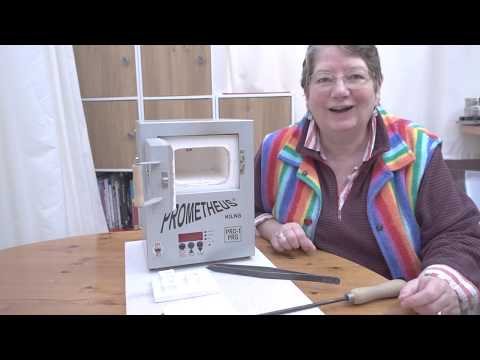
[0:26]Hi, I'm Joy Funnel, and today in this video, I'm going to tell you a little bit about using your kiln and how to program it. Um, I get quite a few people asking me, they've bought a new kiln, they're super excited about it, but they're also quite scared of it, and I understand that. This little thing is absolutely the metal clayers best friend, whichever type of kiln you have, this is just the one that I'm going to use for an example today. Um, but you need to become friends with it and you need to not be scared of it and know how to use it. So I'm not going to be telling you how to fire lots of different metal clays and that sort of thing. I purely want to try and explain a little bit about the basics of using it and um, the basics of programming it. So, to start off with, what are you going to put your kiln on? It's really important to think safety, safety, safety when you're using a kiln. It gets really hot, so don't forget that. Um, when it's on, it gets super hot on the top here. It's going to get really hot on these sides and the back, and also on the door gets really hot, so it's important to only touch the handle on the door. What doesn't get hot is directly underneath it, because if it did, the heat and the heat went downwards, um, it would melt the controller and the wires, so if you think about it logically, it's not going to get hot underneath. That said, it is important to stand it on a heatproof surface and to have a heatproof surface in front of it, especially if you're going to be taking things in and out of the kiln while the kiln is running and hot. And as an enameler, I do that a lot, so I always have a nice area in front of it. And just for, you know, general safety's sake, I always make sure my heatproof extends underneath the kiln as well. Inside the kiln, um, I would always suggest that you do something on the floor of your kiln, because in these type of little muffle kilns, um, if you get bits falling onto the floor of the kiln or whatever, they can actually damage it, and you don't want that. You, you know, this this little baby is a precious thing and you want to be looking after it. So uh, I use ceramic fiber sheet. This is a little bit um, this is a don't do this at home, if you're going to use ceramic fiber, be very careful, be careful of the dust from it and that. Um, but this is a little bit of three mil ceramic fiber sheet, often called ceramic fiber paper, just to confuse you. Um, even though that's not actually paper, and if you've been touching it, always wash your hands afterwards, um, for the dust. You can either line it with something like that or you can use what they call kiln wash that you buy from um a glass firm or, you know, anywhere that sells kilns probably has kiln wash, which is a special um solution that you mix up and you paint the bottom of the kiln with it, and then it will protect the bottom of the kiln. And I do recommend that um it's worth taking those steps and making sure the bottom of your kiln is protected before you start using it. Um, for a lot of things with metal clay, you can use your kiln, you can put them into the kiln cold and you can go back to cold again. So if you're worried about the heat, you don't necessarily have to be opening and shutting the door while the kiln is glowing and red hot. But there will be times when you might need to do that, for example, if you decide to do some enamelling at some point in time, or if you um, wanting to add gold using Kum Boo using the kiln, which I do quite a bit. So it's useful to know how to get things in and out your kiln while it's hot. There are various methods people use. My preferred go-to method always for putting things in and out of my kiln is to use a piece of um ceramic fiber hard um shelf. And uh also a wire mesh like this, which has got like it's a little um little uh, you know, the mesh is bent down. And the reason it's that shape is because I also use a firing fork, and a firing fork is um, let me see if I can get that somewhere where you can see it. Uh is a piece of um wire in a wooden handle that comes into a U-shape at the end, and that goes in underneath our mesh, which we can then pick up from a nice safe distance, and I'm holding a nice wooden handle, which is good and insulated if I, you know, if anything should happen, it's it's a good safety thing.
[5:06]And then on top of that, whoops, don't do that. On top of that, I have my piece of ceramic board on the top, and I put my things to be fired, that um on the top like that, and I'm just going to get up and show you. This allows me to go into the kiln, pop it in, put it down and just make sure if I've gone into a hot kiln, I always put my firing fork back on these um heatproof surface. Uh, and then when I want to take my piece out again, if I'm enamelling, I can just go into a hot kiln, bring it out onto a heatproof surface. That's my preferred method, and I also use that whenever I'm doing um metal clay open shelf firing metal clay. That is because I was enamelling long before I ever got into metal clay, so that's where I was coming from. What's important if you're not going to use that method is you don't want to be putting things directly on the floor of your kiln, so you want little kiln posts, which are readily available and you um, so for another method, you can put these into the kiln, and I'm just going to pop three of these in, because you don't necessarily need four. That's fine. And again, a little bit of ceramic board, and you can use some kind of tongs or tweezers, something with a longish handle if you're going to be using it hot. Um, and you can just go in and pick this up the board and pop it in and put it in on top of the um, on top of the little posts like that, so your piece is sitting up and away from the floor. And again, you can go in and just take it out. If I was taking it out hot, I'd probably have another set of little posts here that I could put it down onto, because I don't want to just put it down onto um, the board direct, I prefer to have a little air gap around underneath. So that's just basically setting up, getting yourself ready to go. Um, and then after that, we need to start looking at the controller and everything. So what I'm going to do is I'm going to zoom in on the controller so you can see it nice and clearly, and I'm going to try and put into simple words how to use the um, the controller, because I know it is super confusing when you first, um, buy a kiln and you read the handbook and you're like, oh my goodness, that absolute double Dutch. Um, so I'm going to try and simplify that out for you a little bit so that you can program your own kiln really easily. Okay, so now I'm going to tell you about actually programming the kiln. Before I do that, I am going to do a quick bit of catching up from my last little section, a couple of things I realized I didn't mention that I really should have done, so I'm going to mention them now. Number one, if you are going in and out of a kiln hot, putting pieces in and out, you may well want to wear heatproof gloves. There's a lot of heat coming forward out of that kiln. It's your choice, personally, I don't, using my firing fork, but I would recommend that you do. Secondly, with the ceramic fiber board and sheet that I was showing you, whenever you're working with anything ceramic fiber, if you're cutting it up, always wear a mask. So just for moving the board around afterwards, that's not a problem, you don't need a mask for that, but if you're cutting it up, anything where you're getting dust up off it, use a mask as well when you're doing that. Okay, so now we're going to cover actually programming the kiln, and I am just going to cover this quite simply. My aim is to just try to try and make this a little more understandable, uh, because it's is, it's a little bit, it's a little bit difficult to get your head around to start with. But believe me, once you've got your head around it, actually, it's super easy. It's just getting there. So, on this little Pro One kiln that I'm going to show you, it's got a three button controller, and this works very, um, there's a lot of kilns that have very similar controllers. The Pro Seven, Prometheus Pro Seven has this same controller, and uh quite a lot of other different makes of kilns all have controllers that work in a very similar way. I'm covering the basic function on how to program it. There will be more functions in your handbook uh varying from kiln to kiln that you can also use, but this is just to try and get you going with the basics. So first of all, we need to switch the kiln on. Some kilns switch on really nice and quietly. This particular kiln switches on extremely noisily. So I get a really loud beeping noise off my little kiln. And when I switch it on, what comes up is the controller here, and it's showing me idle. At the present moment, it's not doing anything, it's idle, the kiln is idle, and it is showing 25, and that is the temperature inside the kiln at this precise moment, so basically more or less room temperature. Most kilns are, in fact, I think all kilns will run in Fahrenheit or centigrade, the little dot here is lit, it says when lit see, which indicates that I am in centigrade. So at the present moment, inside that kiln, it is 25 degrees centigrade. We have the three buttons, this is increase and decrease of the two main functions for these two, and this one is our program start stop switch. And basically, everything we tell the kiln to do, we kind of press that afterwards and say, okay, just to confirm the instruction that we're giving to the kiln all along. This particular kiln will take nine different programs, and for each program, there are five segments. There you go, you're confused already, aren't you? So every program is basically a firing schedule that I can set up for whatever I want, and each segment inside that program is an instruction. So, if I press this button again, it shows program one. And from there, I could carry on and start programming, which I'm going to. I'm just going to show you if I keep pressing the up key on that, it's just going to run through telling me the number of programs I've got each time. With a nice little beep each time, and then it goes back to one, which is the one I'm going to set up and show and try and explain. So program one will be a firing schedule. We're dealing with metal clay, you might in time deal with glass, it will be exactly the same thing. This is a firing schedule, this is putting my clay into the kiln from cold back to cold, or from unfired to fired, it's all in one program. Within that program, I can give it five different instructions, five segments, and each one of those instructions could tell it to do something different in terms of adjusting its temperature and how fast to do it and how long to hold it for. But I don't have to use all five instructions in each program. I might have a simple program that's only one instruction. Don't worry, it'll get clearer, I know, it's confusing. Okay, so program one, I'm on program one, great. So next thing I'm going to do is say, yes, I want to deal with program one, so I say okay, and it comes up showing this little RA one. This is ramp one. What on earth is ramp? Okay, ramp is the speed at which a kiln will go up or to heat up or cool down. So for every thing that a kiln does, it's going to either be heating up, um, or cooling down to get to a temperature that we want it to get to. We call this ramp. The ramp is a figure here, so at the moment, it's only showing 11. Can you see as it's cycling, it's showing 0011, so it's currently showing, and that's 11 degrees centigrade, and in in terms of ramp, the speed it's going to change temperature at, this is per hour.
[13:43]So like a car's speedometer is in miles per hour, ramp is in per hour. So if I want to tell this kiln to heat up as fast as it's possibly can, I would go downwards because I've got my up and down option. I would take it down, oops, too far, to full. And when it says full, that's telling the kiln, go as fast as you can, either up or down, and we'll come to how it knows that in a minute. But it's saying for this ramp, for this instruction, go as fast as you can. But what I didn't do is I didn't press okay. So it gave me a little bit of time to press okay, said, well, you didn't press okay, so obviously you didn't want that, I'll go back to what I was on before. So I'll take it back down to full, and press okay, and the kiln knows I want to go as fast as I can. So this is this instruction, which is the three part instruction. So the first thing we've done is tell it how fast we want to get somewhere. The next thing we're going to set is what temperature we want it to go to. So in this case, um, I'm going to set this for um art clay silver, this first instruction, and art clay silver is a very easy, this is art clay silver fine silver 999, which is very easy, and I'm going to set this little program and tell it, I want it to go up as fast as it can, and I want it to go to 800 degrees centigrade. So I'll put my finger on the button, press and hold. It starts to go up, the longer you hold it for, the quicker it'll start to go up. So it hits a point, there you go, where it starts whizzing up, and then you just need to adjust it back to the actual temperature you want. And again, as soon as you've done that, you press the program button saying, okay, that was right, that's what I wanted, and it goes on to the next instruction. So we've told it to go as fast as it can to 800 degrees centigrade, and now I want to tell it to stay there for, I'm going to tell it to stay there for 45 minutes. So this time, we've got our hold time. This is how long when it gets to that temperature, it's going to stay at that temperature. And I can set this in hours or just in minutes, so at the moment, it's on nine minutes, that's all, so 00, dot, so that's your hours first of all, and then 09 is your minutes. So again, just put my finger on, hold to go up, and take it up to 45, I went one too far, just press the down, oh, hang on, we'll get there, there we are, 45 minutes, tell it, okay, that's what I want. Now, we are still in program one. We have set the first instruction to the kiln. And this kiln, as I said before, can take five different instructions, five segments for each firing program. But this is art clay silver, and I only want to fire my piece at 45 minutes at 800 degrees, and that's it. So I now need to tell the kiln, that's it, I don't want you to do anything else, because it's saying, okay, ramp two, what would you like me to do next? So I'm going to press it, so it goes down to, zero, I'll go get there in a minute, there we go. I knew it was in there somewhere. Um, so I've taken it to 0000, and I'm going to press that and say, and zero says, okay, I don't actually want you to do anything else. That one instruction was all I wanted for that program, that's fine. When you've done that one instruction, you can turn yourself off, the zeros tells it, nothing else to do. So it says, okay, I'm ready to start then. And it just sits there saying start, and when I press my button again, it starts firing and it's on. And you know it's on, it flashes up, and it shows you this little run button to say, yep, I've got a program, I'm running, I'm doing things, and this will start to go up as it starts to, the elements inside start to heat up. If at any point you want to stop that program, so you can see it's just going from 25 to 26, it starts heating up really quick. You can stop that program if you want to before the end, just by pressing stop. It says stop. And it'll still flash and show you the temperature inside the kiln at that point, and then if you press again, it goes back to idle. So it says, okay, I'm not doing any program at the moment, I'm just completely idle, I'm not doing anything, I'm just sitting here. So when you come back to use the kiln again, you switch it on, it's showing idle. And you think, oh, I want to fire another bit of of art clay silver, it's in program one, that's the one I need to use. So you switch it on, you press your button, and it comes up with the program. If you wanted a different number, you'd use your up key to get to a different number to be able to set that. You press okay, program one, that's what I want. It's not going to just go straight into start each time because it wants you to check each time before you set it running that you've got the right instructions in there, which is really good, because that means that you're not going to accidentally put it on a wrong program, because so long as you just look as you go through this bit, you're just rechecking the sections. So this is program one, the firing schedule for art clay silver, and it could have up to five instructions in it, but it's only got one simple instruction in it. And we're just going to run through that again, so it's showing my ramp is full, it's going to go as quick as possible to get to the temperature I want. I press okay, the temperature is 800 degrees centigrade because our little light is on, which is what I want. So I say great, that's fine. I press okay again, and it's going to hold it for me for 45 minutes. That's fine, that's what I want. I say okay again. It says ramp two, and it's showing all the zeros, which shows that nothing else is to be done because it's all on zeros, nothing. Just think of a line of zero as meaning to the kiln nothing at all, and then press that again, and it says, great, we're ready to go. I'm ready to go, I'm sitting at start, waiting for you to press that button. Don't forget to press that button, you can sit there quite a long time waiting for it to do anything if you forget to press the start button. So you press it once more, and off we go. And your little light comes up, it shows you it's running, and off it goes.
[20:31]And you can see just with that little bit of time I've had the kiln on, how the temperature in a kiln goes up really, quite quickly.
[26:40]In this particular kiln, um it will go from cold at full ramp uh in oh less than half an hour uh up to it will get to 800 if I tell it to go as fast as it can. And then I'm just going to press stop because I don't want it to run, and I'm going to press it again so it goes back to idle.
[31:42]So I hope that that kind of explains the buttons a little bit, what they do, and how you can set your own programs, um, and hopefully makes it a little bit more meaningful. But whatever you do, don't get a new kiln and sit there and don't use it. Please make friends with it, please love it, because it's going to be your best friend.


