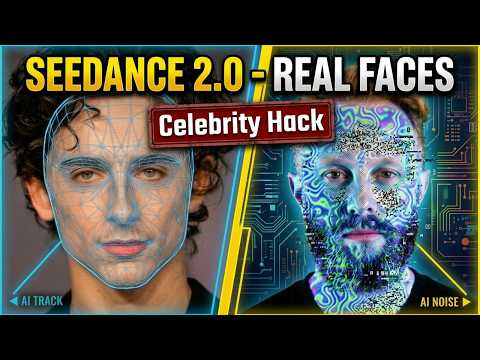
[0:00]Ever wonder why many sedans 2.0 renderers fail halfway. Well, it's simple, the real time frames can't count a human face. By pass the filters you have to hide in plane site. And today I'm revealing the 6x6 grid, the software UI mesh and the pedal noise mask. The three ways to stay invisible to the AI cup while staying crystal clear to the AI artists. Also, I'll be giving away three video in Pro memberships for free, so stay tuned to find out how you can win one. Plus stick around for a bonus on how to use these hacks even for celebrities and real person reference videos. Okay, so let's start with the first workout. So I'll be using video in all in one AI image and video platform. It has all of the models and everything that I need. First, upload the image of yourself. Okay, so here is the image of myself. I'm here on the green screen, but you don't have to just upload any image of yourself or anyone you want to use. Then choose Nano Banana 2 or for example C dream also, and then a simple prompt. Add a subtle very thin semi-transparent 6x6 wide grid overlay. And that's it, nothing more. generate. That's it. Image is done and this is what we need. I'll click here use and then let's try to create a video using 2.0 at image one and then some I don't know, semi-promt. So image one, me walks on the street and greets people and shake their hands in an awkward way. He says high and similar awkward and funny things to each person. Not a very imaginary prompt but I just wanted to show how does that work. generate. Now we you will see if it starts percentages here that it will work in most cases and I'll explain why in most cases later when we'll mention celebrities. So now CDC is already in video generation phase we went around the first policy the second policy that is happening in the background is checking copyright so you know celebrities etc. Since I'm not celebrity this will pass now. Okay and here is the video so let's look at it. I mean it's a simple video. Just wanted to say hello. Uh okay. Hi, I'm Ryan. Nice to meet you. Yes, very nice. And by the way, this all in one AI image and video platform will upgrade three of my subscribers to Pro account. To participate, just sign up for a free account and leave a comment below. I'll be replying to three winners so they unlock those pro features for you. Now, let's get back to the students' work around. Now, if you would like to have a full consistency, once again, use a full image, then image to image and paste the following prompt. Character reference sheet, six panel model sheet at the same character all of those things. And then also add every view must have that same subtle very thin semi transparent 6x6 wide grid or light and when you generate that you receive something similar to this. So we have everything we need for 2.0 consistent character generation, either image to video or reference to video. So here I try this interesting prompt of me sitting in a old bus and then transforming into something. Once again the reference image is this one and this is the video be received.
[3:11]This is a pretty good video and it even maintained the consistency in those quick scenes and especially at the beginning. So you see that's pretty good. Now this will not always work. So for example you see those are two different images. One of those will work and one of those will not work because AI recognize them differently and to showcase that once again one walking on the street. You see it didn't even started progressing at 1% because at the first frame it noticed the following error. The input image may contain a real person. So then just regenerate your grid a couple of more times. And now for the second method because the first method sometimes simply will not work. So upload the image of yourself whatever you have and then a high fidelity digital human asset or lay a faint translucent blue geometric wire frame mesh onto the face. The mesh should follow the contours of the checks and forehead. The eyes and mouth must remain clear and then rendered in a technical software interface style. So let generate that. And so this is the image that we received. Pretty good. We have everything and then I just written down walking. Simple things here and here I am. Completely consistent character and everything without those mesh lines. So sometimes in your prompt if you want to be sure just at the end of the prompt add remove mesh line and text and all of those things. But even without that it works. Now I try that same thing with Trump and many other recognizable people and it did not work because it hits the policy in the second part of the generation. So it started generating video but then during the first frames of the video were generated, it noticed that the person resembles at least 80 or 90% to someone famous, some celebrity and then it stopped generating in the middle of the generation.
[5:00]See that later. And then we have the third method which is used when nothing else works and also in some cases for celebrities and famous people. So here we overlay the reference phase with a high contrast digital static perlin noise textures. The noise should be dense enough to break the continuous surface of the skin and with that we basically break the AI but sparks enough to see the eyes and mouth positions. Technical glitch, aesthetic. And this is the kind of image we receive. So it looks pretty nice, very funky and kind of. So then if we put that into the video, image one walking on the street, we can receive something like this.
[5:40]So obviously we need to remove these colors and plain noise because it doesn't make sense. So to do that, image one walking on the street and then cinematic AK footage of a person with clear smooth biological skin, high fidelity photorealistic skin pores, surface scattering, organic human textures, all of the things here, negative prompt, static, noise, noise, glitch aesthetic, technical overlay blue lines. So to remove all of that, and then it really did recognize everything, even though the image was covered completely with the colors and the noise, it finally created the video like this.
[6:18]So you see complete consistency of my original face, even though the beard color is slightly different, but we can change that easily. So this method also worked for a celebrity, so here we have a bit, but I must be honest only worked once, but then again I have additional work around for celebrities. So stay tuned for that also. Let's see this video. Additional advice here is if the poodle noise and all of that digital noise does not work. Then you can also generate an image of a person looking up and away at 45 degree angle with a heavy squint. Sometimes that will give you additional methods. So now let me show you a couple of more examples. and then the final famous person trick. Let's put it like that. Here I have image of myself completely with a digital noise. Then once again Brad Pitt here, this video is succeeded because I did not prompt in the video to remove the noise. So what then the C dance did? It started generating video and during the generation, since the purly noise was not removed, it did not trigger the copyright and sensitive video issue that it triggers all the time when you try to generate someone with a famous face.
[7:35]Then we have the Timothy or I don't know how to pronounce his name, but let's call him Timothy from now on or Tim. I will call him Tim. Okay, so I added the glitch to the team here and then I started generating a video with the same prompt, you know, the plain noise and then in the video process to remove that plain noise and the digital glitch. The error detail is the request failed because of the output video may be related to the copyright restrictions. So those are the restrictions when video already started generating. Let me show you what happens. Use reference to video, image one walking on the street, a cinematic portrait of a human, all of that and now you will notice something interesting. It will start generating the video most likely and then stop at 10% or 50% connecting. Nice, generating, you see. Now let's wait. I suppose in a matter of a couple of seconds, it will stop with copyright or information policy violation. So this is exactly what happened as expected. You see the error details the request filed because of the update video may be related to copyright restrictions. As you noticed, it did started create video and then in the middle of creation when doing the real frames, it noticed that out of this, it will generate the real Timothy which is a copyright issue. So what you can do then is add a prompt to the image, a high fidelity CGI human mix 70% of the reference subject facial structure with 30% of the generic non-celebrity. male person in this case. Maintain the jaw line but adjust the eye width and nose bridge realistic skin, neutral lighting. So then we receive with slightly larger eyes, slightly bigger width between the eyes, then we can try again. It did not work because it recognized famous person. Then what you can do up to a point where it makes sense, it just prompt make the eyes slightly wider and nose slightly bigger. It's still him, I mean, it will be recognized when creating a video, so we can try with that. Then I just wanted to play with the boundaries and then you know, created something kind of funny. Make the eyes much wider, slightly more round and make the nose much larger. Then we received this image, which of course is not anymore Timothy and it will not look good in the video, but I just wanted to show you this example. Then I created the digital noise and everything based on that image and it did work. It created the final video, but we don't want the video with the person that has that kind of weird eyes. We want Timothy. or someone who is at least slightly similar to Timothy. So on purpose I exaggerated here to create that kind of image. But then I started playing with just a small percentage so make the eyes and nose and jaw 10% larger or 5% larger and do that until you break the AI pattern of recognition which is around 80 to 85% for the famous people. And you see here he still looks most the same but with this image and this overlay we managed to break the AI. Let's put it like that. And I also created a nice video of a image one so him removing all of the things from the skin and then cinematic cating shot with hand held camera motion and camera shape shows this man holding an Asian artifact he's running away from giant pursuing mommy and received this nice video.
[11:19]So basically work around for celebrities and famous people is to slightly make the eyes and nose bigger or smaller by percentages than adding the nose And then it should work. So, you will not receive 100% likeness of any person, but you will receive around 90% which is nice in some cases. And as explained that the beginning of this section, one time it even worked to completely recreate the Brad Pitt. Now, for the final trick, if you would like to reference a video because of the specific camera movement or some other tricks, we cannot do that simply by adding into the scene because it will violate the content policies. So, we have this great scene from surveillance in the elevator with nice interesting camera moves and if you would like to replicate that, we can simply use link three Omni add the video you would like to have and then write recreate this video but in cartoon style. And then the video looks like this. You can also go for example to the cap cut. Here I have the video of Tom Cruise running the famous scene of him, you can also not add that into the scene, but what you can do in cap cut is select video go to AI style, then AI effects and then choose some of those effects for example, I don't know. comic here and then click generate. You will receive video that looks like this. Nice. Then you go back to the C dance and write something like for example. realistic man with a beard in his 50s in the elevator at image one. so here is the elevator. All camera movements are completely reference from video one. so here we now the video of a cartoon that we created. Then we have the elevator doors opens and the camera follows the man out of the elevator and the exterior scene is reference from the image two. So this one here. And after that, managed to create video exactly as we wanted. So let's look at it.
[13:27]And this is one way of a work around for video references if you would like to pick up camera movement or some interesting other tricks from the video. Just make it cartoon and use it as a reference. And those are the three ways to hide in plain sight and master seats 2.0 using real faces and even celebrities. Don't forget to enter the video in a giveaway by signing up and commenting below and I really hope this helped. So thanks for watching and I'll see you in the next one.


