[0:00]Hello, everyone. Today I'm going to demo the new way of doing CICD on a Kubernetes platform. As you may already know, CNC is one of the prominent practices for DevOps. which very much focuses on fast delivery of your applications. Here I'm using Builder to build my container images, using Tekton for my continuous integrations. And finally, ArgoCD for my continuous delivery. The names in red colors are the names for the supported version of each components. For example, OpenShift Build is for Builder. OpenShift pipelines is for Tekton. OpenShift GitOps is for ArgoCD. You will get full support along with the Red Hat OpenShift subscriptions. Now, what is Tekton? Tekton allows you to create cloud native CICD. Tekton itself is built on Kubernetes native, which uses CRD, custom resource definitions. It is, it is important to know Tekton provides open source components to help users standardize their CICD tooling's based on standard specifications. around pipelines, releases, workflows, build, test, and so forth. Let's see what are the differences compared to traditional CICD. Traditional CICD is designed for VMs. That's why there's centralized server or the centralized instance, which require an administrator to maintain. You will need to install different kind of plugins into the centralized server to cater multiple CICD integration points or scenarios. No interoperability with Kubernetes resources and the administrators also need to manage the consistency from a single centralized server. Lastly, all the configurations are embedded into the same server.
[2:49]While for the cloud native CICD, it is definitely designed for containers and Kubernetes. It is based on a distributed and serverless mechanism. That's why there's no centralized server and no centralized management is required. Each of the pipelines are fully isolated and no dependency from each other's. Every executions are running in a continuous. They won't be scenarios like the CICD server is down and all the pipelines cannot be executed. And it is a total zero resources utilization if there's no pipeline that is running, because it's serverless. You only spawn the continues on demand when you execute your pipeline. The whole setup definitely is based on community resources and it uses community's persistent volumes for is storage and a config map for is configurations in the distributed manner. Next, allow me to briefly explain what is GitOps. GitOps is a declarative approach to achieve application delivery. You define how your deployment should be in Yaml file or helm chart and you store this artifact in a repository, for example, a Git repository.
[4:36]Then the GitOps tools like ArgoCD will pull those configurations from your Git and deliver the deployment for you.
[4:50]So the entire state is in the code. You define your application state in the codes. The Git repo will serve as your single source of truth. All the histories of the state, the changes are kept and tracked in the Git repository as well. That give you the benefit of tracing the histories and you can easily roll back to the previous state of deployment. The tool I'm using to do the GitOps is ArgoCD. Basically, ArgoCD is implemented as a Kubernetes controller. which continuously monitors running applications and compare the current state with the desired state that you define in your Git repository. Once it detected the drift, it will take actions and synchronize into your deployment environment with the latest changes.
[6:04]This is a continuous process, so it will go back to monitors and uh, keep, keep in the loop of this deployment process as shown in this diagram.
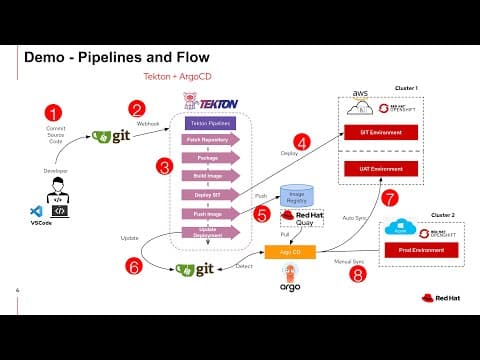
[6:23]Now, this is the pipelines and also the flow that I'm going to show you later. As a developer, I'll be working on my application coding in my local PCs. Once I finish my coding, I'll commit my source code into a Git repository. And once I commit my source code into the Git repository, it will trigger the Tekton Pipelines with the webhook.
[6:56]And then it will go through the whole steps within the pipelines like, for example, fetching the source code from repository, do the packaging, build images and deploy into my first environment, which is my SIT. My SIT is hosted in the OpenShift in AWS, and at same time, I have my UAT environment sitting on the same OpenShift on the AWS. While my production environment is sitting in OpenShift in Azure Cloud. So now, my pipeline will deploy my application into the SIT within the Tekton Pipeline itself. After it deploy, it will push the images into my image repository. In this case, I'm using Red Hat Quay. The last step it will do is, it will update the Git repository with the latest deployment configuration that is using the latest images.
[8:10]I just push into this image registry. So the ArgoCD will detect from this Git repository. And it sees there's a new image is released, and according to that image informations, it will pull that latest image from Red Hat Quay and it will deploy into my UAT environment automatically. Next, it will deploy into my production environments. But this required some manual steps. which can be act as approval process in between.
[8:59]Now, let's move to my demo. Okay. So for my local PC development, I'm using VS Code Studios. So I have a application, a Java application here that is built using Quarks. Quarks is the next generation of Java framework. That's a name, another name called Supersonic Java.
[9:30]That gives you the benefit of resource optimizations in terms of CPU and memory, where you can run the Java applications in a very low CPU and memory consumptions. But without sacrificing the capability of serving the amount of the workload or TPS. Okay. So the application here is a very simple API. So basically, it will return a message. and then followed by the local host name. Right? So, let's go ahead and start this application in development mode. Okay. So, Quarks allow us to do something like live coding.
[10:30]where we can make changes into our code and the effects will immediately uh deploy into the server without manually restart the server. Okay? So, the situation is like when you change some coding in HTML, right? The moment you just refresh the web page, you know, whatever changes will be shown. Right? You don't have to restart the server. Same thing applies here. Okay? So, let me pull another console here. So, now this application is running locally. So I'm going to make a call into my local host. So, the return I expected to receive will be like testing from and then my host name. Okay? So, now, I'm going to change my message to, for example, aloha. Right? So, my uh VS Code will auto-save my changes, and then it will do the live deploy. Let's try to curl again to my local server. You can see the uh hot replace performed. Right? And you can see um, the result is updated Aloha. So, this gives you the benefits of speeding up your development timeframe. Right? So, on the right side here, as I've shown in the slides, I have three different environments. Okay? The one at the bottom is my SIT environment. And then middle is my UAT, and on the top is my production environment. Okay? I'm using a uh infinite loop to curl and call to each of these API I deploy into each environment. For my SIT, there's only one instance, one pod. Okay? That's why the message and the host name, so called the pod name that you receive is constant because it's only one. While for my UAT, I have two pods. That's why you can see the pod name is interchange between two. Then, for my productions, there are three pods. So, you can see there are three different pod names that appear here. Okay? So, now, I have made my changes, right? I changed from testing to aloha, but all these environments are still remain as the testing. Okay? So, now what I'm going to do is, I'm going to uh commit this, right? Into my uh Git repository. Okay?
[13:24]So, I'm going to use aloha demo. Right? Now, I'm going to push into my repository. So, the moment I, I, uh push this into my repository, it will trigger my Tekton pipelines. Okay? Now, let's go to my OpenShift console. Okay? This is my OpenShift pipelines, which is the Tekton. Okay? You can see there's a task that is running. Okay? So, if we click into this latest pipeline runs. So, you can see this is similar to the slides I was going through just now. So, it started by fetching the source code from my Git repository. Then it will do the packaging, do the compilations. Then it will use the Builder to build the images. Once it's finished building the images, then it will deploy into my SIT. Which is my environment that I've shown in the lowest path here. Okay? So, the moment it deploy, you should see the message will be changed will be changing from testing to aloha. After it deploy the SIT, it will copy the image into my Quay repository. And then it will deploy the Git GitOps.
[15:02]In other way, it will push the latest image deployment configurations into the Git repository. And from there, the ArgoCD will be triggered. Okay? So, for the Git, I'm using GitTea here. So, here I have two repositories. One is the one that's storing my applications. The other one is all the deployment artifacts. Okay? In other words, it's uh, those deployment configuration Yaml file, route, services. Okay? So, this this particular repository is monitored by the ArgoCD. Okay? Then, I have my Quay image repository here. Okay? So, let's go back and take a look on our pipeline. Okay? So, it has been successfully deployed into the SIT. Okay? So, we should see the message here will be slowly changing from testing to aloha. Yeah. Okay. So, I also, uh, we also can see the image has been successfully copied into my Quay repository. Let's go ahead and take a look on my Quay repository. Let's do a refresh. Yep, there's a new image that is being pushed into this repository a few seconds ago. Okay? Okay. So, the final step also finished, right? Which is triggering the GitOps. Basically, is committing the changes into this pod name deploy. by, uh, you know, updating the latest images to be deployed. Okay? So, let's go and take a look on our ArgoCD. Okay? In my ArgoCD, I have two applications configured. One is at my Quarks UAT. The other one is my Quarks production. So, these two configuration will continuously monitor this Git repository to detect if there's any new configurations or new changes. Okay? So, uh, there's a interval for the ArgoCD is like a few minutes, but for this demo purpose, I'm going to just uh refresh it so that it can detect the changes immediately. So, you can see once it, it, it detect the changes, it will take actions and roll out the new deployment with the new images. Okay? So, it's doing a rolling update where it will spawn the first continuous and make sure it's successful. Then only it will scale down the previous one. Then continue with the second one. Right? So, now you can see in my UAT environment, the message is changing from testing to aloha. And you can see both of the port names are different as well. And you can see there are two different port names because I have two instances of our two parts here. While for production, uh, it detects uh, the changes. Okay? It shows out sync here. But this uh, production, it did not automatically go ahead and deploy with the new images because I configured it in such a way that it needs somebody actually, uh, to manually click this sync and, uh, push the later changes into production environment. Okay? So, this can be served as like a manual steps or approval steps. Okay? So, let's go ahead and, uh, click on this synchronize. Okay? So, it will push the later changes into my production environment. Okay? You can see now it's starting to scale uh for the first pods using rolling update deployments strategies. Okay? Right? Then now it's going to scale for the second one. Okay? So, you will see the message changing, uh, the message of the aloha slowly to appears. But you can still see some uh, testing messages in between. That is the uh, you know, rolling update strategies. It will make sure one pot is up and then only I set the order pots one by one. And eventually you should see all the images being updated and changed to aloha. Okay? So, um, that's all I want to show in this demo about the uh new way of doing CICD by using Tekton and ArgoCD. Thank you for watching.


