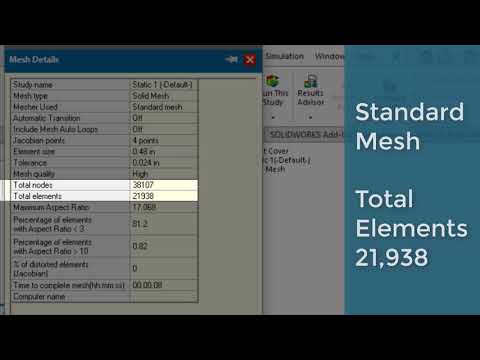
[0:04]SolidWorks simulation meshing provides several parameters to refine and adjust the mesh, including element size, tolerance, and meshing scheme. Let's look at how these parameters and schemes affect the mesh output. Creating a mesh is simple. Right mouse select on the mesh folder and choose create mesh. The mesh property manager opens and several options are presented. First is the mesh density slider. Do not touch this. Too far one way or the other in the mesh goes to the coarse or refined extremes. To control the mesh density, expand the mesh parameters and specify a global element size. SolarWorks simulation does a good job of recognizing the geometry sizes and specifying a general starting point for the standard mesh scheme. The tolerance sizing automatically updates with the global change. Three meshing schemes are possible with the SolarWorks simulation. Standard, curvature, and blended curvature. The standard meshing scheme tries to apply the same element size across the entire geometry. Note the number of elements in the mesh. The same model mesh with curvature mesh automatically reduces the element size in the areas of curvature throughout the model. Providing an additional refinement for the first mesh. Note the number of elements, the curvature mesh generates. The blended curvature scheme is a middle ground between standard and curvature. Blended curvature only uses one CPU for mesh generation, so the process can be slower. Typically, blended curvature meshes are used when standard or curvature meshing schemes fail. Note the number of elements the blended curvature mesh generates. Mesh parameters cover the fundamental settings of mesh generation. SolidWorks simulation predicts an appropriate mesh size based on the geometry, but is fully customizable to the user's liking. Through size settings and meshing schemes.
SOLIDWORKS Simulation: Mesh Parameters
CATI: Computer Aided Technology is now GoEngineer
2m 8s288 words~2 min read
Auto-Generated
Watch on YouTube
Share
MORE TRANSCRIPTS