[0:00]Today, I'm going to show you a Discord fishing scam that's actually really easy to fall for. First off, what is a fishing scam? Well, a fishing scam is basically a fake website that you go onto and you send your account credentials to the hacker or the scammer, and then they take your account and they can do whatever they want with your account. Most scammers will either buy Nitro, or if you have rare badges, sell your account for money. It's all about making money. Now, this webpage in itself could be presented in many different ways. You could have, I don't know, some sort of weird scam DM. In this case, I don't have an actual example of this specific URL being used. But regardless, this advice in the video should still apply. So you'll go to this website. It'll look completely normal, right? And it tells you to authorize to add this random bot to your account, so you can, I don't know, do something, whatever the scam is trying to say. Now, some of the previous advice I gave was, make sure that this link here is a legitimate link, so it goes to discordtrackers.com. This is discordtrackers.com. Regardless, everything looks very kosher, so not a lot of red flags will pop up for someone who's looking through this stuff. So they'll click authorize and they'll get this Discord popup window to log in. Now, great advice from a lot of people is that whenever you're going to log into a webpage, look at the URL that you're actually logging into. In this case, it's discord.com/login. Now, if I actually go to discord.com/login, this is the legitimate website. And a lot of people, if they're worried about fishing scams, they'll make sure to look at the URL bar. Once I said, oh, it was fake Discord and don't log into fake Discord. Well, if we look at this little popup here, you'll notice that it's just normal Discord. So that advice doesn't apply anymore. This would make you assume that this is actually safe to log into. However, let's just mess around with this little popup and see what it does. I can drag it around. I notice it doesn't look exactly like my Chrome, but the best way of figuring out if you're having a fake popup, a fishing scam, the best way to figure out if it's fake, is to try and drag it outside of the webpage. You'll notice that I'm dragging it, and it just will not leave this Chrome webpage. And that's because this popup is not an actual popup. It's an embed inside the website. So let's get a little nerdy on this. If I press the F12 key, I'll pop up my little inspect element thing in Chrome, and I can select an element and I am going to click on this big popup window because, like I said before, it's actually part of the website, it's not a legitimate popup because we can't drag it outside of Chrome, it just stays stuck inside. So what we have is this iframe. Now, I Googled because I don't want to be wrong here, an iframe is basically just an HTML element that loads another HTML page within the document, so it's a page within a page, it's kind of an embedded page. In this case, this is an embedded website. So, if this is an embedded website, what is the source website? Well, thankfully, HTML is somewhat coherent to read as a normal person, and you'll notice that there's this SRC, which stands for source. I can say that confidently. I hope. I might be wrong. Whatever, let's just pretend I'm right, okay? Anyways, you will see this dot login page. Now, if we hover over it, you'll notice that it says discordtrackers.com/login. So, why not go to that website, right? New tab, paste it in /login, so discordtrackers.com/login. Oh, deceptive site ahead. Thank you very much, Chrome for saving all the idiots like myself that click on random links. But you'll notice, oh, wait, this is a Discord login page. But if you use your fishing advice that you got beforehand to look at the URL, you'll notice that it says discordtrackers.com. This is not discord.com/login. As you'll notice, I mean, discord.com/login is the legitimate website, but this is discordtrackers.com/login. You'll also notice a couple of differences between these websites. Usually these websites are a little outdated, but we won't rely on that. So to wrap up what's really going on, is that if we go back to our main page here, and I'm just going to shrink this a little bit. We have this embed here, right? And it's an iframe, and we went to the source of the iframe, which is this discordtrackers.com/login page, and that's this webpage right here. So what these scammers are doing is they're actually using an iframe, so an embed in or a website inside of a website to load their fishing website. Then what they'll do is they'll add a little bit of HTML code, so it looks like this Chrome bar up here that has the Discord login URL bar right here. Now, what if I'm using Safari? Well, there is code in here to figure out if you're using Safari, and it'll pop up with the Safari webpage. Same thing with Firefox, it changes its looks slightly, once again, it doesn't perfectly match, so that's a dead giveaway. But regardless, it does figure out what browser you're using because that information is very easily available if you join a website, and it'll say, oh, you're using Chrome, we'll use the fake Chrome popup. And how do I know this? Well, as you can see, this iframe here, it's just this rectangle here and anything above it is this fake window location wrapper, whatever class they call it. And it just is composed of different HTML elements. As you can see, a URL bar, I open this up, it's just, you know, some sort of SVG, and this SVG has, you know, all the path stuff that you can convert into an image. But you'll notice that it just has plain text here saying, oh, Discord login. I mean, I could literally say, I don't know, something hilarious. Oh my goodness. Now we're logging into my actual YouTube channel. Oh my goodness, it's youtube.com/notexttospeech. You should subscribe maybe, I don't know. But anyways, it's very clear to see that this is just like going into Google, right clicking on something, inspect elementing it, and just changing the text to say something, uh, I don't know, different. Something like this, what is cool? Me, I am so cool. You've done this when you're like, I don't know, 12 in computers class and messing around with your friends. I mean, if you haven't done that, what are you doing with your life? You know, a little bit of an aside, but this is all just some sort of part of the website that we can modify. This is not an actual functioning URL bar. Let's just wrap up with a brief conclusion, so my message doesn't get diluted by my awful analogies and stories. Basically, if you manage to land on some sort of website that you click authorize and it tells you to log in, just stop for a second and use your brain. First off, the first thing to do is that if it's in a pop-up, try to drag that pop-up off of the active browser window. So you'll notice that I'm trying to drag it off of Chrome. It doesn't work. That means that this is part of a website. This is a fishing website, I would not go on it. Now, the second thing to do is that if you do manage to go to some sort of website that's just a login page like this, make sure you look at the URL bar and notice that it says, you know, this is not the legitimate Discord login page, it's Discord trackers. Just a couple other things that are really easy to notice is, first off, if I try to log in, none of my Discord information will pop up. And also, if you were logged into discord.com/login. If you're already logged into your Discord account, then you shouldn't have to log in again. So, if you're already logged in on Chrome, and you randomly have to log in again, just take a step back and think. Now, there are some websites that do this, if you try modifying your Google password and stuff, it'll ask you to log in again, but with stuff like Discord, you usually don't have to log in twice. So just make sure that if you ever go on some random webpage and you have to log in, just take a step back, think about it, and do those very simple tasks that I showed you. Now, if you did send in your login information on one of these websites, there's a couple of things you need to do. First off, you need to change your password as soon as possible. That will reset your token and your QR code, and it also just change your password. Now, this is where things get difficult. If you use the same password for everything, like, I don't know, Ilovedogs12345 with a capital I, then you're in big trouble because now this scammer or hacker knows your account's username and password. Usually your email. What they're going to do is they're going to try and go on any other website and try to log into your account. So this is why I highly suggest you using today's video sponsor, I'm kidding, there is no sponsor. Use a damn password manager. Generate crazy complex passwords that are literally just numbers and symbols like that, and use a password manager and use a very strong password for that password manager. Just make sure you use different passwords for different websites, because doing this will make sure that if you do get your Discord account hacked, that doesn't mean that your bank account information is now very easily available to the scammer. Use a different password for every single website. Okay, that's it. That's all I got today. I'm running out of juice, okay? I, I wrote down a couple of things I got to talk about and I went through the list like five times in a row. So anyways, I'm going to cut it off here. I love you, sweetheart. I'm going to like, I don't know, bake some cookies or something. Anyways, love you.
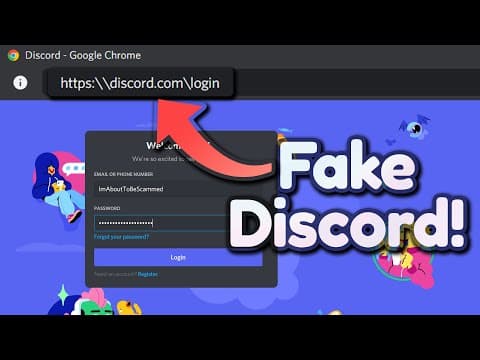
The Scariest Fake Discord Login Phishing Scam!
No Text To Speech
8m 56s1,790 words~9 min read
YouTube auto captions
Transcript source
YouTube auto captions
This transcript was extracted from YouTube's auto-generated caption track. The transcript below is server-rendered so it can be read, searched, cited, and shared without opening the original YouTube player.
Pull quotes
[0:00]Today, I'm going to show you a Discord fishing scam that's actually really easy to fall for.
[0:00]Well, a fishing scam is basically a fake website that you go onto and you send your account credentials to the hacker or the scammer, and then they take your account and they can do whatever they want with your account.
[0:00]Most scammers will either buy Nitro, or if you have rare badges, sell your account for money.
[0:00]And it tells you to authorize to add this random bot to your account, so you can, I don't know, do something, whatever the scam is trying to say.
Use this transcript
Related transcript hubs
Watch on YouTube
Share
MORE TRANSCRIPTS


