[0:01]Hey everyone, welcome back to code with Yousef channel. In this video, we will create the sequence diagram for online shopping. In previous videos, we created this activity diagram, use case diagram, uh class diagram, ER diagram.
[0:18]Uh you have the links for those videos in the description. So in this video, we will create the sequence diagram for online shopping. So let's start. Before starting, please subscribe our YouTube channel.
[0:30]First of all, I will draw the sequence diagram, then I will explain every step in sequence diagram, okay?
[0:40]A sequence diagram is used to show the interactions between object and the sequential order that those interaction occur. Okay, it is the sequence diagram. In the sequence diagram, we have vertical line and sequential, horizontal line. The vertical are the process or object with us and the horizontal line show the message or transfer the message.
[1:06]So for the online shopping, first I will create the sequence diagram for the search catalog. Whenever a customer come and he is searching, okay, he is searching in the catalog. So I will create the sequence diagram for searching catalog.
[1:20]So first I will drag the customer, the actor here, okay.
[1:29]Customer.
[1:32]So now let's drag the life line.
[1:42]This line show the life line of this customer, okay?
[1:47]The second process with us is catalog. Let's catalog, okay?
[1:57]The third process is product.
[2:08]Product.
[2:11]So the life line of customer will start here.
[2:17]So let's track.
[2:24]Here the customer, what the customer will do? Customer will search product and first string.
[2:34]Then the life line of catalog will start here.
[2:42]And here a message will goes to the product.
[2:52]Yeah, to get info. Get info.
[3:03]To get info from the product. So here the life line of product will start.
[3:19]So back a message will come from the product side.
[3:25]To the catalog. What it will do? It will return full product info.
[3:35]Also a message from catalog will come to the customer.
[3:43]Here products info.
[3:55]So this was the use case diagram for uh searching catalog, okay? So now we will create the use case diagram for add items to the shipping card.
[4:09]Here also first we will track the customer. Let's track it.
[4:16]And draw the life line for customer.
[4:28]And the second process will be shopping cart.
[4:36]Shopping cart.
[4:40]The third process will be the item.
[4:50]The item.
[4:58]So first of all, the customer will add item to the shopping cart. So let's create a message here.
[5:09]And start the life line of customer. And start the life line of customer.
[5:26]Add item card, ID and quantity.
[5:40]Quantity.
[5:45]This will pass to.
[5:48]Okay, so now the message will goes from shopping cart. Let's drag the life line of shopping cart.
[6:00]And the message will goes to the item.
[6:11]So here verify item, okay?
[6:30]So here should move it here because here if the item was out of stock.
[6:40]So then it should return a message.
[6:47]Yeah, out of stock.
[7:09]Verification status. Verification status.
[7:18]A verification message will come and here another message will come. Just to describe that.
[7:36]operation success or fail.
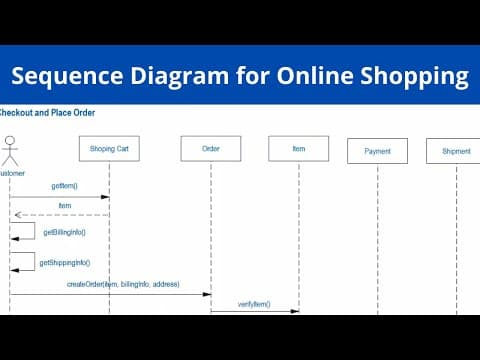
[7:43]Yes, so it was about add items in shopping cart. It was the sequence diagram for it. So now let's create the sequence diagram for the checkout and place order.
[7:55]So we have these processes and objects. So let's create now the messages between them. So first message will be from the customer side to the shopping cart.
[8:08]That will be get item.
[8:13]The customer will get the items message back from shopping cart.
[8:24]Item. Another message will be for uh billing address.
[8:43]Get billing info.
[8:48]This message will goes back to the customer because it will get the billing info from customer. And another message will be back. That is getting shipping info.
[9:09]Get shipping info.
[9:16]Okay, get shipping info. So now a message will goes to the order. That will be create order. And it will pass the item. Billing info.
[9:44]And address.
[9:55]So now a message will goes to verify the item.
[10:10]Verify the item.
[10:16]Then a message will come back.
[10:30]That will be verification status.
[10:43]If the items were not available, then a message will goes to the customer. Out of stock.
[10:52]So now a message will goes from order to payment. It will process payment, billing info and amount.
[11:13]A message will come back. That will be payment status. If there was an error, the message will goes to the customer about order status.
[11:29]Payment status.
[11:33]If there was an error, the message will goes to the customer about order status.
[11:47]Error, okay? If there was no error.
[11:53]A message will goes to the shipment.
[12:13]Process shipment.
[12:17]A message will come back for shipment status. Then a message will come to the customer about order status.
[12:29]Shipment status.
[12:37]Then a message will come to the customer about order status.
[12:48]Order status.


