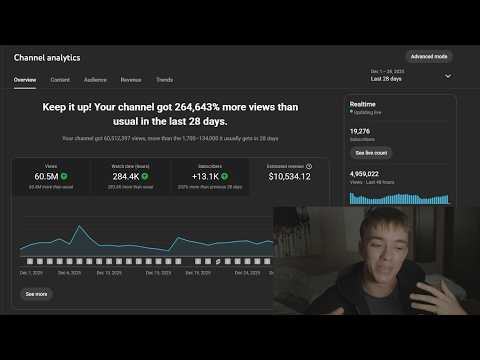
[0:00]YouTube Shorts are one of the most cracked ways to make money online right now. Check this out. This is a channel that I started a few months ago. It got monetized a month ago, first day, $265. Go to December, which is the full first monetized month, and we're cracking hundreds per day fairly consistent. All of this is outsourced. I've got editors that make the videos, and I can tell you something right now. I don't care if you're fat, mentally challenged, or got a low IQ, or you work a full-time job. You can do this, too. The beauty of this is we're posting 30-second clips online. You don't need to put any capital upfront. The only real risk is the time that you're going to spend editing videos. All you need to know in order to get these types of results is how to find a banger niche, how to make a viral video, and how to scale it up. And I'm going to teach you all three things in this video. Now, you may be thinking, why am I qualified to talk about this? Well, of course, here's a channel example that I'm showing right now, but I've been doing this for three years. I've generated six figures with just Shorts channels. I've sold multiple of them, and I also run the number one YouTube Shorts mentorship program called EarnIt Media, where I've helped over 100 students get monetized, get insane results like 10k months, 100k months. I'm going to show like a bunch of results on the screen right now. It's a great community full of killers. We even had a meet-up this year, but I'm not going to waste your time. I'm going to cover the most important lessons. In fact, everything you need to know in order to go viral and run this up and potentially turn this into a full-time gig. Now, the first step to creating a viral Shorts channel is finding a banger niche, okay? So we need something that's got a high idea or clip ceiling. Something that has a lot of views, ideally consistent and low saturation. So I'm going to show you exactly how to do that. So what we're going to do is go over to YouTube here, click on Shorts. I'm not logged in. What I'm going to do is basically just scroll until I find something promising. Ideally something with a voiceover, because an English voiceover means higher RPM and uh guaranteed monetization as well. I'm also looking for something that's relatively low effort, so we can improve it a lot.
[2:26]This is good, but it's pretty high effort. I'm going to teach you something a bit lower effort for now, but if you're advanced, this is something that could appeal to you.
[3:32]Okay, so this has a voiceover, so what I'm going to do is I'm just going to create a tab on this channel. And this was uploaded recently as well. You want to be looking for recent outliers. You don't want to be looking at something that went viral a year ago, because that might not be what works right now. And this is only two weeks ago, which is brilliant.
[7:19]I guess this is just like a quick summary. If I was you, I'd probably spend like a good hour or two doing this, look through multiple channels, look through common patterns. I've just landed on something pretty good here, pretty quick. But I would explore your options further, but this to me is it's a pretty good, good to go. What you can also do, you can download the VidIQ extension. I'll put a link in the description actually, because it is quite good. It's a free extension, and you can see here how many views they've done in the last 30 days. Ideally, you always want to look for something that's done above 50 million with consistent upload schedule. Yes, so he's done 22 videos and 28 million views. KezTalks has done 77 and 25. So, this right now is looking like the better option. So now we have the niche that's, I guess, got us interested, the one that we think we want to pursue. But now what you want to do is kind of like a saturation checker, right? Because although this guy's doing well, there might be a lot more people doing this as well. So what we're going to do is let me just have a quick look at some of his videos.
[8:42]If you remember correctly, the guy that we are analyzing for the outlier video, he did like a really fast arrow that circled around the screen. Now, we can do something similar, but personally, I'm not a fan of like a really fast arrow, but we'll see what we can cook up. So we just want it lasting over the first clip.
[19:53]Now, to do captions, I'm in DaVinci Studio, so it would be a bit of a cheat to use the auto captions on this, because the Studio version, I think, costs like $300.