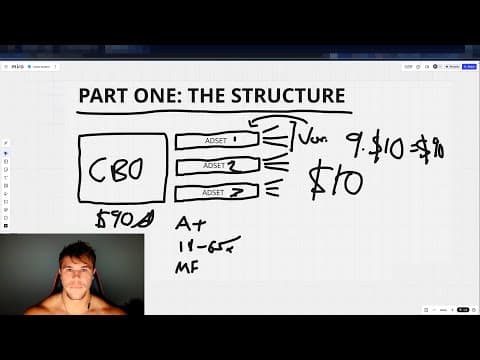
[0:00]Hey guys, Mark here. In this video, I'm going to show you how to test Facebook ads post Andromeda Update. First, I'll be walking you through my personal Facebook ads testing structure. Second, I'm going to show you how to actually set up this exact structure within your ad account. And third, I'm going to tell you why this structure works so freaking well. So, the Andromeda update basically flipped my entire creative strategy on its head because pre-Andromeda, I was very heavy on testing a shitload of variations. So, when you're testing ads, you can kind of put them into two categories. You can put them into a lot more, but generally the way that I think about it is you have your variations and you have your new concepts. So, if you can't tell by the name, variations are very small changes to existing winning ads. New concepts are basically completely unique creative material that you're bringing into your ad account. So, like I said, it flipped it on its head. What I used to do was the majority of the ads that I was launching, roughly about like 80%, I would say was actually variations. Because once you find a winner, you can just create winner after winner after winner after winner and skyrocket your win rate because you're just making these tiny changes to your ads. And of course, new concepts would have been the other 20%, but now this has basically been completely flipped. To the point where my creatives are 80% new concepts and 20% variations. And when I'm testing new ads from like a brand new product, let's say, I am pushing much harder on testing new concept instead of one concept with a bunch of variations. So first, let's talk about the structure. To launch new ads, I recommend typically using a CBO. CBO stands for campaign budget optimization, and sounds like a big fancy word. All it means is that you set the budget at the campaign level instead of ad set level, and Facebook will determine how to spend your campaign budget across the various ad sets. Now, I'm going to come back to the actual budget and how you want to calculate how much you should spend. But inside of your CBO, you're going to have multiple ad sets. The number ultimately is up to you, but if you're launching something new, I recommend at least two or three ad sets in here. So again, back to a CBO, if I set the budget at $100, it doesn't mean that it's going to perfectly spend $33 here, $33 here, and $33 here. Now, of course not, it could quite literally spend $99 in this one ad set and 50 cents here and 50 cents here. Unlikely to happen, but a lot of times one ad set does cannibalize things, but that's actually okay. This entire philosophy of how I structure my ad testing centers around letting Facebook do the majority of the heavy lifting for you. So, inside each of these ad sets, the ad set level is typically where you set your targeting. So, who are you really going after? And what I do inside of these ad sets is I keep them completely broad. Which means Advantage Plus Placements, typically I'm running in terms of ages, 18 to 65 Plus, and I'm running male and female. Of course, if you're only selling to one demographic, then select the one that's most relevant to you, but if you're selling to both, keep it broad. Now, at this point, you may be wondering, Mark, why do you have three ad sets if they're all going to be identical? They're all broad, they're all Advantage Plus, and they're all 18 to 65 Plus. Everything is broad. Why do you have three of them? Well, the reason I have three is because they're not actually identical. You see, inside each of these ad sets, if this is ad set one, this is ad set two, and this is ad set three, I'm actually going to have three different creatives in each of these three ad sets. Again, I'm just using three, if you want to have more ads per ad set, you can, but here's the point that I'm trying to make. You want to segment these ad sets by ad concept. So, let's say ad set one is ad concept one, ad set two is ad concept two, and ad set three is ad concept three. And then inside, let's say you have three creatives each, which these three would actually be variations of that one concept, okay? I'll explain kind of what I mean, but this would be a total of if we count the actual ads, one, two, three, four, five, six, seven, eight, nine total ads for this ad launch. But these three ads are going to be variations of this one new concept. So, the reason why I said you can have as many ad sets as you want in here is because you could have five ad sets in here, but only one ad per ad set and each one is a new concept. I think the sweet spot is not one, I think it's like anywhere from three to ten, but shit, I have ad sets running that have 20 Plus ads in there, you know, 30 Plus ads, 50 Plus ads, some of them. There isn't a rule here, okay? I'll tell you what I recommend is anywhere from three to five ad sets, which means three to five concepts, completely unique concepts and anywhere from two to five variations in each of those ad sets. And by the way, this is mostly relevant to images and videos. I typically do my testing with images because you can typically just do it faster. But, if you want to test with images and videos, you can. I would recommend segmenting them in the ad set or even in a completely different CBO because typically what I see is if you throw a bunch of images and videos in the same ad set, one of them will cannibalize everything else, like all the videos will get spend and the images will get no spend, which of course you don't want. Because you still want to make sure you test those images, right? So I'll do a separate CBO if you're going to combine images and videos. For me, I just keep it simple, just pick one, only videos, or only images, and run with that. Now, let's talk about the budget. How do you calculate the budget for a CBO? Well, I have a golden rule that I want to have at least $10 allocated out of my total budget per ad in the CBO. So, like I said, how many ads do we have in the CBO right now? Well, one, two, three, four, five, six, seven, eight, nine. If we take nine and multiply it by $10, that is a total of $90 a day. A day, yes, that you want to run this CBO ad. So, you take the number of ads across all of the ad sets, total, multiply that by 10, and that is going to be the minimum daily budget that you run with. The one exception to this rule is I would never recommend that you run a CBO at less than $50 a day. I don't care what your budget is. If you don't have enough cash set aside to run a $50 day CBO, you should not be running paid ads. It's my personal opinion, if you don't like it, I do not care. So now that we've gone over the structure, let's actually build this inside of the ad account. So I've got almost a brand new ad account here. What we're going to do is go select create new campaign. We're going to hit sales and hit continue. I'm not going to go over naming conventions in this particular video, but name it something that makes sense for you at the campaign ad set and ad level. Here, we're going to set the campaign budget. Let's use our example to $90 a day. And make sure that you have campaign budget selected. Everything else here, we're not going to touch. We're going to keep it exactly as is and move on to the ad set level. Here we are at the ad set level. We're going to have website, conversion location. Performance goal is going to be max conversions. Dataset is going to be the pixel that you're currently running your traffic to. Conversion event, we are going to be optimizing for purchases. I almost exclusively optimized for purchases and almost exclusively run sales campaigns because anything else is mostly, mostly, with very rare exceptions, a complete waste of your time and money. Now, we're going to keep scrolling down under the attribution window, I typically do seven day click and one day view, and I keep the view through completely turned off. You can do testing on this once you get a little bit more advanced, but initially this is a super standard setup, seven day click, one day view. Now, onto the budget and schedule. I always schedule my ads for the next day at 6:00 a.m. EST. This account is actually in PSD, but imagine it was in EST. I typically run my ads right around that time to start getting active. Next, what we're going to do is edit the location. So, I do the majority of my testing in the United States. So, we're just going to search United States here, select it, and remove Singapore, which is there for some reason, and continue to scroll down. Minimum age, you can keep. Languages, I typically keep broad as well in the US because it's an English majority speaking country. At least that's what my customers are going to be buying in. And then finally down here, as I said, we keep it broad. We're going to have the Advantage Plus Placements on. So there is nothing for you to edit within here. You can keep it completely broad, don't touch anything. All right, now we are at the ad level. Once again, apply your naming conventions here, keep it nice and neat and organized. Here you're going to have create ad selected, single image or video. You can keep multi-advertiser ads selected. Now, let me tell you this one time. I'm going to upload an ad here, just as an example, and I'm going to show you how much nonsense Facebook tries to push on you with their updates. I am utterly amazed because I still spend time in my ad accounts every single day. But I'm amazed at how many bullshit settings, and that's me putting it very lightly, there are for Facebook to try to take your money. Majority of them are a complete waste of time and money, so just follow what I do here. This is basically the only setting that it's actually okay to keep it on, and even then, I haven't split tested it extensively, but keeping it on personally doesn't hurt. Under destination, you're going to put the website URL that you're driving traffic to. Make sure that this matches the the uh if you put your URL in the ad copy as well, make sure that it matches one to one, and also make sure you deselect optimized website destination. Because if that's on, it'll send to traffic outside of that direct domain, which we don't. Display link, you can keep empty. Browser add-ons, you can keep at none. You don't want to have any add-ons. Now, let's actually upload the creative. Let's say we're running image ads. In this case, we go ahead and select image add. So as we're going through the creative setup, again, make sure that just about every setting here is turned off. If you want to split test it later down the line, you can, but for me personally, I keep everything off here. So promo codes is unchecked, branding off, site links off, products off. We're going to hit next and actually upload the creative. And just like that, we got our phenomenal creative there if you want to take a look, boom, beautiful. 10x ROAS coming very soon. Now, I don't adjust any of the aspect ratios here. We're going to hit next. Now you're going to fill in your copy, primary text, the headline, and the description is all there, and it's a fantastic message. Run more ads. Going to hit next, image generation, deselect all. It won't even let me deselect it. Now under enhancements, you want to make sure all of these are turned off. Be careful, because there's a lot of them, so you got to scroll down. For example, overlays, turn off visual touch-ups, music, text improvements, all turned off, animation off as well. All right, there we go. There's our lovely beautiful ad. Let's keep cooking. Keep scrolling down. Call to action. I usually have learn more. I actually have seen a slight lift in learn more versus shop now, but I think most of the time it's pretty trivial. So, depends also what kind of ad you're running. So, I keep it to learn more. If you are going direct to cart, you can do shop now. The Advantage Plus creative enhancements, everything is turned off, which is perfect. Languages is off, tracking, pixel is there. If you want to add any UTMs at the bottom, it's right here. So that is basically the entire process. After I set this up for one ad, I'll just duplicate it, you know, two times, and I'll go in and edit the creative to change it to a different variation. And after that is created, I'll duplicate this ad set two times, so I have three ad sets in here. The CBO budget is currently set to $90 a day, three ad sets, three concepts, three ads per concept, for a total of nine total ads, as you can see here. And they're all going to be beginning to run tomorrow directly at 6:00 a.m. Eastern. I actually made a separate video to this that is unlisted on my YouTube channel right now where there's so many questions that come up after you launch the ads. It's like, how do I know when to kill an ad, how do I know when to scale an ad, what if an ad doesn't get spend? I briefly covered that, but it's a little bit more nuanced. What about testing landers? Do you ever use ABOs? There's like a million questions that occur once you click publish ads and you actually start getting data. So I put together a separate video. If you want to get access to that, just go to my Instagram, it's at Mark Builds Brands. And DM me the word law, like L A W because these are laws of scaling. Now, the last thing I want to touch on here is why does this strategy actually work? Well, we have seen, or at least I have seen over the years, Facebook push many, many updates to the point where I remember in 2019, they said that CBOs were going to be mandatory and they were going to just delete ABOs off the face of the Earth. So every time that Facebook launches an update, you have to kind of take with a grain of salt and most importantly, trust the data. So, for me, I have a lot of freaking data. Not only do I have my own ad accounts that are run, I have friends ad accounts that I'm looking at, but I also have all of our students inside of BBA where we are instructing them the best testing structure. So we've been doing a lot of testing internally to find out what that best structure is, and this is what we found works really, really well. So, the number one reason why it works is just straight data. You know, there's a lot of people that will say, oh, this is like not optimal or you should do, you know, straight up ASC campaign. Look, to be honest, I really don't give a fuck. I care about data over anything. A lot of times, Facebook says this is how the Facebook machine operates and all the shit. I don't care. I listen to what the data says, and I am willing to touch just about anything in pursuing the right kind of data. But more importantly than that, the real reason why it works is because of what I was mentioning earlier, where, you know, I have shifted much more of my ads to being more unique, more creative diversity, and increasing my ratio of variations to new concepts. But I don't necessarily want you to think about it in terms of like ratios like 80/20. I think the right way to actually think about how you approach your testing is you basically just change the order in which you're testing variations and new concepts. So again, like I said earlier, the way that I used to do testing is let's say one concept, like one new concept, and then variation, variation, variation, variation, just like this, right? And the only difference now is that instead of just testing with one new concept, I'm testing with many. I showed you in this video an example of three, but typically I'm testing with even more than that, sometimes as many as 10 new concepts for a single product test. So if I were to visualize it, it's more like this, like if this were kind of the the five ad sets that I'm running, it's new concepts and then all the variations in here, right? So, yes, I'm actually testing more ads typically when I'm launching, and that's not a hard rule. The point is, if it hasn't been made abundantly clear by this point, is that you need to prioritize more creative diversity and new concepts in your testing and less variation testing. Because one is clearly going to move the needle way more than the other. And I know like the number one objection here, especially when you run CBOs, is, well, what if like this ad set gets no spend, or like, what if this ad, or these few ads get no spend or been cannibalized by the other? Well, good. You don't necessarily need to test every single individual ad at the same level of ad spend across, you know, every single ad concept that you're running. Sometimes, sometimes, if Facebook doesn't spend on that particular creative at all, or very, very little, then it means that that creative wasn't that good to begin with in the first place. So, it's a tough balance. You know, all I can say is that this is supported by data, and I can say one thing for 100% sure in my heart of hearts, which is that you need to be prioritizing creative diversity post Andromeda. This variation spamming game is just not nearly as effective as it was previously. I kind of alluded to it earlier, but this strategy is exactly what we teach inside of Brand Builders Academy. So, if you're interested in like having somebody actually like help you out, you know, set this up and more importantly, like the feedback loop that comes after it, you can always click the first link in the description and apply for an application and we'll see if you're a good fit. Other than that, guys, thank you so much for watching. I'll see you Legends in the next one. Peace.
how to test facebook ads post andromeda update
Mark Builds Brands
18m 22s3,317 words~17 min read
YouTube auto captions
Transcript source
YouTube auto captions
This transcript was extracted from YouTube's auto-generated caption track. The transcript below is server-rendered so it can be read, searched, cited, and shared without opening the original YouTube player.
Pull quotes
[0:00]In this video, I'm going to show you how to test Facebook ads post Andromeda Update.
[0:00]Second, I'm going to show you how to actually set up this exact structure within your ad account.
[0:00]So, the Andromeda update basically flipped my entire creative strategy on its head because pre-Andromeda, I was very heavy on testing a shitload of variations.
[0:00]You can put them into a lot more, but generally the way that I think about it is you have your variations and you have your new concepts.
Use this transcript
Related transcript hubs
Watch on YouTube
Share
MORE TRANSCRIPTS


