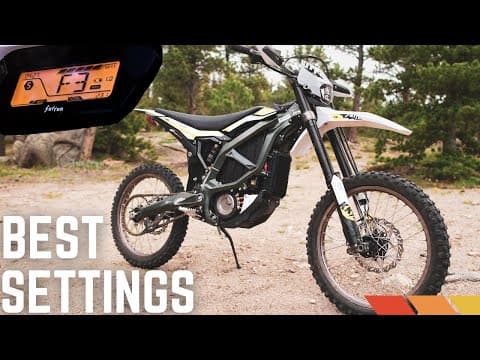
[0:00]This is the new 2023 Suron Ultra B. And by now, many of you already own this bike. So we figured it's a good time to run through the menu features, explain what they do, and help show you the best way to set up your Suron Ultra B.
[0:16]For more options in a written version of these settings, check the description in this video.
[0:22]First, we'll run through the basic display setup, then we'll dive into the feature settings and show you how they perform while riding.
[0:32]Now let's dive into the system feature settings mode and set up our ride modes.
[0:37]Make sure the key is on, the motorcycle is fully stopped and the kick stand is fully extended. Press the ASR button on the left side handlebar while simultaneously pressing the ready button on the right side handlebar for two seconds.
[0:51]This will allow the display to enter the system feature mode. Momentarily pressing the ASR button will toggle between each main category feature, which is brake regeneration, coast regeneration, traction control, brake sensors, tilt sensors, throttle sensitivity, and charging settings.
[1:11]Momentarily pressing the ready button will toggle between the levels within each feature.
[1:17]Brake energy regeneration. This is setting B in your menu. When the bike is moving, the throttle is off and the brakes are applied, the electric motor is switched to a generator and begins to return energy to the battery.
[1:32]Physically, the rider will notice an additional level of braking at the rear wheel when activated, versus this feature being disabled. It should be noted that this feature does not work until the battery has been discharged below 95%.
[1:48]There are six levels labeled between zero and five. The factory default is B2. Disabled is B0. B1 is the lowest amount of brake regen with the regen level increasing up to B5, which is the highest setting.
[2:04]So we're going to test all of these features on a steep hill climb to feel what the bike is doing going up and down.
[2:11]All right, so you can see here that we are in the B0 setting, which is basically the free wheel setting for the brake energy regenerative system. So this is going to feel most natural going downhill. It's just going to be your brakes.
[2:33]Free wheel feel. But yeah, feels natural. Just feels like you're riding the brakes, just like any other bike.
[2:49]All right, so let's try the factory setting now. We're going to bump this up to B2 and see what that feels like.
[3:07]I can definitely feel it locking up the rear. It's not extreme. Just a little bit. Gives you a little bit of extra braking in the rear. I guess the downside to this is, I mean, you do feel it kind of immediately lock up. So if you're somebody that likes to drag the rear downhills and stuff, then you'll like that. If you're somebody that finesses it, even just putting it on B2 might be a bit stronger than you'd like.
[3:49]All right, now let's try it with the strongest setting. So we'll bump this up to B5 and see how strong that feels.
[3:59]So to me, although this is the strongest, I mean, this feels like a two-stroke to me. Potentially even less, depending on what gear you're in in your two-stroke, so I think you would expect B5 to feel like four-stroke regen, or four-stroke engine braking, I should say. But, uh, no, it feels like a two-stroke.
[4:50]That's normally what I'm riding up here anyways, so, yeah, I kind of like that. I've personally been running it in E4. I think that's a good setting for me, and after doing that experiment, yeah, that's where I'm going to keep it. E4.
[4:58]Coast energy regeneration. This is setting E in your menu. This is what can be closest referred to as engine braking. When the bike is moving, the throttle is reduced and the brakes are not applied, the motor is switched to a generator and it begins to return energy to the battery.
[5:15]Physically, the rider will notice an additional level of slowing or engine braking of the motorcycle when activated, versus this feature being disabled.
[5:26]There are six levels between zero and five. The factory default is E3. Disabled is E0. E1 is the lowest amount of regen, with the levels increasing up to the highest or strongest setting at E5.
[5:41]When slowing down, the bike will alternate between brake regen and coast regen based on the throttle position and brake levers being used.
[5:49]Pressing either brake lever enables brake regen. Releasing both brake levers enables coast regen, as long as the throttle position is less than what's needed to maintain the current speed.
[6:02]All right, to test this, we're going into E. So, we've got E0 through 5. Let's try E0 just to see what it's like to have no engine braking or no regen.
[6:15]So this is going to feel most like a mountain bike or a dead engine bike. And I can really feel it picks up speed super quick going downhill. So, depends on what you're riding, right?
[6:40]If you're doing hill climbs and descents, you probably wouldn't want to run it in this E0 because the bike is really going to want to coast on you. But on the flip side, I could see really wanting to run that if you're on a flat motocross track or something where you really want to keep your momentum in corners and you don't want the bike slowing you down at all.
[7:09]But yeah, that is a lot of braking to be done when you're on E0 going downhill.
[7:15]All right, let's try the factory setting. So, we're going to bump it up to E3 now. So, that's kind of the mid-range regen setting and this is the factory setting. So, let's try.
[7:38]You can definitely feel that regen stronger than zero, as you would expect. It's not super strong, but definitely some delay there. Probably a good middle of the road setting for everything. I think if you're riding what I'm riding right now, which is, you know, steeper mountain type riding, probably going to want to run something stronger than three, but I think for an all-around setting probably the best mix of free wheel and engine braking that you can get.
[9:28]Traction control (ASR). This is setting A in your menu.
[9:34]During acceleration, the motorcycle compares the RPM of the front wheel to the rear wheel. If the rear wheel RPM is greater than the front wheel of the motorcycle, it will reduce the power to the rear wheel to minimize the difference.
[9:47]The purpose of this setting is to maximize traction in loose soil conditions. There are three levels labeled between one and three. The factory default is A2. The lowest setting is A1 and the highest is A3.
[10:03]The setting you select here determines the initial setting the motorcycle enters when ASR is enabled from the left handlebar combination switch. ASR is enabled and disabled by pressing the ASR switch on the left handlebar switch three times or a single long press, and riders can toggle the intensity level by quickly double-pressing the reverse switch.
[10:26]All right, so this is hill climb number one. We're going to do no traction control on this. I'm going to try to get you guys some shots so you can see what this hill climb is like because it's definitely a lot steeper than the GoPro shows you, but let's try this with traction control off, stock tires, that have seen a bit of riding thus far. See how we do.
[11:03]Pulling pretty good. It feels like any other dirt bike, without traction control. Actually hooked up pretty good, especially considering this rear tire is probably not the best for hooking up, but yeah, I'd actually climbed it pretty darn good.
[11:22]Not a whole lot of slipping there. All right, so we're back at the bottom now. Let's uh, pick a more difficult line. I feel like I got up that too easy, so I know that there's a loose section that we can hit. And let's do it.
[14:35]Let's bump it up for traction control. So, let's do go over to A. I'm actually just going to go full full on. We're going to go A3 and see what the strongest setting feels like for traction control.
[14:55]So that's immediately cutting power on me. I can feel it. I was just kind of holding it wide open, and it's just chopping power, doing its job, I suppose. Oh. But yeah, so I'm struggling now to just get momentum. I want to be going faster than this. Oh. So that could just have been rider error, but that's just me picking a bad line potentially, but I broke the rear loose, uh, way worse with the traction control on.
[15:27]Why is that? Maybe just a predictability type of thing for me potentially. At least when the traction control's off, you know what to expect, but I could have also just picked a bad line there, so. Oh. Yeah, it it, there's just no traction here, so.
[15:33]So you can see, this is steep and this is loose. Um, and yeah, and traction control three, it just isn't going to go anywhere. So, we're going to take that off. And see, maybe a good experiment to see from a dead stop in the middle of a steep climb with loose rock and dirt. How do we fair? Ready?
[28:37]All right, hopefully this helps you get the right settings on your Ultra B. As always, leave any questions in the comments, and thanks for watching.


