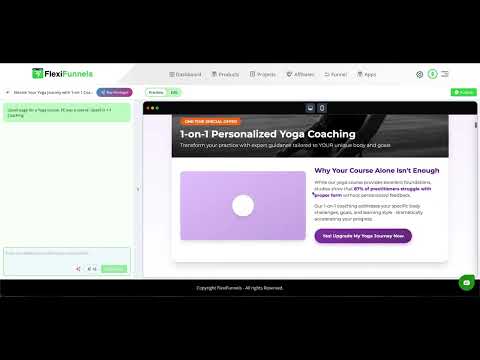
[0:02]All right, I want to show you a new feature release inside Flexi AI editor that will take your page creation skills and your results to the next level. As you can see on the right hand side, there's a sidebar appearing. It wasn't there before. We've just added it. So, the sidebar is all about this. Here we've added all the different types of pages you can create. For example, you might have an application page, an event page, a homepage, an about page, a checkout page, an upsell page, a downsell page, a webinar registration page, or a sales page. We've thought of all the different types of pages that can be created. Of course, we can add more if requested. Right, and here we've added a dropdown. Now, the way this works is, let's say you want to create a new page. For example, you want a sales page for an iPhone photography course. Okay, let's say you want this. Now you'll add other details. For example, my name is this, and this is going to be my price and things like that. But at the same time, on a page, there can be a lot of sections that can be really valuable. But since AI is doing the job here, you're not really sure what exactly is going to show up. From AI, right, once the page is created for you, but if you give it input, if you select some sections here like, hey, I definitely want, let's say this is a sales page. I definitely want a process section on this page, like how it works. I definitely want features on this, like an in-depth breakdown of what exactly is going to be delivered inside the course, and I want 10 bullet points in it. So now, this is going to make it very specific, okay? So the way it works is, the sections that you select here are definitely going to be added to your page. However, that doesn't mean that if you haven't selected something, it can't be included. It might still show up because the AI is going to deliver the best page for you based on its understanding and the training we've given it. Okay, so it's still going to deliver the best page. But the selections you've made will definitely be included. That means your selected sections are definitely going to be on your page. And that increases the value of your page because it gives you the certainty that, okay, this particular thing will definitely be there. And what we've done is we've done it very smartly. We've done thorough research and provided you with almost all the sections and elements that should be on a sales page. And most importantly, we've arranged them in the exact order they should appear. So, you know, this is exactly how a sales page should be structured. Of course, this is extremely detailed. On a sales page, you might want to include certain things or you might not. For example, you might not want to include case studies, you might not want, let's say, testimonial, or maybe you don't want this particular section. But we've included everything just to make sure you don't miss anything. And while you're providing your input and building your page, you won't overlook anything. Right, so this will make sure of that. And I'll show you some examples of the output. For example, let's say we created an upsell page for a yoga course, if you take a look, right? If the main product was a course and the upsell is one-on-one coaching, these were the inputs that I selected, right? Just for testing purposes. So if you look at it now, now this has increased the value of the page, right? Where your yoga journey isn't finished yet. And now I'm pretty sure this is something that's definitely going to show up. Transform your practice with personal guidance, right? See now, now look, take a look at this. Look at how detailed the page is. If I had just sat and said, let's say, give me 10 features for my upsell page, give me features, then I wouldn't be sure if it would give me five features, six features for three or what? But now I'm sure that it's going to give me 10 features, right? So I can definitely say this is something, you know, that's really, really useful. Like, I had selected probably eight testimonials. One, two, three, four, five, six, seven, eight. So this is something that came up, right? So automatically, this enhances the value of the page. Take a look. See the difference personalized coaching makes. Without coaching, with coaching. So of course, this is the selection that was made, right? So it's a side-by-side comparison if you look. So all these selections have been made. And because of that, the
[4:26]thing is visible right in front of you, right? The special offer expires. So this gives you a lot of extra control over the output, the kind of page you'll be getting, right? Take a look at this, who will be coaching you? Like all of these sections are definitely showing up, and then I was selecting, I believe I would have selected FAQ as well. See, testimonials were selected, and there's a bonus with this upsell. Let's see if I selected the FAQ or not. Because even if I didn't select it, it can still show up. That's what I told you, right? AI is still going to do the job for you. So it's still going to create a perfect page for you. But the things that I select are definitely going to show up. And this gives you a perfect idea and a perfect breakdown of which sections should be on a particular page. So that you don't miss out on anything, okay? This just elevates the kind of page creation experience you're going to have. See, this is for the call booking page for the dentist, but of course with all the inputs that we would have selected. So there's a call booking page, all the inputs are here, right? So we would have selected them and then looked at the page, right? There's a lot of detail here, like with the embedded form and all the other details. So it has created this perfect page. So yeah, this is something that's really, really helpful and it's definitely going to help with your page creation. All right.