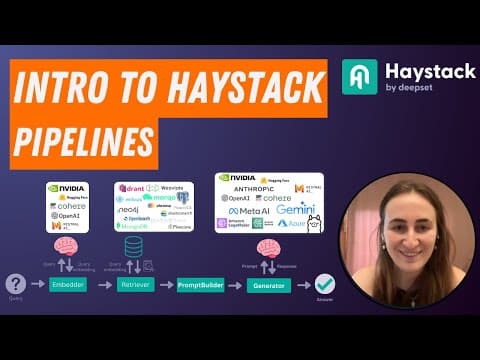
[0:01]Hi everyone, this is Tuana from Deepset and I've decided to record a quick video to introduce everyone to Haystack pipelines and components. And if you find this useful, let me know because I might start recording more of these. All right, so let's start. Haystack is built on the concept of two main architectures, components and pipelines. And effectively, pipelines are a structure that we create by combining components in a manner that we want to achieve a certain AI application with. So this could be a rag application, it could be an application that simply indexes documents and embeddings to a vector store. It can be translation, summarization, it really depends on what components you use. As you can see, we attach those components to each other and this produces a pipeline and pipelines can do branching. They can also do looping, which I'm not going to go through in this video, but that's really cool because that means that our pipelines can become a service that runs until a certain condition is met maybe. And it also means that our pipelines have pretty agentic behavior as well. components are entities that expect a certain number of inputs and they produce a certain number of outputs. But what those inputs are and what those outputs are is completely up to who builds the component. Uh so Haystack provides a bunch of components out of the box like generators, embedders, um document pre-processors and so on, but if you notice that a component that you need is not provided by Haystack, very easy to build your own, so I'm going to show you that as well. In our documentation, you'll see one documentation page for every component that we provide. So here I have an example of the Weviate embedding retriever, and the documentation page lists the inputs that the component expects and the outputs that it produces. This is quite useful because then you can also start to see which components can easily be attached to other components. In this case, the Weviate embedding retriever is a component that can extract documents from a Weviate document store. And it expects query embedding and it produces a list of documents. I can then start attaching components to each other if the output and input type match. And in this case, I have one component here that is expecting a sentence and producing an embedding, which could be an embedder component. And then I have a second component that expects embedding as input and produces a document, and if I attach these two to each other, maybe I've already achieved a pretty effective retrieval pipeline. But these days, this is more relevant, and I think it's probably what we're seeing most people build. And here you're seeing a very classic Haystack rag pipeline. Um here we have four components that we mostly use, an embedder that creates an embedding representation of a query, a retriever that can return documents based on that embedding. Something that builds a prompt, in our case is a prompt builder, and a generator, and you can also see all of the different APIs and databases that we support out of the box. Um but I suggest you go through the Haystack documentation to see all the lists of different embedders, document stores and generators and different component types that we support. Like I said, um you can, however, build your own components. So the interface to build practically anything in Haystack is the same. You need a class which is decorated with component, you need a run function, and the inputs to that run function define what the inputs to that component is going to be. And it's going to return a dictionary of outputs. The only other thing we need to do is also provide a decorator to the run function that lists the output types. This is going to be used for pipeline validation down the line. In this case, I've created a a translator component that expects three inputs from lang, to lang, and documents. And it's producing an output called documents which is returning to the translated documents. And that's it. So let's have a look at how we can build these pipelines. So the first thing I need to do is import pipeline. And document stores are probably one of the only exceptions, they're not technically components, but components can interact with document stores. In this case, I've done the very easy thing and I've used the in-memory document store. But if you want to see what other document stores we support, you can check out the documentation, as you can see, we have Chroma, Weviate, Quadrant, Pinecone, Neo4j, and you can change this, uh in-memory document store to be one of the other ones that you want to use. The next thing I need to do is start adding components to my, uh, pipeline. In my case, I've decided to use the sentence Transformers document embedder. This uses, let's have a look. Here, this uses the all MPNet base V2 model, uh, as default. Next, I want to also add the document writer and I'm providing my document store to this document writer. So whenever I use this document writer, it's going to be writing documents to this in-memory document store. The next thing I need to do is connect these components in some way. So I'm saying whatever the output of my embedder is is going to the input of writer. When I run this cell, I can also check that the connection is what I expect. But the other thing we provide is this pipeline dot show. You can also write this out into a, uh, image file. But this is quite useful to see if your pipeline is doing what you expect it to be doing and especially useful if you start building complex pipelines that do branching and looping. Next, I can run my pipeline, and the one thing that you can see already here that the embedder is expecting documents, but I haven't provided documents yet. So I know that my embedder is going to need some documents and here, I've provided a list of fake documents. It's about where various people are from. Tuana is from Istanbul, Silvano is from Turin, Julian is from Berlin. Once I've written those into my in-memory document store, I can also filter documents with no filters to check that I've got the right documents. I do, and here are the documents and I can also see that I've got some vector representations or embeddings for each document as well. All right, let's try building a rag pipeline. Since I use the sentence Transformers document embedder, I'm also going to be using the sentence Transformers text embedder to embed my query, my question that I want to ask my database. I'm going to be using the prompt builder, in Haystack, prompt templating is all done with Ginger templating. Next, I can decide to use what generator I want. In this case, maybe I use a Mistral model using the Hugging Face Inference API. Or I can also maybe switch that to an OpenAI generator. If I do that, I maybe want to change my model name. So let's say let's use GPT-4. Um, and that's it. So I create these components. And one thing that I haven't shown you before is how you can be very specific about what output is being connected to what input of another component. In this case, we know that I'm connecting my embedder to my retriever, and my retriever is returning documents. But I want to be very clear that the documents should be input to prompt builder documents. So query is still something that my prompt builder is going to be expecting. Next, I'm going to be providing the prompt builder prompt to generator. When I do that, I can also check that the connections are what I expect.
[8:49]I can also do the same and display it like this. And then finally, I run my pipeline. Here I've already run it. I've asked where is Tuana. I know that my text embedder is expecting text, so I need to provide that. My prompt builder has been provided documents by the retriever, but my prompt builder still needs a query. So where is Tuana from is also being provided to my prompt builder. And when I run that, I get a list of replies. Tuana is from Istanbul. And that's it. Uh, in a next video, maybe I'll try to show you a bit more of a complex pipeline, but I hope you found this useful.


