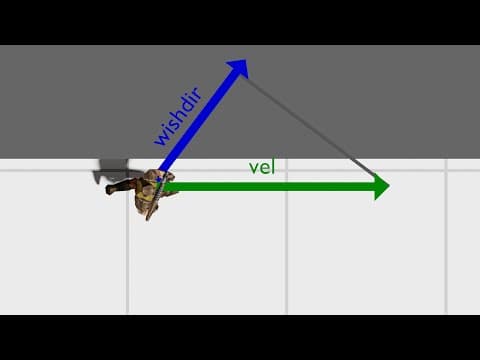
[0:01]Over the years, Quake's player movement techniques have evolved from simple tricks through to elaborate routines that have completely changed the way the game is played. One of the earliest tricks discovered was zigzagging, a rapid alternation of the strafe keys while running forward. Next came wall running, which is done by strafing into a wall while running parallel to it. Finally, there is bunny hopping or strafe jumping, a technique that has gone through its own evolution over the history of Quake. All three give the player a speed boost, and amazingly, all three are born from the same short piece of code. Being the progenitor of a vast family of first-person shooters, Quake's player movement DNA can be found in many other games across the genre. For example, any other game that features strafe jumping of some kind likely has this same short piece of code or something very similar at its heart. We have explored strafe jumping specifically related to Quake 3 in another video, linked here. In this video, I'm going to dive into the original quick source and explain how a relatively small piece of code gives rise to all three of these techniques. Rather than showing the C code directly, I've translated it into pseudo Python for clarity. However, I've also included references to the C code if you wish to read further. The player physics logic starts by converting key presses and mouse movements into what's known as a wishdir. As the name suggests, this gives the player's intended movement direction. It's formed by adding a scaled forward vector to a scaled side vector and then normalizing the result. Which components are included depends on the directional keys that are being pressed. In addition, the length of the forward and side vectors can be adjusted with the CO forward speed and CO side speed variables. We'll come back to these later.
[1:47]The wishder is used to update the player's velocity in the horizontal plane. The vertical velocity is calculated according to a simple gravity model. When on the ground, the velocity update looks like this. First of all, some friction is applied, which scales the speed. The rest of the function updates the velocity by adding on the wishder scaled by some factor which I've called add speed. The amount of speed to add depends on the current speed and the developer intended maximum speed. So far, so good. However, it's in the calculation of the current speed that the loophole lies. Rather than taking the current speed as the length of the vel vector, it is taken as the scalar projection of the velocity onto the wishder. By using the keys and mouse to manipulate the wishder relative to the velocity, you can make current speed as large or as small as you like. The add speed is then just the difference of the current speed and the nominal maximum speed, clipped to be between zero and a constant intended to limit the player's acceleration. Whenever the add speed is being limited by the max acceleration constant, you can make the speed on the next step faster by bringing the wishder closer to the velocity's angle. Fully exploiting this bug then usually requires having the current speed lag behind the max speed by this acceleration limit. Let's see how this theory can be exploited in the game with some slow motion analysis of a few speed running tricks. Since the speed increase for a given frame depends only on the wish angle relative to the velocity, we can make a plot of hypothetical speed increases. The blue bar here corresponds with the selected wishder, so the point where it crosses the curve gives the actual speed increase. The technique shown here is known as zigzagging, which gains speed by changing the strafe direction against the current movement direction. The velocity then moves towards the wishder pushing us into a zone of deceleration, but then the player switches strafe direction changing the wishder relative to the movement direction once more. And so the process repeats, with the player gaining speed until the speed gained by manipulating the angle is balanced out by the speed loss through friction. Strafe jumps usually start with a move on the ground where forward and a strafe key are held while swinging the mouse, known as a pre strafe or circle jump. This gains some initial speed before transitioning to the inner part of the jump. Like zigzagging, the wishder is continually changed to keep the wishder velocity angle in the sweet spot. Although this time it's done by changing the view angle rather than the keys. Here's an illustration of wall running, which is performed by running along a wall while strafing into it. Collisions with walls are handled by clipping the velocity to be parallel to the wall. This means that the wishder velocity angle can be kept constant simply by moving into the wall at a steady angle. As with the other techniques, doing this at just the right angle gives a speed boost. Note that when looking up the wall, extra friction is applied, so wall running is best performed by strafing into the wall rather than running into the wall with just the forward key. When in the air, the velocity is updated in a very similar way to on the ground. The only differences are that no friction is applied and that the nominal maximum speed is only 30 units a second. Reducing the nominal maximum speed means that to accelerate, the player's wishder velocity angle must be close to 90 degrees. Much less and current speed exceeds the new limit and therefore add speed is set to zero by the lower bound in the clip call. Much more and wishder points back on vel enough that the total vector does not get longer. When strafe jumping, the angle is kept close to 90 degrees by holding a strafe key while turning the mouse to stay in the zone of acceleration. To stay on a straight path, the strafe direction and turning direction can be changed, which places the angle near the sweet spot on the opposing side. Typically, the player will chain together a series of these jumps, minimizing time spent on the ground and subject to friction. Nevertheless, there is still exactly one frame between each jump when the ground physics apply. This means that the acceleration zone briefly moves to a more moderate angle. To deal with this, the best speed runners will tap forward when approaching the ground, momentarily reducing the wishder velocity angle. The exact angle is determined by the ratio of the CO forward speed and CO side speed variables. The default values work pretty well, provided that they always run option isn't used which doubles just the forward speed. Instead, the run key should be held or plus speed issued at the console, which increases the forward speed and side components in the same ratio. This covers all the ways that people have exploited the velocity update rule in Quake. But is there another technique to move faster? It turns out there is, but it's only exploited in tool assisted speed runs, that is, speed runs that permit scripting of inputs to overcome limitations of human reactions and dexterity. Here's a clip from the current tool assisted World Record, which completes the game in 9 minutes and 35 seconds, over two minutes faster than the human record. There's no side-to-side movement as you'd normally see with strafe jumping, yet nevertheless, the player is still gaining phenomenal speed. What's actually happening is joystick like inputs are being used rather than keyboard inputs. Using inputs like this allows continuous selection of the wishder. The script driving this run can then select the wishder velocity angle on each frame to maximize the speed increase. Being computer controlled, the script can alternate direction on every frame resulting in a virtually straight path. Unlike a regular strafe jump, the view remains stable as the mouse is no longer required to influence the wishder. I hope this video has helped to explain the different ways in which Quake's player acceleration is exploited. If you liked it, please click like and consider subscribing. As always, if you have any questions, please leave a comment below.


