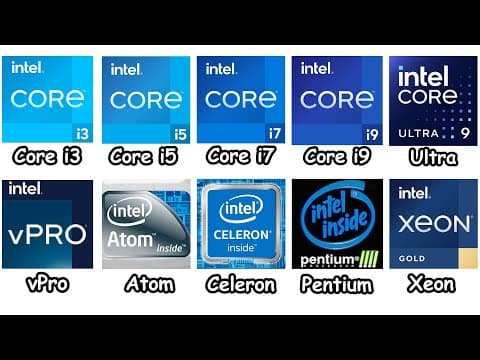
[0:00]Core i3. Core i3 is Intel's low-tier processor that's built for basic computing and light multitasking. It usually comes with four to six cores, which is good enough for browsing the internet, watching videos, or working on several documents at once. You can even play some light games too, but if you try to run heavy work like rendering or modern AAA game, it's possible but there's going to be some lagging and stuttering. But that's actually what makes this processor cheap and a good entry level CPU for a budget computer. Oh yeah, another important thing to understand is, if you look at the end of the CPU name, you'll sometimes see a letter or suffix. That suffix actually shows what kind of performance or feature the CPU has. For example, laptop variants of the i3 usually come with the U suffix. This means the CPU will prioritize limiting its power so that the laptop generates less heat and has longer battery life. And this is useful for office workers or students because they don't have to keep recharging their laptop since it can last through an entire day. On desktop, Intel Core processors usually come with integrated graphics. But some versions also have the F suffix, which means those don't have integrated graphics at all. So you need to have a graphics card in your PC. But the good thing is, these F models are usually a bit cheaper. So just in case you already have a spare graphics card, they're a good option for a budget build. And there's also the T version, which is made for low power desktops, making it ideal for compact PCs or office setups because it uses less electricity and has a cooler temperature. Core i5. Intel Core i5 is the mid-tier processor and also one of the most used CPUs by a lot of people. That's because it's still cheap, but also more powerful than Intel Core i3. I5 processors come with six or even 14 cores, which makes them good enough for doing photo or video editing, programming, and of course, gaming as well. But just a side note for you, a higher CPU tier doesn't always mean it's a lot faster and stronger if it's from an older generation. For example, if we compare Intel Core i3 with Intel Core i5 in the same generation, of course, the i5 is definitely stronger. However, if we compare the newer generation of Intel Core i3 against older generation of Core i5, they're actually pretty much equal. Because even though the Core i3 is a lower tier compared to the Core i5, its speed and efficiency will improve a lot if it's from a newer generation. Oh yeah, talking about gaming, sometimes people also compare Intel Core i5 with Ryzen 5. Because in general, Intel has a slightly better performance due to its higher clock speeds and strong single core performance. In terms of suffix, i5 processor in laptop still come with the U suffix, but now it has the H suffix as well. This H suffix means the processor is aimed at gaming laptops because it offers higher performance, but it will consume more energy. On desktops, some i5 models include the K suffix, which means the chip has the overclocking feature. So if you want to overclock the processor, it can run faster than its normal speed. But it needs higher wattage consumption and produces more heat. So if you plan to use this feature, you'll need a better cooling system like liquid cooling because regular cooling fans usually aren't enough to keep it cool. Core i7. Intel Core i7 is a high performance processor for people like content creators who need to run heavy programs and multitasking at the same time. So if you can play a game on high settings with Core i5, with Core i7, you can play your game at high settings while recording your gameplay with OBS Studio, opening Discord, and opening a lot of Chrome tabs without lagging. And it's all possible because Core i7 has more cores, usually around 8 to 20 cores. And in terms of suffix, i7 in laptops usually comes with the HX suffix. The HX is basically like the H suffix, but HX gives you a lot higher performance. It usually comes in some thick high-end gaming laptops because it requires larger cooling systems to cool off the heat. Oh yeah, as for desktops, there is also a variant called KF. It simply means the processor has the overclocking feature, but it doesn't have integrated graphics, which makes it cheaper compared to the one with the K variant. But just to let you know though, people these days prefer AMD instead of Intel, especially for the high-end tier like Core i7 and Ryzen 7. Because while Intel CPUs still perform well, Ryzen processors generally have cooler temperatures at similar or lower prices and offer better performance. Core i9. Intel Core i9 is Intel's flagship processor that's built for professionals and tech enthusiasts. It has 16 to 24 cores, which makes it very powerful for heavy workloads like studio level 3D modeling, reaching ultra graphic settings in heavy AAA games, and 4K video editing. About the suffix, it's just the same with Core i7. So what makes it different is that Core i9 is just more powerful in terms of performance. Oh yeah, however, if we're talking about performance in gaming, more people these days don't even want to choose Core i9. They pick Ryzen 9 instead. Actually, Core i9 is still great, but Ryzen CPUs have the suffix called X3D, which is AMD's processor that has 3D V-Cache technology to boost your performance in video games by a lot without having to consume more wattage. But despite all these pros and cons of the Intel Core i9, most people don't really need a CPU this powerful anyway. Because only people like tech enthusiasts or professionals really need this kind of CPU. Core Ultra. Intel Core Ultra series is the newer generation of the usual Core series. And you can find them in high-end laptops like ASUS ROG and Lenovo Legion. So what makes the Core Ultra series different is because it has a built-in NPU inside the processor. And just in case you don't know, NPU is a chip that handles task that's related to artificial intelligence. So instead of burdening every task to your CPU, which can make it hotter and consume more wattage, those tasks will be handled by the NPU instead, making your laptop run cooler. Some real life examples of NPU being used are when you generate automatic background blur for video calls in Windows Studio effects. Also, when you use the AI generative fill feature in editing software like DaVinci Resolve and Photoshop. But despite all of these nice AI features, most people don't really need this anyway. It's more suitable for professional editors, designers, or anybody with tons of workloads. Intel vPro. Intel VPro is a special variant of the Intel Core series for business. You'll often see VPro versions of Core i5, i7 or i9 in office or enterprise laptops. What makes VPro special is because it has Intel's active management technology and total memory encryption feature. So AMT is basically a remote management feature where IT admins can update, control, or lock many computers remotely, so they don't have to fix it one by one. And the total memory encryption means it can encrypt your login credentials, encryption keys, and other text-based files that are stored in the memory. So if somebody wants to steal your data, the data they get will become scrambled and unreadable instead. Intel Atom. Intel Atom is an ultra low power processor that's built for small and portable devices, so you'll mostly find them in things like point of sale machines used for payments, digital kiosks in malls or airports, and also embedded into devices like security cameras. These CPUs are designed to use very little electricity compared to Intel processors in laptops and desktops, so they barely generate heat. That's why they don't really need fans or big cooling systems like the other CPUs. Intel Celeron. Intel Celeron was Intel's weakest processor series that's literally made for really basic tasks like typing documents. It was mostly used in cheap laptops and office PCs back in the early 2000s, but Intel officially discontinued it in 2023 since nobody's really using this weak CPU anymore. In fact, if you check CPU benchmark rankings of 273 Intel processors, the Intel Celeron series sits at the very bottom. The reason why it's so weak is because it was originally Intel's normal chip, but it came with defects and errors. So Intel decided to disable those defective cores to make them function normally, and then they call it Celeron. That's why if you open one browser tab with Celeron, everything's just fine, but the moment you open two, the whole system starts to lag. Intel Pentium. Intel Pentium was basically the same as Intel Celeron. They both were weak and got discontinued in 2023, but the difference is, Pentium was slightly stronger and more expensive than Celeron. So you could open more browser tabs or run simple office apps more smoothly. It could even handle some games like chess and the classic Doom game. Intel Xeon. Intel Xeon is a processor that's not made for a regular PC, but it's for powerful workstations and servers that handle heavy duty tasks like large scale simulations, data centers, and cloud computing. And Xeon is able to do all of that non-stop without crashing because they have lots of cores like 32, 64, and even 120 cores. Xeon CPUs also support multi CPU setups, so a motherboard can use two or more Xeon processors at the same time to handle those heavy workloads. With all these capabilities, Intel Xeon used to dominate the professional workstation market for years, but these days, Ryzen Threadripper from AMD is taken over because it gives more power and better price to performance. By the way, I also made a cool video about every AMD Ryzen CPU explained. So don't forget to watch it later, okay?
Every Intel CPU Explained in 9 Minutes
Byte Sized Explainer
9m 30s1,708 words~9 min read
YouTube auto captions
Transcript source
YouTube auto captions
This transcript was extracted from YouTube's auto-generated caption track. The transcript below is server-rendered so it can be read, searched, cited, and shared without opening the original YouTube player.
Pull quotes
[0:00]Core i3 is Intel's low-tier processor that's built for basic computing and light multitasking.
[0:00]It usually comes with four to six cores, which is good enough for browsing the internet, watching videos, or working on several documents at once.
[0:00]You can even play some light games too, but if you try to run heavy work like rendering or modern AAA game, it's possible but there's going to be some lagging and stuttering.
[0:00]But that's actually what makes this processor cheap and a good entry level CPU for a budget computer.
Use this transcript
Related transcript hubs
Watch on YouTube
Share
MORE TRANSCRIPTS


