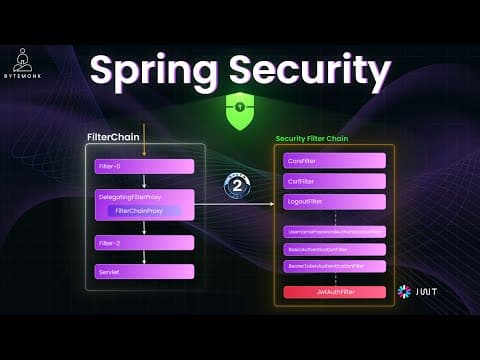
[0:00]Spring Security is a module that works seamlessly with Spring Boot and Spring MVC. It just plugs in naturally. It handles a ton of security concerns right out of the box, from login forms to JWT authentication. And hey, if you haven't already, check out my previous video where I broke down Spring MVC, Spring Boot, Dependency Injection, and Inversion of Control. That'll give you the right context to follow along here. In this video, we'll break down what Spring Security is, dive into how it works under the hood. Filters, security context, user details, password encoding, and then build up step-by-step how to use it in real app. We'll cover from login, custom user setup, method level access, JWT, OAuth2 login, CSRF, CORS, and how to tie it all together with clean config and code examples. So, let's get started. Spring Security has two main goals: authentication and authorization. Authentication is about verifying who the user is, and authorization is about checking what the user can access. It is a powerful framework that plugs right into your Spring app and handles authentication (who you are) and authorization (what you are allowed to do). And it's not just about login pages; it also handles password encoding, role-based access control, session management, OAuth2, JWT, and more. And it does all this with sensible defaults, but also gives you full control when you need it. Now, before we move on, let's talk about filters for a second. In Spring or Spring Security, filters are the first line of defense. Think of them as guards at the door. They inspect every request before it even touches your controller. Spring Security gives you full filter chain of built-in filters, like UsernamePasswordAuthenticationFilter, which handles form logging, processes login forms, reads username, password and triggers authentication. There is also BasicAuthenticationFilter that handles HTTP Basic Auth. It reads authorization basic headers and validates them. BearerTokenAuthenticationFilter is used for OAuth2 resource server or JWT bearer tokens. It expects an authorization bearer token header and verifies it if you are using Spring's built-in resource server support. And by the way, I have done deep dive videos on both OAuth2.0 and JWT. So, if those concepts feel a bit fuzzy or unclear, definitely check those out later. Links are in the description, or you can find them in my security playlist, also listed in the video description. Now, sometimes you might want to add your own filter. That is when you are doing something custom. For example, if you're rolling your own JWT login system, like manually creating tokens on login, storing them on the client, or validating them yourself, then you can implement something like our JWTAuthFilter. Basically, adding a custom filter into this chain. And here is how to plug it in. This tells Spring Security, "Hey, check this token before trying any standard username-password authentication." Note that custom filters can be placed anywhere in the filter chain, before or after specific built-in filters. And you can define the position explicitly using this code. So, when a request hits your app, Spring Security intercepts it using a filter chain, like a gatekeeper that decides, "Is this user authenticated?" "Do they have permissions to access this endpoint?" If not, it blocks the request or redirects to login. It uses the Security Filter Chain, and behind the scenes, it connects with UserDetailsService to load user information, typically from a database. Here is the flow at a high level. User sends login credentials. Spring Security's filter captures the request. Spring Security then needs to fetch the user details, like username, password, and roles. That's where UserDetailsService comes in. UserDetailsService answers the question, "Who is this user?" It's an interface with a single method. You implement this to tell Spring how to find users. Maybe from an in-memory store, a database, or even an external API. This basically tells Spring, "Here's how to look up a user from my DB." Now, Spring doesn't store passwords in plain text, thankfully. It needs a way to compare the hashed password from your database with the password the user typed in. And that's the job of PasswordEncoder. So you define a bean like this. Credentials are then validated using a PasswordEncoder. So here, BCrypt is a secure hashing algorithm that's built right into Spring. When the user logs in, Spring will take the raw password from the login form, hash it using this encoder, and compare it to the hashed value from your database. If they match, authentication is successful. It creates a security context and stores it. Every future request uses that context to verify access. Let's see it in action. First, add this dependency to your Spring Boot app. And boom, your app is now secured. By default, every endpoint requires authentication. Spring auto-generates a login form, a default user is created with a random password (check your console). Now let's say you want to define your own user instead of using the default, and this is how you configure this. Here, this code registers an in-memory user named 'admin' with password 'password123'. Now, let's say you only want admins to access /admin and everyone to access /public. And so here, this code gives you fine-grained control over who can access what. And if you want to let users log in with Google, GitHub, or Facebook, Spring Security makes this super easy. Here, if you add this to your application.yaml file, Spring will automatically generate an OAuth2 login page, it will redirect to Google, and handle the callback. But here is the important part: don't hardcode this in your source code or commit them into Git. Instead, use environment variables or external config files and reference them using placeholders. This way, you're not leaking sensitive data, and your secrets stay out of version control. I have also talked about CSRF, or Cross-Site Request Forgery, previously in detail. Spring Security enables CSRF protection by default for non-GET requests such as POST, PUT, and DELETE. This helps prevent unauthorized commands from being sent from authenticated users' browser. But if you are building a stateless REST API, it's common to disable CSRF. Why? Because in stateless apps, there is no session, no cookies, so CSRF attacks aren't effective. I have also covered CORS in detail in my previous video here. It stands for Cross-Origin Resource Sharing. It's basically a security feature built into browsers that block requests made from one domain to another unless the server explicitly allows it. For example, if your front end is using http://localhost:3000 and it tries to call your Spring Boot backend at http://localhost:8080/api, without CORS enabled, the browser blocks that request with error like this.
[7:29]Spring Security blocks CORS by default. You need to configure it in two places. First, you define CORS mapping configuration to allow specific origins. For example, here we set allowed methods to GET, POST, PUT, and DELETE, and set allowed headers to Authorization and Content-Type. And then, you enable it in Spring Security. So you add this code in your filter chain. Basically, CORS is enforced by browsers, not Spring. Spring needs to be told, "Yes, it's okay for this frontend to call me." You fix it by defining allowed origins and plugging CORS into the security config. As you have seen so far, Spring Security gives us powerful annotations to control access at the class and method level. And here are some of the ones you'll use most often. @EnableWebSecurity turns on Spring Security for your application. Without this, your security config won't kick in. @EnableMethodSecurity is a new way. This enables method-level security using annotations like @PreAuthorize. In older versions, this was called @EnableGlobalMethodSecurity. @PreAuthorize is used before a method runs, and it's great for fine-grained role-based checks. It also supports SPEL, or Spring's Expression Language. So you can even do like this: only allow the users to access their own data. And similar to @PreAuthorize, @Secured is simpler. It just checks for roles. It's less flexible than @PreAuthorize, but still widely used. So, those were the four most common annotations you'll use a lot. As you go deeper into Spring Security, you'll come across more powerful annotations like @RolesAllowed, @WithMockUser, and others for method level and testing scenarios. But don't worry about memorizing them all now. You'll pick them up naturally as you start building more secure and complex apps. Alright, we have covered a lot in this video, from how Spring Security works behind the scenes to filters such as JWT, OAuth2 login, CSRF, CORS, and even method-level access controls using annotations. It might feel like a lot at first, but once you understand the flow, Spring Security becomes one of the most powerful tools in your toolkit. It handles security in a clean, pluggable, and very Spring-like way. And if you found this video helpful, drop a like, leave a comment with what you want me to cover next, and of course, subscribe if you haven't already. I'll see you in the next one.


