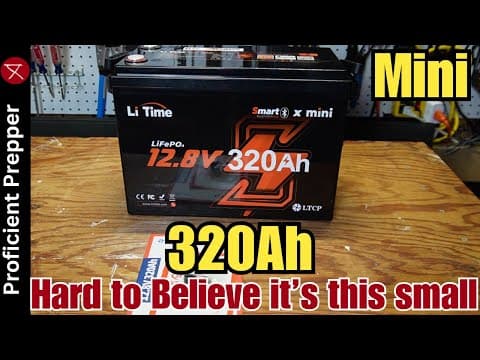
[0:00]In this video, I'm going to take a look at this Li Time 12-volt 320 amp hour mini lithium iron phosphate battery. Yes, it's a mini battery with 320 amp hours and a 200 amp BMS. It's hard to believe they could fit so much 12-volt power into such a small package, which is actually not much bigger than a standard group 31 size battery. I can't wait to see how they've packed everything in there when I open this thing up. I'm going to run this battery through some tests, cover the price and give you my final thoughts at the end. So, here's what came in the box. We have, of course, the battery and the ABS flame retardant case. We have one set of terminal studs with protective caps and actually some washers in there, which is unusual, in case you needed those. We have a quick start guide and we have a product manual. I just want to mention how well this thing was packed. Look at the size of that foam. Really thick foam, it's wrapped in a plastic bag. This is on the top and another one of these on the bottom. So, when the battery arrived, it was at 13.14 volts, which means the battery is somewhere around 50% state of charge, which is perfect for storage. Okay, let's take a quick look on the outside of this battery. It says here, this is a smart BMS, which that term to me is a little bit vague. I know it means that it has Bluetooth and a mobile app and things like that, but there's probably some other advanced features I'm not really sure about. Uh, 320 amp hours, low temperature charging protection, which I will be testing. Uh, these handles. These are handles on the side a little bit different than what I'm used to. They're a little bit larger than the straps, these ropes and these different style handles. That's I guess for the added additional weight. Uh, 400 4,096 watt hours. It is a mini battery, which I'll show you to compare it with another normal battery in a minute. And I guess that's about it. Uh, let's take a look at the top. Okay, so here's the top of the battery. We have the color-coded terminal studs here on this end. We have the basic specs of the battery, which is nice to have them right on the battery. Have a QR code for pairing with mobile app, which I'll be covering and the serial number, which also the mobile app wants. Uh, we have a QR code here for downloading the Leetime mobile app to take a look at the battery. I'll be taking a look at the mobile app as well. So, here's Leetime's uh, outboard motor uh battery. I did a video on that, if you're interested in that, but I just want to show a comparison of a 320 amp hour 12-volt battery and a 100 amp hour 12-volt battery. Now, look at the size difference. There's not that much difference. Let's just turn it to the side here, see if we can. As you can see, it's not really that much bigger. Let me give you an overhead shot. So, here's a 100 amp hour battery here.
[2:43]And let's just take a look at them compared overhead. As you can see, not a big difference. Now, weight, this one weighs 57 pounds and this one weighs I believe 22 pounds. I'll put it up on the screen. Now, you would think 3, 3.2 times the energy storage, it'd be 3.2 times the weight of this one, but it's not. So, I don't know how they've saved that weight, but they did somehow. Okay, I'm getting ready to start the battery capacity test. At 320 amp hours, this is going to take a while, so let me check back in once that's complete. Okay, so that took a total of 30 hours to complete. Uh, so how do we do? So I have a rated capacity of 320 amp hours and 4,096 watt hours. We did 326 amp hours and 4158 amp hours. So that's a pass. All right, getting ready to start the max load test. Just some quick notes before I get started. I had an ANL fuse here that's only 250 amps, and I think it would have been okay, but I was afraid I might burn it up and I didn't have a bigger one. So, I did have a 300 amp mega fuse, so I put that in here. That should be plenty for this test, more than enough. Um, oh, and the uh, terminal fuse, I usually use to protect the wire between the battery and the uh DIY solar generator here. I had to remove that because it was only 200 amps. But I, uh, normally I wouldn't do that. I'm just doing it for this test here. So, I've got a space heater here and a oil heater here on the floor, and we'll be using both of those. And we'll pull up the mobile app here in just a second, but let me, um, zoom in here, and I'll get this started.
[4:20]I'm going to try to draw 200 amps for about a minute, and then I will, uh, see if I can do my maybe 250 amps, whatever I can throw at it here for maybe 30 seconds or something. Let me turn this on. And here the inverter fans kick on. Let's turn this side of the oil heater on. I've got one more side I can throw at it, so if you see where we're at, we're at 200 amps now. So, let's get this started.
[4:47]And I'll run this for one minute.
[4:56]Sorry. Okay, that was no problem. Then we'll throw everything at it. And we're up to 272 amps. See how long we can hold that, 276 on the mobile app. All right, we turned off. Now, I never heard, I never did hear the, um, inverter beep. So that tells me the battery did shut off. Let's see what we have on the mobile app here, any warnings, anything. Let's see. BMS. Over, yeah, so discharging over current protection has kicked in. So that is good. That's what we wanted to see. So discharge function has been stopped. Click to activate, to kick back on itself. But let me turn off the oil heater here. All right, good. So, we were able to actually, um, trip the battery and it did cut off just like it should. Okay, so just got the lid loose. And, uh, see what we're seeing in here. Let me take the camera off the tripod. Okay, see what we can see here. Uh, so the first thing I notice is that it is a Leetime branded BMS. I'll pull back that, pull back the, uh, padding in just a second. And it looks like we have four large cells in there. It's maybe hard to see this, I'm going to try to pull that out, of course, in a second. Hopefully I can get that out. And we have what appears to be, yeah, there's two wires in there. I don't know what size they are yet. I'll cut that back in a minute. And for the negatives, it looks like we have six number 10 gauge wires.
[6:50]Okay, so, let me see what else I can pull back here. Okay, I was able to pull back. This piece of foam here, that's just the Bluetooth QR code, and we have a part number there, if that means anything to you.
[7:13]Now, to show you the wire size, I did have to, I did peel back this and finally found it. It's way up under there. Let me put it on the tripod so I can show you what that says. All right, I'm going to try to peel this back where you can see it. Hopefully you can read that. It says six gauge wire. So, we have two six gauge wires in there, which should be enough. So, I've already checked all the leads here and they're all very tight. That bus bar is moving there, but the lead is tight. Let me see if I can get this uh battery pack out of the case. Okay, so I have failed miserably at pulling this out of the case. Uh, I can normally do that, but this one is, I don't know if they just heavily glued it or secured it to the bottom somehow. But I just can't get, get it out of there without just completely destroying the case, and I don't want to do that. But I was able to find a QR code here. Let me see if I can scan in and show you, and I'll, I'll put that through the QR code scanner and show you up on the screen, which shows that it is a Sunwoda, I don't know if I'm saying that right. I'm not familiar with these at all. If you are, please put that down in the comments and share with us. I'd like to learn as well. I did go to their website and found that they seem to be a fairly sizable company. I'm, I'm just not familiar with them. So, it seems like that's going to be all I can do here opening up this battery. I wish I could pull that out, but I just have to destroy it, I'm, I'm afraid. Okay, I'm getting ready to do a low temperature charge protection testing and not temperature. And I found two low temperature probes. I guess you'd say. So, let's see, the first one here, I'll just point out is right there. It curls and goes up underneath the BMS, and I can't find anywhere else it goes, so I think it's, I think it's just directly connected to the BMS. And the next one is right there, if I can get this to go down a little bit further. Second, sorry, right there, and you can see it right in there. Uh, and it's glued down and taped down directly against the battery cell, which is good. Okay, so let me pull this off and get the test started. Okay, I'm going to do the low temperature charge protection first. Got the power bench supply pushing 5 amps into the battery there. Uh, so it's charging. I've got the probe pulled loose here. Got some salty ice water, and it should be just below freezing. Let's see how long it takes this to trigger the low temperature charge protection.
[9:49]Okay, it dropped to zero. That was roughly nine seconds. I think I was counting in my head, but it was nine seconds. Let's see if it warms up and starts charging again. Yep, there we go. So good. Low temperature charge protection pass. Okay, I'm going to do the high temperature charge protection, and that would probably be coming from the probe that's connected directly to the BMS. So, I've got a heat gun here. I'm going to turn on low. See when it gets hot. Still pushing five. Just about 5 amps in. It's not very hot. Okay, a little bit hotter than that.
[10:31]That should probably do it. Okay, let's see how long we take here. Oh, yeah, that was about about seven seconds, I counted. Let me cool it down. And good, back to charging. Okay, low and high temperature charging protection does work correctly. Okay, I thought I'd take this time while I'm charging up the battery here to show you a little bit about the mobile app. So, when I first got this battery and started playing with it, I, I downloaded the app, and it, it didn't have this guest mode, and then in a few days later, it updated. So now it does, which I know a lot of people like. So, if you just click, I'm just going to do guest mode here. Click at the bottom. It talks about the difference between guest mode and creating an account. Continue guest mode experience and then bottom left is the device, which I've already added. Uh, to add this just click the plus in the top right area of the screen, and then it, you will, uh, scan the QR code and the barcode. So let me click the device I've added. Now, point something out. Sometimes when I open this up, I have to click the little Bluetooth icon in the top right to get it to connect. I don't know why sometimes it does that, but anyway, so now it's connected. Uh, you can see we're 91% state of charge and we're charging. 1.79 hours to a full charge. There's the voltage, current, power and capacity we're at right now. Uh, if you remember earlier when I did the test, the BMS icon was kind of red or orange-looking. Meaning there was a problem, but if you click it now, it shows it's all normal. Before it showed, um, over-current protection, I think. Uh, so the BMS is good, cells are normal. So, if there's a problem, it would turn kind of orange or red and tell you what it was. And there was also a note up here at the top that said what the problem was. So, there's the serial number, the temperature, how many cycles it's had, and the firmware version. Let's see what this bottom right is here. Okay, you can turn, oh, you can turn discharge on and off. You can actually power off the battery and remove the device. And that is about it that to the in the mobile app, very simple, but very excellent thing to have. So, what are my final thoughts? Well, I'm still surprised at how they were able to stuff that much storage capacity into a case of this size. Um, and if so, if you're thinking about that you may need this much energy storage capacity, uh, it's typically better to buy fewer batteries. uh, with larger capacities like this one, so I don't have to use all the wiring and the connectors and and worry about keeping them balanced. It's just, it's also less expensive to not have to buy that stuff. That stuff adds up quick. Uh, regarding quality, as I have found with all my Leetime battery reviews, they always seem to be good quality, and they always live up to what they advertise. Uh, there's also plenty of other highly rated reviews on YouTube of Leetime batteries, including this one. Leetime does have a very wide selection of different batteries for different purposes, so you may want to check them out. I will put a link down in the description below, uh, so you can check out this battery if you're interested. Uh, at the time I'm filming this video, the price on this battery is $640 on their website. But, Black Friday deals may be just around the corner. I'm not sure if this will be included in the Black Friday, if it'll be reduced any, but I do have a 10% discount code I'll put down into the description. I know it's a limited time. I'm not sure how long that will last. Uh, the three, I do have a 3% code that I'll replace it whenever that does expire. Well, that wraps up this video. I hope you enjoyed it, and as always, thanks for watching.