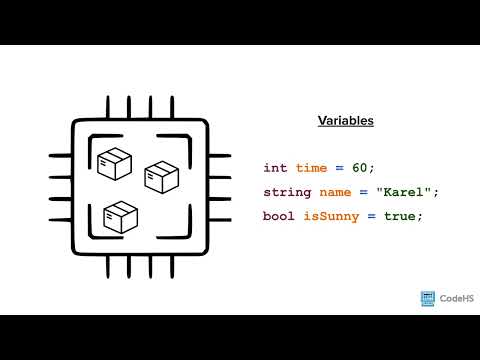
[0:01]Hi, in this lesson, you'll learn about variables and data types. Computer memory can store pieces of information that can be changed or updated throughout the program. One way that programmers are able to store information in a computer's memory is by using variables. While they use the same names, variables in algebra and variables in program are a little bit different. In programming, a variable is a container for a value. You can think of it like a box. Each box has a unique label called the variable name and a type of information that can be stored. In this example, you have three variables or boxes. One is named time to store an integer or a whole number. Another is name to store a string or a series of characters, and the third is is sunny, which is designed to hold a boolean, which is a true false variable. You can then store a value in each of these boxes according to its type. Here the time box contains the value of 60. The name box contains the value of Karel, and the is sunny box contains the value of true. A computer allows you to store thousands of variables with a variety of information that we can access and change as the program runs. To store information in memory, you must first declare or create the variable. This step is important because a variable must be declared before it can be used. If you try to access a variable without declaring it first, it'll cause an error. In C++, to declare a variable, you use the variable type followed by the variable name. Using our box analogy, this line of code creates an empty box called name that can store a string variable. When naming variables in C++, you follow a naming convention called camel case. When using camel case, you put multiple words together without any spaces. You then capitalize the first letter of any word after the first word to make it easier to read. In this example, the variable date of birth uses camel case where there are no spaces between the words and the word of and birth are capitalized. In C++, you cannot start a variable name with a number, so names like first name will not be valid. Likewise, we want to use camel case, so a name like algebra underscore grade should be formatted differently to use the camel case. For now, let's continue with our simple variable called name. Now that you've declared a variable called name, you can assign it a value to store. To set the initial value of a variable, you write the variable, the equal sign, and the value you wish to store in the variable. The equal symbol in programming does not mean the same thing that you're used to it meaning for math. The equal symbol here is called the assignment operator. C++ assigns the value on the right of the assignment operator to the variable on the left. The above line reads, name is assigned the value of Karel. Using box in the box analogy, this line of code inputs the value of Karel into the box labeled name. You can also declare and initialize variables all in one line by using the variable type followed by the variable name, the assignment operator, and the value you wish to store in the variable. The value Karel is now saved in memory associated with the variable name. We can access it whenever we want simply by calling the variable. But what if we wanted to change the value stored in the variable? We would need to reassign it. For example, this line of code creates a variable called name and assigns it a value of Tracy. If you wanted to reassign the variable to have a value of Karel, you would write name equals Karel. Notice how the reassignment statement does not include the variable type. Once a variable is declared, that variable will remain that variable type throughout the program. It cannot be reassigned, so we do not need to restate the type again. Let's take a closer look at the different variable types we're going to use in C++. Strings are a common variable and made up of a sequence of characters and or symbols of any length. A string literal is a raw string value and defined with double quotes. You can then attach that string literal to a string variable by declaring the variable and using the lowercase string keyword. A character is a single letter, digit, or symbol. When declaring a character, you use the car keyword and notice that the character is enclosed in single quotation marks. If you don't use single quotations or include more than one symbol, C++ will throw an error. C++ has two different common number types, integer and double. As mentioned earlier, an integer is a whole number and the negative counterparts to that. But it does not contain a decimal. In contrast, a double is used to declare a value with a decimal number. The last main variable type is a boolean value. Booleans are true false values and are declared using the keyword bool. To assign a boolean value, you use either true or false, but when printing, you will see C++ print a one for true or a zero for false. So here's all the variable types summarized. So it's important to note that C++ does not have as many checks as other languages. This can be helpful for some advanced programmers, but as a beginning programmer, you need to be careful not to get yourself in trouble. Specifically, in C++, you can access a variable type that you've declared, even if you have not initialized it. When declaring a variable in C++, the memory gets allocated for that variable. If it has not been initialized, your variable will hold whatever value was last used in memory at that location, which will be a garbage value. So you have to be careful to make sure when you declare variables that you also initialize them. Okay, let's take a look at this in our code editor. Okay, so let's take a look at some basic variables. If I go ahead and run this program, we're going to see that we print out some different things. We have a number, a double, letters, a character rather, a string, and then we have these bull values. So true is their first one, we print, you notice it prints a one, our second one, false, prints a zero. I'm going to just delete some of this for right now, and just kind of focus in on this number here. So if I go ahead and run this again, you'll see I'm just printing out that one number. Now, I can reassign this value and print it again. So if I'm going to just copy and paste here, if I do that whole thing, it's going to give me an error. It's going to say, oh, you know what, I already have a number one. So I want to actually reassign it by getting rid of the declaration part that tells me what kind of variable, and then reassign it there. Now, notice here I'm reassigning the value, so I first printed as a six, and then I print it as a 10. Now, as noted in the slides, if we actually declare a variable and don't define it, we could get some garbage. We never know what we're going to get when we do this, but let's try it and see what happens. So I run it and I get a zero, and you notice I never assigned it, and so zero may not be the number I want. If I run it again, I probably will get the same number for a while. If I try a maybe a different variable, I'm not sure if I'll get another number. Um, oh, I don't have that one declared. So again, I'm probably getting zeros here, but you just never know what you're going to get, and so you want to always make sure when you define a variable that you define it and assign it at the same time. Go ahead and play around with this yourself.
Variables and Data Types
CodeHS
8m 35s1,394 words~7 min read
Auto-Generated
Watch on YouTube
Share
MORE TRANSCRIPTS