[0:13]Welcome to week five of writing in the Sciences. So this week we're actually going to change modes and jump right into talking about the format of an original manuscript. But first I want to give a little recap of what we talked about last week. So we talked about streamlining your writing process. And I told you that I like to break the writing process actually into three discrete steps. So there's what I call the pre-writing step. This is when you're gathering and organizing your information, coming up with the themes of your manuscript. Uh I like to keep that separate from the next step, which is writing the first draft. This is when you're actually sitting down at the computer composing prose. Uh and then the third step is actually revision, going back and editing that prose. And the reason I like to think of that as three distinct steps is what I think that often times there's a temptation for scientists to just want to jump right into that writing the draft phase. You really just want to get into it and bite the bullet and say, I'm going to sit down today and whip off that manuscript. And the problem with that is that it actually surprisingly turns out to be a really inefficient way to write. If you spend the time up front, as I told you last week, getting organized, gathering the information so that it's at your fingertips, then when you sit down to write, it will be much, much more efficient. You will be able to write much more quickly, and it will be a lot more fun to write. I've also encouraged you to spend more time in the revision step. So when you're writing that first draft, don't feel the need to edit yourself as you go along. Save that step for afterwards. You can go back and make it sound uh better afterwards. So I think this the mistake that scientists make is they tend to spend too little time in pre-writing and revision. And that actually, it might seem like you're going to end up taking less time overall, but in fact, I think you you end up taking more time overall writing the whole manuscript. You can actually uh compress all of the time for writing the manuscript by doing each of those steps well. So that's one of the points that I made last week. The other thing I wanted to add, the other tip that I wanted to add that I forgot to mention last week, is if you find uh writing to be daunting. If if you're, you know, intimidated when you've got to go in and write your manuscript, which is which is true for a lot of people. One of the things that I do to kind of help ease that uh anxiety about writing is to set yourself very reasonable goals for writing for each day. Kind of break your manuscript or your paper up into sections, and what you need to do is just work on, you know, a reasonable set of modest goal for yourself for each of those sections. So, for example, if I've um got a feature story I'm working on, and I'm going to go in and write today, maybe I just say, well, today I want to finish these two sections, I want to write 800 words. And I set myself something that's a very reasonable goal and I'm very confident that I can accomplish. Uh and that doesn't seem so daunting. Imagine if you're driving into work and you're say, well, I've today I've got to write the whole manuscript. Well, that's just, you know, it's one, it's probably unrealistic, you're probably not going to be able to whip out the whole manuscript in one day. And and two, it's just very daunting. Whereas if you say, today I'm going to write the introduction section, or I'm going to write 300 words, set yourself some very reasonable, modest goals, break it up into sections, and that can help really uh make the whole process uh seem easier and more fun. All right, so we'll continue to talk about the writing process as we go through the course, but now I want to actually today focus on the format of an original manuscript. And I'm going to talk about um the original manuscript in the following order. This may not be the order that you're sort of used to hearing and about hearing about original manuscripts, but this is the order in which I write an original manuscript and I this is what I'm going to recommend uh the order, this is the order I'm going to recommend for you. So I think it's best when you're going to write an original manuscript to actually start with the tables and figures first. And I don't just mean kind of putting together some rough data in a table. I mean nailing your tables and figures. Your tables and figures are actually the story of your paper. So you really need to get those down kind of into final form, complete them before you actually write your paper. Each table and figure should tell a story and that together they should progress to tell the entire story of the manuscript. So I recommend getting those down and getting those really well done, having them look professional, kind of nailing down the story in the tables and figures first. If you do that first, then the next thing that kind of follows is then you write your results section, right? Because the tables and the figures kind of leads right into the result section. The result summary section is a summary of what's in your tables and figures. So it makes sense to write the result section next. Then usually, uh the next thing would be the methods. Now, of course, you could write the methods at any time because you've already done the experiments, you know what you did. But uh I put that as the third thing. I find the methods a little bit boring to write. It's not hard to write. But it's kind of boring. You're just kind of rehashing what you did. Um but, you know, I put it as the third step after that. And then the next thing I would do is write the introduction section. And of again, you could technically write the introduction section before you've written these other sections. But what inevitably happens is um, you know, you're you're again, you're telling kind of a story with your with your data and your tables and figures. And the introduction, even though it's it's somewhat independent of what you've found, have kind of knowing what that story is, kind of helps you to set up the introduction section. So I'll write that fourth, and then I'll write the discussion section. That's of course the hardest to write because it involves the most writing, it's the most complex. Um, I'll do that next because that's of course comes after all of these other sections. And then I leave the abstract to write for the very end. Don't bother to try to write your abstract before you've written any of these other sections because the abstract, of course, you're just kind of pulling a little bit out of each of these other sections. So it's much easier to write after you've already done these other sections. So these are the order that I'm going to present things to you today. I wanted to give you a couple of uh good references if you want to do some further reading about the format of an original manuscript. And I've used both of these uh references to help um me it they've contributed to some of my slides as you'll see later. So um, there's a great uh series of articles uh published by Clinical Chemistry. And even if you're not a chemist, um, it's pretty these are, they're pretty generally written and would apply to most scientific disciplines. And he goes through and writes um, about, you know, how to write an abstract, how to write an introduction, all of those things and does a really nice job. So I'd recommend if you've got some time to go and read that, they're pretty short, so it's not too hard to go through those and you can pick out particular articles that uh would be most helpful to you. So a whole series. Uh if you're in the biomedical sciences, there's a really nice textbook by Mimi Zeiger on the essentials of writing biomedical research papers. She goes through in great detail each of the sections of an original manuscript, and in much more detail than I'm going to go through in these lectures. So if you're coming from biomedicine, that's a really good reference if you've got the time to pick that one up. Again, I'll be um using some material from both of those today uh in this week's lectures. So in this first unit here, we're going to talk about tables and figures. And again, tables and figures are really in a way the most important part of your manuscript. And the big mistake that scientists make a lot of times is they kind of do the tables and figures very haphazardly. Let's just I'm just going to throw my this data in a table, throw that data in a figure, and they don't think it through very carefully. So you really want to think through those tables and figures very carefully because they actually found form the foundation of your story. And editors, reviewers, and readers may look first and maybe only at titles, abstracts, and tables and figures. That's what I do as a reviewer. So I got a paper to review, I'll skim the abstract just to get a sense of what the paper's about. And then I jump right to the tables and figures. I want to see that data for myself before I hear what the authors want to tell me about their data. So I look at those tables and figures without having read the text. So that means the tables and figures need to be self-contained. So all the information you need to understand them has to be right there in the table. Acronyms have to be defined, experimental details need to be defined, so that you should be able to look at that table and immediately or very easily understand what it is that the authors were looking at and what it is that they found. Um, so, um, so those figure tables and figures have to each tell a little bit of a of a story. And it should be clear to the reader what what story the table or figure is trying to tell. And they should also progress in that story from one to the next. So I jumped to those tables and figures and I want to be able to figure that story out without having to read the text. So make sure that you know the point of each table and figure as you're creating it. It's kind of like writing the the topic sentence of a paragraph. You need to know what is it I'm trying to convey to the reader in this table or figure and stick to that point as much as possible. Some people would say that the data, which is in the tables and figures, is actually is the story of your manuscript, is your scholarship. And some people call that a manuscript that you write around the tables and figures, just the advertising for the scholarship for the data. Um I picked out a quote here that's specifically about computational science but actually applies across uh instead of the computational part think of putting the data part. So he says an article about computational science in a scientific publication isn't the scholarship itself, it's merely advertising of the scholarship. The actual scholarship is the complete software development environment and the complete set of instructions which generated the figures. And again, you could insert in there, you know, the scholarship is actually the data that you've collected. So in a way, your writing is just an advertising for that data, so they've got to have the whole story in there. So a couple of tips on tables and figures. So first of all, you want to use the fewest figures and tables needed to tell the story. And often um scientific journals may even have limits on the numbers of tables and figures that you're allowed to submit. You don't want to repeat the same data in both a figure and a table. Choose one or the other. Choose to present the data as a table or as a figure, you don't need to have it in both places. And a lot of times one of the decisions you've got to make is what data do I show in a table and what data do I show in a figure. So the distinction is that, you know, figures are really used because they have some kind of visual impact. So if you've got data that really lends itself to a nice, visually appealing figure, think about putting it in a figure. Figures are also used to show trends and patterns. And you have to be able to be able to visually quickly pick up those trends and patterns from the figure. If it's too complicated then uh you better put it in a table. Figures tell a quick story, so if there's a real main point you want to get across to your readers, that's another thing to put in a figure. I really like figures also because they tend to tell the whole story about the data. So if you're putting like means and standard deviations in a table, that's telling you something about the data, but it's not displaying like the range of the data, the variation, all the data points. So um sometimes when you display all your data you're kind of uh airing your dirty laundry, you're really showing the reader exactly what's going on in your data. So that's nice because it's telling the reader the whole story. And often times people will use figures to highlight the most important result of their uh paper. Because again, figures are visually appealing, so that will tend to get the reader to look at them. So if it's the result you really want to highlight to your reader, you might put it in a figure. Uh tables are used to give precise values. So on a figure, you often will not be able to get the precise, you know, value down to the decimal place. So if you think those precise values are important, you might be putting those in a table. And of course, if you have many values, many variables you need to display, a table it is better for for putting a lot of information. So we're going to talk a little bit about how to format a table. So a table's got to have a title, and those are usually pretty easy. You need to make sure that you identify the specific topic or point of the table. Again, what's the story in the table? A couple of things to keep in mind, you want to make sure that you repeat the same key terms in the table title, the column headings of the table, and in the text of the main text of the paper. As we talked about a couple of weeks ago, it's okay to repeat those key terms because you want it to be consistent so that the reader's not confused. So make sure that those match exactly. You want to also uh keep the table title as brief as possible. Uh but make sure you have all the key information in there. So an example would be something like descriptive characteristics of the two treatment groups. You might want to specify what those the treatment group names are, I've just made a generic title here. Means plus or minus standard deviation or N percent. So you're telling them exactly what data are presented or what statistics are presented in that table. Tables will also have footnotes. So um it can get kind of confusing because what symbols do you use to denote the footnotes? Well, some journals will have one, two, three, four, other journals will have A, B, C, D. Some journals will have a series like star, double star. So, you don't want to figure that out on your own. Just when you're starting to build your tables and figures, try to at that point identify what journal it is that you're going to be submitting to. Then go pick up that journal, pick up a published article from that journal and just look and see what um what superscript symbols, what footnote symbols are used in that journal. Each journal has its own set of guidelines, and the best way to figure out those guidelines is either to read the author's instructions, or even easier, pull a paper from that journal and just copy what they've done because uh every journal will have its own preference, and you might as well format the table for your particular journal that you're targeting. You're going to use footnotes to do things like explain statistical significance. If you put little star to indicate statistically significant differences, you got to explain what groups those refer to, what test was used, uh what the actual P values are, if you want to be more specific than 0.05. Uh use the footnotes also to explain experimental details or abbreviations. Again, the table has to stand on its own, so you can't just use acronyms in the table that you've defined in the text, you have to redefine those within the table. As we talked about before, try not to flood your paper with acronyms though. Um but if you're using them in the main text, be consistent, use the same acronyms in the table, but make sure you define them in a footnote. Also things like if there's particular ways you define variables that aren't standard or that the reader might not be sure of, because the table has to stand on its own, you got to define those again in the footnotes.
[14:20]So again, uh in terms of formatting the table, all of these little decision points you've got to make. Like, do I capitalize the the variable names in the table? Do I flush them left or center? Uh do I use italics? Where do I put the footnotes? What are the footnote symbols? All those little decision points, don't try to reinvent the wheel and figure them out from scratch. Just go pull a published paper that's right from the journal that you're targeting and just copy what's in there. Every journal has its own set of style guidelines. You might as well make your tables look like other published papers in that journal. That is uh helpful in terms of getting your paper um in the journal because if an editor looks at that and says, oh yeah, that looks professional, looks like things in our journal. So that's actually very helpful. Another thing to point out about table formats is keep in mind that most journals, the standard really is to use three horizontal lines in your table. So you put one above the column headings, one below the column headings and one below the data. And a lot of people the first time they create a table, for some reason aren't really haven't paid attention to that and aren't aware of that. And so they come up with very funny things in terms of where they're putting lines and I'll show you in a minute that looks very unprofessional. So here's an example table. I made up some data. My daughter right now is really into the Wizard of Oz. So uh there's a line in the Wizard of Oz where the good witch is asking Dorothy, are you a bad witch or a good witch? So they have bad witches and good witches. She's very into that. She's too uh right now. So, uh I thought, well, imagine that we had some data on bad witches and good witches and we wanted to put them in a table. So, uh I've got a group of 13 bad witches and 12 good witches in my study. I've collected some descriptive characteristics on them and I've put them in a sort of a typical table one that's describing my study population. So this is what a typical table would look like. Notice the three horizontal lines. So if you haven't ever kind of paid attention to that before, just kind of get that in the back of your mind that most journals you'll have uh sort of three horizontal lines. Again, there may be variation with different journals, so you want to go to that journal and see what their standard is, but this is pretty much the usual thing is to have those three lines. Um you'll also see sometimes, you know, uh some journals will also highlight with some graying each row. So that helps the reader to to kind of distinguish from one row to the next. And so that also looks very professional and that's done by a lot of journals. So either of these kinds of formats looks good, looks professional. All right, so, um, I'm now I'm going to show you some things that you don't want to do in your tables. Okay, so first of all, I mentioned earlier, uh the use of lines. The importance of getting those three lines correctly. So here's a table in which they have included all of the grid lines. And you might think, well, what's the big deal? So what? They left in the grid lines. Who cares, right? This is such a minor detail, it's nothing to do with the science. Okay, that's a fair point, but let me, let me tell you, um, a little story that I like to tell my Stanford uh students. So, um, that doesn't look, if you look at that table, it doesn't look like a professional table because that's not the way they're formatted in the literature. It looks different than a professional table. And so I always emphasized this very heavily with with my student at Stanford. Because I've reviewed so many papers over the years that at some point, I kind of realized, I noticed that whenever I would get, you know, again, I turned to the tables and figures right away. That's the first thing I look at. So I'd kind of noticed that whenever I flipped to the tables and figures and the first thing that jumps out at me is a table with all of the grid lines, uh I kind of noticed over time that that those papers tended to be written, um, possibly by somebody who was the first time they've written a paper, or just someone who it it turned out that that tended to correlate with problems elsewhere in the paper. And so over time, I think I've formed an association between papers that have tables with all the grid lines and other problems in the paper. Because I think uh again, it tends to be people who are new to writing a paper, don't know how to format the tables, or just are not paying that close of attention. And so I kind of made this connection in my head. So when I flipped to the tables and see all those grid lines, there's a little red flag that goes off in my head that like, oops, this is going to be an unprofessional paper and the paper, you know, often times does have other problems in it.
[19:02]So the problem is if you submit a paper with all those grid lines, or you've got this kind of unprofessional looking table, it sets off this little alarm bell in people's heads even if they're unaware of it. But they've got that association for being exposed to lots of papers that when you come out with all these grid lines, it just tends to be a bad paper. Not always, but it tends to be more uh likely to be a bad paper.
[19:31]So, so it's important enough that I like to spend some time on it. So figure out in your word processing program how to get rid of all those extra grid lines and just have the ones that match what's in a professional paper. Make your table look professional. Along those same lines, a couple of other things you want to do to make sure that that table looks professional. Um, you know, you want to make sure that you've got all your columns, all the data is lined up correctly. Uh, they don't usually look as bad as this, um, but I've obviously done this for a fact. But sometimes you'll have things like decimal places that aren't lined up. Like all the decimal places should be lined up. I don't have any decimal places here, but uh you can see that it just kind of looks unprofessional. Things aren't lined up nicely. Uh I've varied here between capitals and no capital, so it just kind of looks unprofessional. So again, really make sure that you're spending the time to make that table look professional. It makes a big impression on your reader and your reviewer and editors. Another little problem that I see with a lot of uh tables is people love to go out to ridiculous numbers of significant figures. Ridiculous numbers of decimal places. And I think that is just because you put something like age in your statistical analysis program. And your computer can average those ages and come out with, you know, as many decimal places as you want in the average. So you can get a number out of your computer like 36.007. But of course, do we really need to know age in the mean age to three decimal places? We don't. It's not important to go that far out, and it makes the table look cluttered. So go back and make sure that you're not putting in too many decimal places. I generally recommend having no or one decimal place in clinical data. Now, of course, if you're measuring things very precisely uh in other fields, you may need to go to many decimal places. But really go out only to the decimal places that you can claim as significant figures, and even then, you might want to go out to fewer if it if it looks better in the table and you don't need to be that precise. Make sure that in tables you always give units. So a lot of uh students when I get uh paper from them, one of the things they tend to leave off are the units. Again, you're kind of cranking things out in your statistical analysis program, and you forget about that all these variables come with a unit. So for example, age here, well, obviously, if you look at 45 and 36, you would guess that this is years. But hey, it could be months, right? We don't know for sure, maybe we're looking at bad witch and good witch toddlers. Um, so you, you need to specify. Again, BMI, we can probably guess the units, blood pressure, we can probably guess the units. Uh but you get down to exercise, and I've got 30 and 60. Well, is that 30 minutes a day? Is that 30 minutes a week? Is that 60 minutes a uh a year? Is that 60 hours a year? There's no way to tell without having the units. So make sure you're always very specific, it's very easy to tell what you're referring to and what the units are. And then the final tip on what not to do on tables is there's also a tendency to want to put too many columns in your tables. So I had a nice kind of crisp table to begin with, bad witches and good witches. We want to compare them, see what's similar and what's different between them. And that's probably was the story of that table. What's the difference? Well, bad witches if, you know, they exercise less, they seem to be less healthy and then in my made up data. Uh they're a little bit more unemployed, they tend to smoke more. So that's the main point of that table. Now, a lot of people will then say, well, oh, okay, well, let me just keep adding data. So let me add an overall, my computer calculated that, my my statistical analysis program calculated that. So let me throw in a column that shows the overall. Well, you can see that we don't really need the overall column here because I can look at, you know, well, bad witches on average are 45 years old, good witches were really younger at 36 years old. Uh you can kind of average that in your head, you don't really need the overall to be given separately. And also that's not the most important thing here. The comparison is the important thing. Additionally, you'll notice in the original table that I'd showed you, I had indicated P values with um subscripts and footnotes. And um what I just showed you what's significantly different and what's not significantly different. Here I've added an additional column with all the P values. Now, there may be instances where it's important to show the exact P values for all the different variables. But I don't think that is the case here. Here we really want to know which ones were significantly different between the groups and which ones weren't. And that's all the reader really wants to gather.
[24:37]And now the reader's got to go through the work of looking at each of those P values and figuring out which ones are different, whereas the star really drew the reader to which ones were different. Plus we don't really need the exact P value information here. So it's just another column that makes that table more cluttered and hard to read and kind of takes away from the main focus of that paper. So try to get rid of columns that really aren't necessary. Don't try to put too much in your table. Stay focused on that main point.
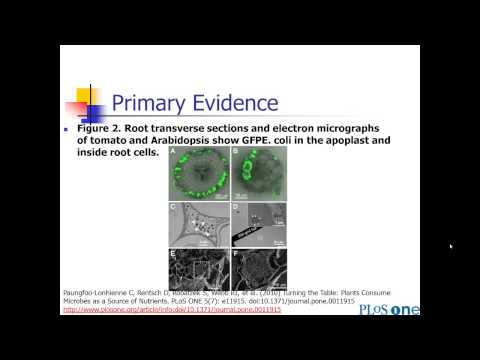
[25:10]So that's my main messages with tables. So then figures. There's three types of figures that we're going to talk about. So uh there's what we call primary evidence. That would be things like gels, photographs, X-rays, micrographs, pathology slides. They're in there to show the quality of the data. And also just because there's a sort of a seeing is believing element, right? So if you see the gel, you see the X-ray, you see the original raw data, you really, you know, kind of feel more confident in that evidence than if somebody just tells you what was in the gel. So um in a lot of uh disciplines it's very important to have that primary evidence in there. Those are usually pretty straightforward to create because you're just taking a picture. Um then we get into graphs. So these are graphical ways of displaying your data. And I'm going to talk a little bit more uh about some of these. So there's things like line graphs, bar graphs, scatter plots. Again, it's a different way to show your data than to just summarize it in a table. It's a little bit more complete and also gives a kind of a a nicer story. It's easier for the reader to get information usually from the graphs than the tables. And then finally, there are drawings and diagrams. And these are probably underused in the scientific literature. These have some really nice purposes. So you can use them to do things like illustrate the experimental setup or the workflow. Indicate the flow of participants or sometimes it's nice for illustrating, if you've got an idea about a cause and effect cycle, you can, uh, you know, or cause and effect relationships or a model. You can put that in a little diagram that can be really helpful in kind of tying together the concepts for your reader. And sometimes people will like to represent uh microorganisms and micro particles as little cartoons. And that can be nice for your reader to give them a visual of something they otherwise couldn't see. So I'll go through each of these in turn. Um, of course, all of your figures will have a legend. And again, you need that legend so that the figure can stand alone. So it's got to contain a a brief title, uh essential experimental details so that the the reader doesn't have to go back and read that main text. This is where you're going to define symbols and line or bar patterns uh to say which group is which. Hopefully you make those easy on the reader. Or you might explain what's in each different panel, if you've got a series of panels. This is often the case. And this is where you put the statistical information, what tests did you use and what were the P values if you're doing statistical comparisons. So here's an example of a figure legend. I'm not going to read the whole thing. Um but the title is root transverse sections and electron micrographs of tomato and arabidopsis show GFP E. coli in the apoplast and inside root cells. This was a paper where they were showing that plants uh actually eat microbes like E. coli. This is kind of a cool paper, has some cool images. Uh you notice that there's a lot of different panels in this figure. I'm going to show you this figure in a minute. So they had to define very carefully what all those different panels are. They also have some letters in the figures and arrows, and they're telling you what those letters and arrows are in the figure. So you can read the figure, you have all the information you need right there. So here's the figure that goes with that legend. So it's kind of a cool picture, right? They're showing all those little green parts are the E. coli that are being taken up by the plant roots. So the the plants are actually eating the E. coli, which is kind of cool. You'll notice all the little white arrows and, uh, there's some letters like EM and R, all of that's defined in the figure legend. So this is primary evidence. They're showing you, hey, you know, here it is. Here's the green, here's the E. coli in the plant roots. So you're going to again, you're seeing is believing. You're going to believe that that's that's actually the case. Or there's typical another typical primary evidence thing would be like a gel. You actually want to see those bands on the gel. So here's the bands on my gel to prove what I'm trying to prove.
[29:49]All right, graphs. We could have a whole course on graphs. So I'm going to give you the uh eight-minute version here of graphs. Um, there's a number of different ways that you can represent data graphically. And again, you really need, you know, a whole course on data visualization to to do justice to this. Um topic but I'm just going to name a couple of different types of graphs that just so you know some of the possibilities that are out there. So you'll see things like line graphs, scatter plots, bar graphs, individual value bar graphs, histograms, box plots, survival curves, there are others that you could come up with, but probably these are the most common.
[30:44]And I'm going to talk about a few of these that are that come up very commonly. Again, I'd recommend if uh you're going to be writing a lot of scientific manuscripts, those figures are so important that you really do want to train yourself well on data visualization.
[31:02]It's becoming more and more important as we get, you know, more and more um things online these days. Now you can have colors in your manuscript, which you didn't really used to be able to do. So, think of think carefully about data visualization and and it's a it's a topic for another course, but I'll give you the the very, very quick uh my quick version. Um so, uh so first of all, line graphs. So line graphs, I really like because they're used to show trends over time. And sometimes time, you might be trends over time, age, or dose, but kind of similar to time.
[31:48]It's used to show trends. And you can display, usually people will display the means and standard errors of of different groups. Um sometimes if you have a low number of uh participants in your study, you could actually have individual lines and that's kind of nice too if you have if you can display them all in one graph.
[32:15]So here's an example of a line graph.
[32:29]They're comparing um two groups here, a control and a treated group, and it's this is really a dose response because they're trying over different um levels of DPI. They're looking at the number of positive cells, and you can see that it's kind of flat in the control group and that there's something happening over time, the trajectory, or over dose, I should say. And that's what a line graph is meant to show. And again, see the nice colors that they have there. This one, you know, you have to think a little bit about what those stars mean above, but that is something to do with statistical um significance. But anyway, that's an example of a line graph and they have good uses when you're doing something over dose, age, or time. Bar graphs. Everybody loves bar graphs because they're really easy to understand. They're generally used to compare groups at a single time point or a single dose. They tell a quick visual story. Everybody can get what's on a bar graph. So that's nice because it's really easy on your reader, your reader doesn't usually have to do much work to understand what's in that bar graph. So here's an example, this was from that same uh study on looking at tomato plants eating E. coli. And so they have um two controls here and a treatment. And you can see that, you know, A, B, C. Now, of course, uh there's a few things that notes I'll make on this um bar graph. So so it's not immediately obvious to me what the A B C's are, so that's one thing to keep in mind is there a better way to indicate whatever they're trying to indicate there without making the reader have to go to the figure legend and figure that out. The other thing about this one that's maybe not quite as visually appealing as you can get on a bar graph is that they've left the bars uh with white space. And that's leaving a lot of white space in that graph. So visually it's not quite as appealing as it could be. So I'll give you a a more visually appealing bar graph. So notice this one, they've actually filled in that bar with a little gray. So that's just more visually appealing. This one's also a little bit higher resolution, so it looks nicer. Um, the other thing to point out about this bar graph is I really like the fact that they've put the ends in each of those groups on the bar graph. Because that's one of the problems with bar graphs normally is you don't know what the ends of the groups are. And it could be that those groups are very different sizes and things like that. So they've indicated the ends on that. So it's nice to do that on a graph when you can. So that's a nice little bar graph showing um something's increasing over uh different concentrations.
[35:05]Scatter plots. Okay, one last thing I want to point out on graphs. Again, this is the very quick version of of graphs, but just to point out sort of the most common ones and what they're used for. Scatter plots are used to show relationships between two variables, particularly linear correlation. I personally love scatter plots because it shows all the data. So unlike a bar graph, which maybe just shows the average, or a table, which you're just going to report the average, the scatter plot shows everything about the data. So it's going to show the good and the bad about the data and really, really gives the reader a sense of what's actually going on in the data instead of just kind of one version of what the data say. So I love scatter plots for that reason. Um it it is again, airing your your dirty laundry a little bit, but it's really allowing the reader to make a really good assessment of what's going on in your data. And also shows you how many people are or how many subjects are in in your data set. Um one thing to keep in mind, just one little point I'm going to make on scatter plots. So here's a nice scatter plot again, sometimes they'll be used to show like a linear relationship. So this one actually came from a theoretical model, so that's why that relationship is quite clear that as the log CE goes up, the log say CF goes up and that's a really nice, clear linear relationship. They superimpose the best fit, a linear regression line here, which is appropriate to do and it's showing you kind of the pattern. Just be a little careful though when you're superimposing lines on scatter plots. So I'm going to show you something here. So here's a scatter plot that I made I just made up data where I'm relating some made up data on vitamin D to uh some kind of cognitive test called the DSST score.
[37:22]The details of that are not important, but we've got two variables that we're trying to relate here. And I've plotted them, and then I superimpose a line here. Sort of probably, you know, trying to indicate something about uh the correlation here. And so if you look at that line, you know, your that line kind of draws your eye. If you look at that picture, you go, oh yeah, there's a, yeah, that's Vitamin D levels go up, it's a little, it's not a strong relationship, but there's uh some increase in DSST scores. It looks definitely like it's an increasingly, linearly increasing to some extent. With the line there, that's what you see. But it's actually completely a visual illusion. So it's not actually increasing at all. So here if I take the line off, you can see, and these are made up data, so I know that there's no relationship between those two things, that it's actually a completely flat slope. So there is no relationship here between vitamin D levels and DSST score. But when you put the line on, oops, and suddenly looks like there's an increasing relationship. So be careful when you're superimposing lines because it often makes the relationship look stronger than it really is, and that can be a little bit misleading. A couple of tips on graphs. Again, the graphs are supposed to tell a quick visual story, so you want to keep it simple. You want to make it easy on your reader. So there's lots of graphs that will have like triangles for one group, circles for another, squares for another, and they're often really, really hard if you you have to, you know, have really good eyesight to differentiate the triangle from the square. Not only that, but you got to keep track of which group is my triangle, which group is my square. So sometimes it's really nice to do something like put inside, you know, put um for your plotting symbol, put a circle, and then put like C for control inside that circle, or T for treatment. So that it's easy for the reader to to know or to guess, well, C must be control, T must be treatment. Do something that makes it easier for the reader. Use colors. Um, and keep in mind that if your figure is coming out to your graph is coming out to be too complex, maybe that data actually belongs in a table. So I'll give you a couple of examples where I think maybe they tried to put too much in in a graph. So, so here's an example, um, I really like the the line graphs on the left here of my left of the screen. Um, you can see that there's four groups, and the proportion of cooperation is going down over time in all the groups, but one of the groups seems to be different. That group in red seems to be different than the other three in terms of the trajectory. So that's telling kind of a nice story. You kind of move over, they also added in this uh figure uh a bar graph. And it's summarizing the same data that's in uh the line graph. What they did is they averaged sessions five through 10. So they wanted to show you like statistically, uh the red group is higher than those other three. And that's what they're doing with all those stars, but you can see it kind of gets very confusing. There's a lot of stars here going on, so it's trying to tell you which groups are significantly different than another, but it's really hard to to get that information from from the it's too many stars on there. They're also, you know, the information I think is better presented as a line graph rather than averaging over five sessions, which loses a lot of the information. So I don't really think you gained much by putting that on the side there. It's probably just more confusing to the reader than anything else. So try to keep it simple. Another tip I could give on this graph was on the line graph, it would be nice, again, instead of having those circles and squares and, you know, it's kind of hard to differentiate. Just put right after the line ends to the right of each of those lines, put the group name so that it's easy for the reader. So kind of try to make it as easy for the reader and as simple as possible. A couple of other graphics I pulled out of a paper where I thought there was a little bit too much going on. It was not telling a clear and simple story. There's just a lot of data being presented here, and there's no kind of clear pattern to me. There's um green is no virus and red is rhinovirus and, you know, without knowing any details, I can't think anything from this figure. Um, it's just too much, I think. And then also another figure from this paper, just a lot going on and there's no clear patterns, right? Where I can quickly visually pick up something. So I'm not sure this really needs to be in a figure. It might be better in a table.
[42:19]All right, so that's my little quick story on graphs. And again, I'll refer you to uh to take a course in statistical analysis or data visualization to learn more about that. Um but the final thing I want to point out is you also have at your disposal, uh in terms of figures, you can do diagrams and drawings. And these can be really great. So um, for example, rather than trying to explain in prose how the flow of participants in your study or the experimental setup or workflow of your study. Try to um put that in some kind of table or figure, little little drawing where you show how, you know, the participants went through your study. It's much easier to get that from a picture than from pros. Also, if you're trying to, you know, you have some kind of hypothetical cause and effect or model that you're trying to to tell, hey, here's all these how all these different elements relate. Again, hard to explain and pros easy to explain with a picture. And it's often nice to, if you're talking about something people can't see, like viruses or proteins, if you put a little cartoon in there. So here's just a couple of examples of the uses of uh of drawings or diagrams. So here's a figure that was this was a paper that was looking at uh drug company advertisements in journals. And so they're showing you the general layout of a of an advertisement. So, you know, you got the picture of the happy physician and the happy guy getting surgery at the top, and then you've got your captain myer curve down at the bottom. So actually that's really nicely presented in a little picture because I can lean information from that really, really quickly, where if you tried to describe that in prose, it probably wouldn't be that interesting to read, and it would be much harder to convey that information. So it's nice to put something like that in a cute little uh diagram. I love this diagram. This was a story paper looking at uh dog bites and cat bites and where they happen and things like that. And so rather than just sticking this data into a boring table, they thought, well, we're going to, you know, visually show you, well, here's, you know, a couple of there's not very many bites that happened on the feet, but there's a lot that happened on the hand. That's a much nicer way to present that data than just kind of putting it in the boring table.
[44:53]And, you know, if you've got things like this was a a study on evolutionary uh games and they're, you know, different ways that they graph approach and bigraph approach and different things going on here. So you can sometimes illustrate complex ideas like that in a nice little figure where you've got just, you know, you kind of draw it out. And if you've got something like software that you're trying to explain, this was a study that was looking at software. So they're kind of showing you how the software works and what the screenshots look like and things like that. So that's sometimes again, is much more uh, you know, it's better presented in some type of diagram or drawing rather than trying to explain them in prose. You can imagine explaining that in pros is going to be a lot more complicated.
[45:56]The preceding program is copyrighted by the Board of Trustees of the Leland Stanford Junior University.
[46:16]Please visit us at med.stanford.edu.


